UI requirements
Ensure that your implementation follows global badging rules
You are legally required to clearly badge ads—including sponsored listings—in your user interface (UI). How and where the ad badge is displayed is up to you and your legal team.
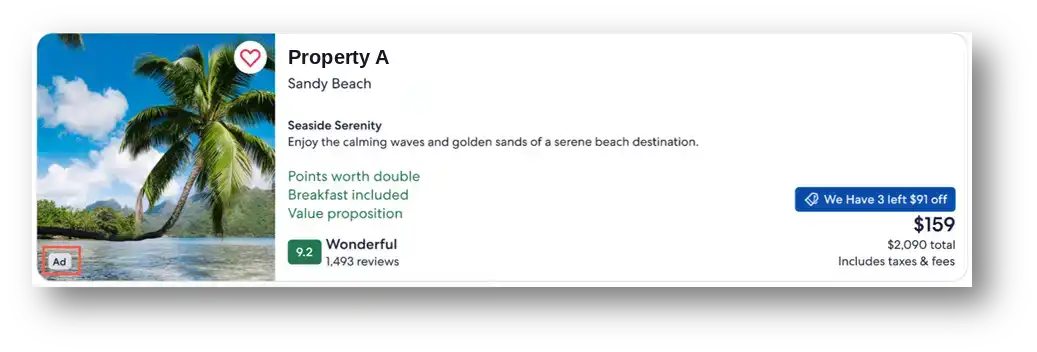
Expedia Group uses an "Ad" badge in the bottom left corner of the sponsored property listing, as the image below shows. It is up to you and your legal team to determine badge wording. Note that the Digital Services Act requires additional ad badging on EU points of sale.
Ad badge example
The Digital Services Act
The Digital Services Act (DSA) regulates online intermediaries and platforms. The goal of the DSA is to address illegal content, disinformation, and harmful activities online. It ensures user safety, protects fundamental rights, and creates a fair and open online platform environment. The DSA requires that you display specific details about ads on your site.
Required details to display
| Detail | Source |
|---|---|
| Entity presenting the ad | Provided in the API response |
| Entity paying for the ad | Provided in the API response |
| Reason the traveler saw this ad | Traveler's current search activity |
| Link to your site's privacy page | Your legal team |
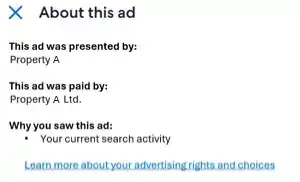
It's up to you and your legal team to decide how you make this information available to travelers. One option is to make the ad badge clickable. Clicking the badge could then activate a pop-up showing all the necessary detail for the customer.
Example
Sort order
It is up to you and your team to decide which positions in sort to dedicate to ads, however there are 2 common approaches that you can consider.
Note: Page placement is typically numbered from 1 (first position in search results) downward. In pagination results, positions continue sequentially across pages.
Option 1: Fixed positions
This most commonly used approach reserves certain positions in sort for ads. Ads are then inserted into the sort order in accordance with their ranking.
Fixed positions usually deliver the most monetization. Commonly, position 1 or at most position 2 are reserved in sort for ads.
Option 2: Dynamic positions
The purpose of dynamic positioning is to determine the optimal number of ads at the top of the search results.
This approach uses models to predict the probability of a click and a booking on a given property for ads and organic listings. Those predictions are used to project expected revenue from the winning ad versus the winning organic listing.
This is a more sophisticated setup, and it has been shown to have limited additional value—lower ad revenue with no conclusive impact on site conversion when more ads are shown at the top of sort.
Sort order disclosure
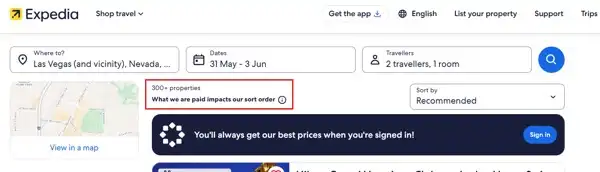
Some countries require sort order disclosure when sponsored listings are included. This applies to organically listed properties too, but often a specific paragraph needs to be added to the disclosure for sponsored listings. Your legal team will be able to advise on the jurisdictional requirements for your website and help ensure you're in compliance with regulations.
Example