
Conversation solutions
Facilitate seamless conversations between travelers and properties, via API or pre-built UI
Conversation API
With the Conversation API, you can facilitate seamless communication between travelers (or agents) and lodging suppliers. Once integrated, you can retrieve conversations for hotel, vacation rental, and Vrbo supply, as well as create and view messages via API.
This feature enables post-booking messages via an end-to-end API experience. You can control the front-end experience by embedding conversations into your own traveler-facing and agent-facing tools to build trust with travelers, reduce cancellations and servicing costs, and streamline support workflows.
The Conversation API also supports topic tagging functionality via notifications. Topic tags are one- or two-word descriptions of message content that can help you automate support and ensure messages are routed to the right channels.
>> Read more under Additional resources
The Conversation API is the only conversation solution that supports Vrbo inventory.
How the Conversation API works
The Conversation API can be configured to enable messaging between the property and the traveler directly, or between the property and your support agents, depending on your needs. In either scenario, you will access the Conversation API link via the Manage Booking retrieve response for that booking, then surface the conversation entry point to the traveler or agent. When a supplier sends a new message, you will be notified immediately via Notifications.
Note: The Conversation API does not come with a pre-built messaging UI experience. You will either need to develop that experience or connect the Conversation API to your existing messaging UI experience.
>> For a pre-built UI, read about the Property Message Center
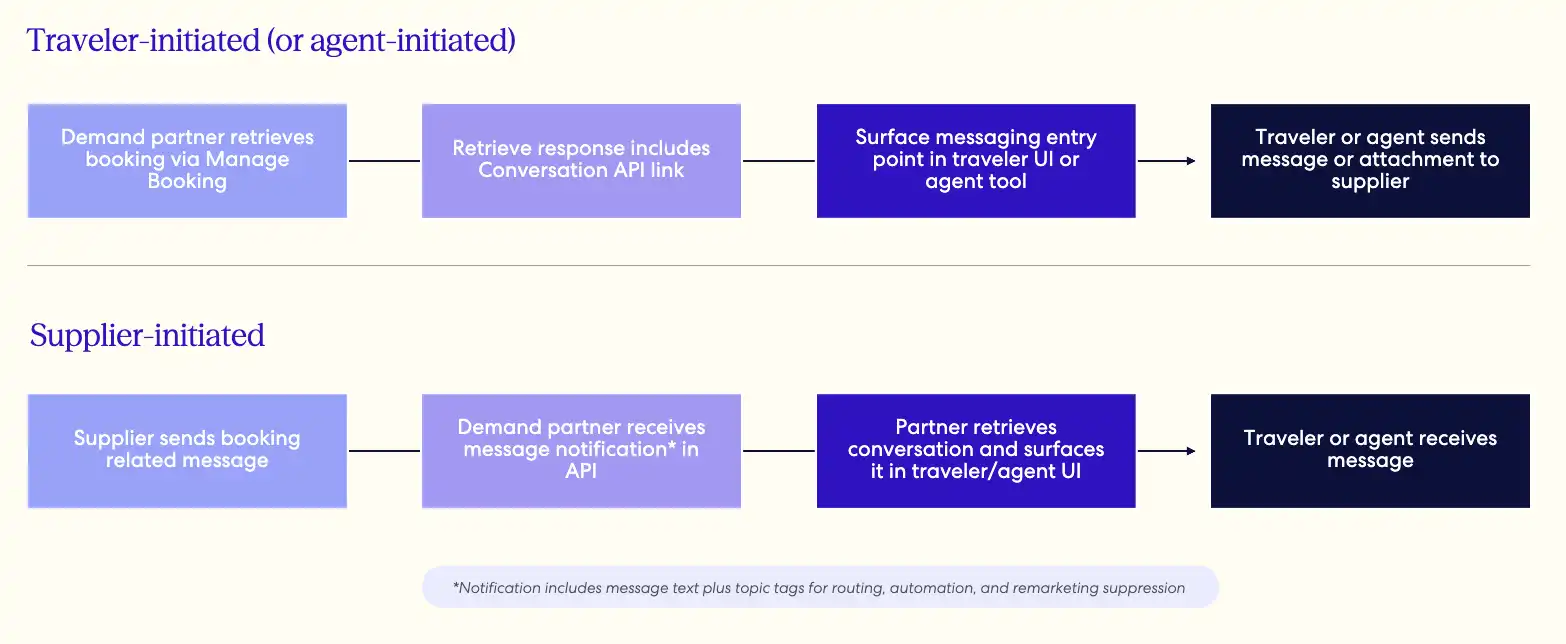
Retrieve the booking via Manage Booking
When you request booking details from the Retrieve Booking endpoint of the Manage Booking API, the response will include a link to the Conversation API in the conversations object.
>> Find out more about the Manage Booking API.
Note: The add-message link for a conversation is time-bound and will expire one hour after it is issued. Always make a new Retrieve call for fresh links in each response instead of storing conversation links long term.
Example of a conversation link in the response:
{
  "itinerary_id": "8999989898988",
  "rooms": [
    {
      "id": "926784314"
    }
  ],
  "links": [
    "conversation": {
      "method": "GET",
      "href": "/v3/conversations/1234567890?token=MY5S3j36cOcLfLBZjPYQ1abhfc8CqmjmFVzkk7euvWaunE57LLeDgaxm516m"
    }
  ]
}
Surface conversation entry point to traveler/agent
You can either:
- Embed the link in your traveler-facing interface so travelers can send or receive messages directly with the property. Common entry points include the booking confirmation page, trip details page, or confirmation email.
>> See Additional resources for best practices - Embed the link in your agent tools so your support teams can communicate with travelers and properties.
Subscribe to Notifications for new messages
Subscribe to the following conversation-related events in the Rapid Notifications API to receive supplier-initiated messages as push notifications:
itinerary.message.received: Triggered when the property sends a new message to the demand partner/traveleritinerary.message.rejected: Triggered when a property message is suppressed after being identified as fraudulent or phishing in nature. The message is blocked and not delivered.itinerary.conversation.attachment.success: Triggered when an attachment sent by a traveler or demand partner (as part of an agent message) has been successfully uploaded and processed. Thefile_nameparameter will appear within this notification so that you can verify the attached file.itinerary.conversation.attachment.failure: Triggered when an attachment upload fails
>> Read more about the Notifications API.
Sending messages to properties
The Conversation API returns the complete message history for the booking in a single response, including both messages travelers/agents sent and replies from the property. Property messages may include attachments and links to access them. Possible attachment types include PNG, PDF, JPEG, and DOCX.
The same response also includes the links used to send messages: one for plain text, and one to initiate an attachment upload.
Sending a plain text message
To initiate a new message or reply to the property, use the add_message link to add a message to the conversation. A successful response returns a refreshed conversation link, which you should persist and use for your next read to keep your token state current.
When an agent sends a message on behalf of a traveler, it will appear to have been sent by the traveler, both in the API and to the property. If the agent wants to indicate the message was sent by an agent, they can include a note such as: "Powered by [Partner] agent on behalf of the traveler."
Sending an attachment
Attachments are uploaded directly to Amazon S3. The flow starts with the Attachments API request, which includes the file metadata and, optionally, the accompanying message text. The response returns a secured S3 URL, its expiry, and the form fields AWS requires. Supported file types include PNG, PDF, and JPEG.
Note: The text supplied in this call is carried with the upload and posted as the message when the file is delivered. A separate add_message call is therefore unnecessary — issuing one will produce a duplicate message in the thread.
Before the secured S3 URL expires, POST the file to it with the form fields supplied by the previous Attachments API response.
>> Refer to AWS documentation for more details
The successful S3 upload triggers a malware scan in Rapid:
- If the file is clean: it is stored, a message carrying the attachment and its accompanying text is delivered to the property, and an
itinerary.conversation.attachment.successnotification is pushed. - If a threat is detected, the file is deleted and an
itinerary.conversation.attachment.failurenotification is pushed.
Example of a conversation object returned from the Conversation API:
{
  "itinerary_id": "987654321098",
  "expedia_confirmation_id": "1234567890",
  "property_id": "12345",
  "messages": [
    {
      "text": "Can I have an early check-in?",
      "participant": {
        "role": "traveler",
        "given_name": "John",
        "family_name": "Smith"
      },
      "creation_date_time": "2025-04-15T00:45:14.000Z",
      "message_type": "free_text",
      "delivery_status": "accepted"
    },
    {
      "text": "Please note that check-in time is 5pm and that you will need to meet with our receptionist to receive information about your room assignment.",
      "participant": {
        "role": "supplier"
      },
      "creation_date_time": "2025-04-15T00:10:12.000Z",
      "message_type": "free_text",
      "delivery_status": "accepted"
    }
  ],
  "links": {
    "add_message": {
      "method": "POST",
      "href": "/v3/conversations/1234567890/messages?token=MY5S3j36cOcL",
      "expires": "2025-04-15T00:45:14.000Z"
    },
    "add_attachment": {
      "method": "POST",
      "href": "/v3/conversations/1234567890/messages/attachments?token=MY5S3j36cOcL",
      "expires": "2025-04-15T00:45:14.000Z"
    }
  }
}
Link validity and token expiry
The links for add_message and add_attachment are temporary, expiring either at the timestamp specified in the expires field or 30 days after the check-out date, whichever comes first. The conversation link itself remains valid for up to 90 days post-stay.
Evaluate the expires field value before every call. If it has passed, or you receive a 401/403, re-run the Retrieve Booking or Conversation calls to mint fresh links.
Reach out to your Expedia Group representative to kick off your Conversation API integration.
AI-powered re-marketing suppression and message topic tagging
Property-initiated messages identified as "re-marketing" (messages promoting booking direct or otherwise off-platform) are automatically suppressed by Conversation API and Property Message Center.
To enable easier, more scalable consumption of property-initiated messages, our conversation solutions employ an AI-driven model that identifies the main topic(s) of a message and delivers those topics as tags in the itinerary.message.received notification event. You can use these tags to power search, routing, automation, and suppression logic in your own systems.
Potential property message topic tags
| Tag | Description |
|---|---|
| Check-in instructions | When a property shares essential information or instructions the traveler needs for check-in or their stay, like access codes, front desk hours, deposit information, ID requirements, etc. Note: The check-in instructions tag will always supersede the re-marketing suppression tag. I.e. if a supplier sends a message that contains both check-in details and re-marketing verbiage, the traveler will still receive the message. |
| Early check-in / late check-out | When a property shares additional information regarding early check-in or late check-out via a direct message. Also used if there is a specific cost for early check-in or late check-out. |
| Food / beverage | If the property message covers restaurant or bar availability or hours, menu items, or other dining details. |
| Maintenance / closure | When a property shares updates on specific portions of the property that are under maintenance, construction, or otherwise temporarily closed. Can include pool, beach, gym, or other facility closures. |
| Parking | When the property shares additional instructions on parking options, reservations, hours, or specific nightly or hourly costs. |
| Pet policy | If the property shares their unique pet policy or costs associated with a pet staying in the room/unit. |
| Request for info / arrival time | When a property is requesting more information from the traveler on their stay details or arrival time so the property can best manage and plan for the stay. |
| Review request | If a property sends a request for the traveler to leave a review of their stay. Most often sent post-stay. |
| Transportation | When a property shares information regarding airport pick-up or drop-off options, shuttle availability, or scheduling instructions, etc. |
| Other | If a message does not have any of the aforementioned tags, it will be labeled as "Other" by default (baggage, housekeeping info, extra beds, sanitation, cleanliness, elevator, electricity, kitchen/utensils, COVID policy, T&Cs, etc.) |
Example itinerary.message.received notification payload with topic tags:
{
  "event_id": "493ae7d4-fb3c-49fb-b180-0d7f4030aaeb",
  "event_type": "itinerary.message.received",
  "event_time": "2024-09-16T15:22:42.783857461Z",
  "itinerary_id": "9025294229844",
  "email": "test@travelnow.com",
  "message": "Please checkin before 12:00 PM!",
  "topic_tags": "Check-in",
  "affiliate_reference_id": "b086d299-2f1f-4134-a23c-f4a1c9286fac"
}
Vacation rentals
Enabling direct messaging with vacation rental properties is essential, 84% of the vacation rentals available on Rapid API do not have a front desk. These properties often rely on direct messaging to provide guests with:
- Personalized access codes to gain entry to the property
- Guidance on unique or available amenities at the property
- Parking instructions or assignments
Note: Property Message Center is not compatible with Vrbo listings. If you currently distribute or plan to distribute Vrbo inventory, we recommend you integrate the Conversation API.
Property Message Center
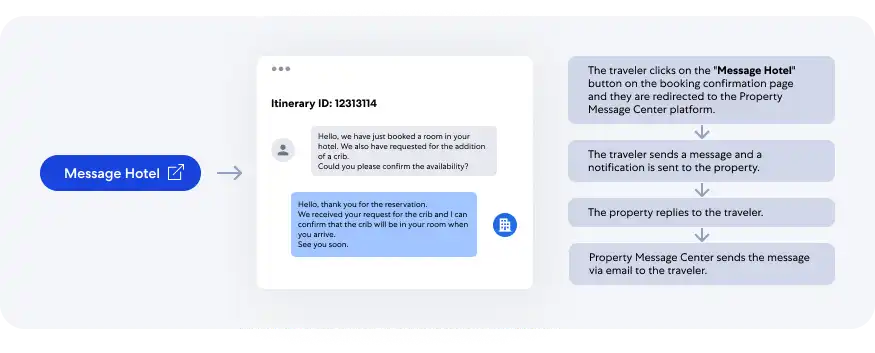
The Property Message Center is a two-way messaging tool that facilitates direct interaction between properties and travelers or agents via a pre-built messaging UI, for a more streamlined post-booking experience.
The Property Message Center can be configured to enable messaging between the property and the traveler directly, by providing a traveler email in the booking request, or between the property and your support agents, by providing an agent email in the booking request.
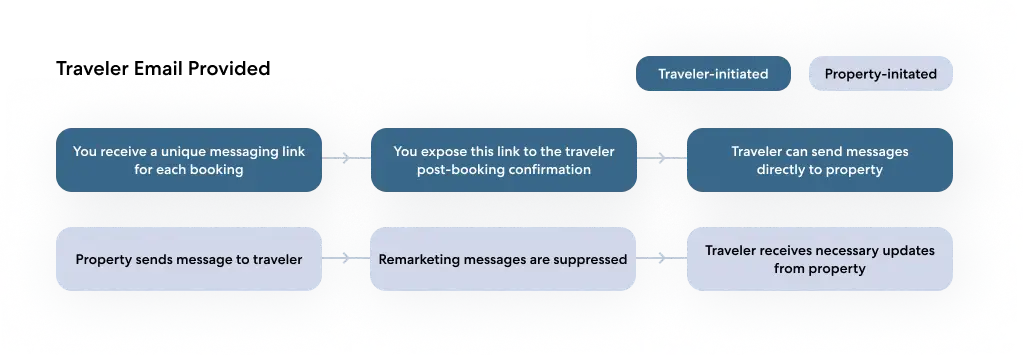
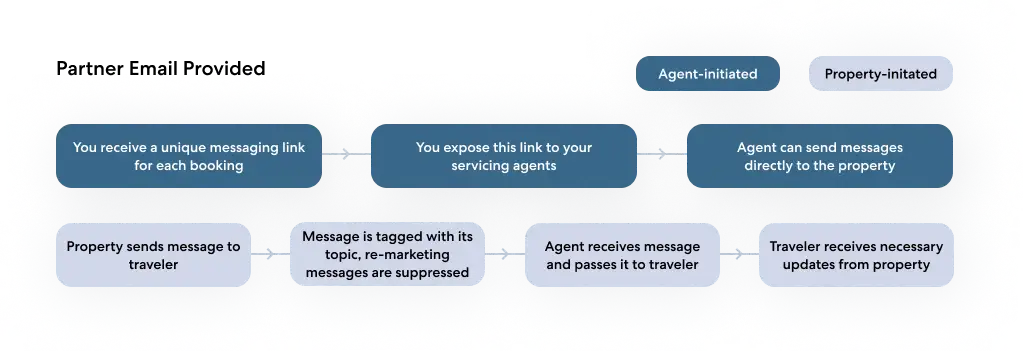
Examples of Property Message Center conversations
Property-initiated messaging: The property wants to inform the traveler that they provide a complimentary round-trip shuttle to and from the airport.
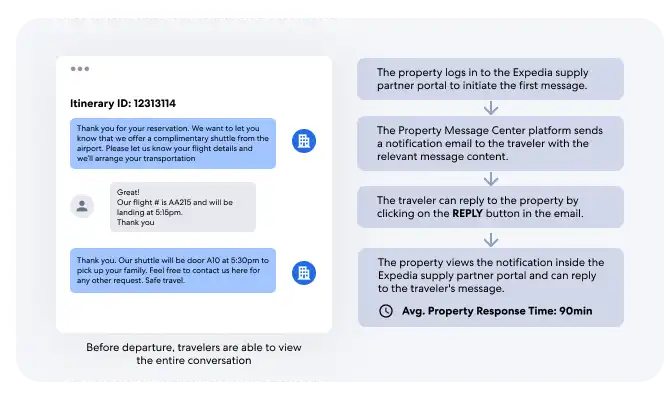
Traveler-initiated messaging: Traveler requested crib accommodations for their booking and wants to reconfirm this request with the property before they arrive.
You must review and agree to all launch requirements before beginning integration. Talk to your account manager to learn more.
Additional resources
Best practices for exposing the conversation entry point to travelers
Here is some guidance on how you can expose the Conversation API link to travelers once they’ve completed their booking.
Add a “Message Hotel” or “Message Host” button to the booking confirmation page
This enables travelers who need to make a request or ask for information from the property immediately after making a booking.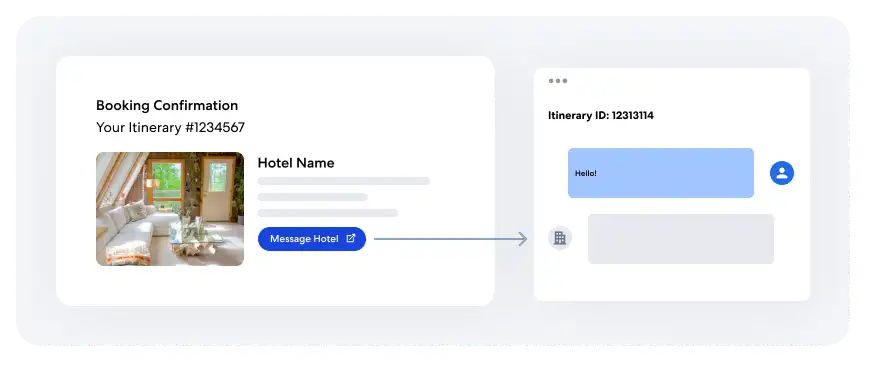
Add “Message Hotel” or “Message Host” button to the itinerary page
This enables travelers to contact the property directly from their reservation page.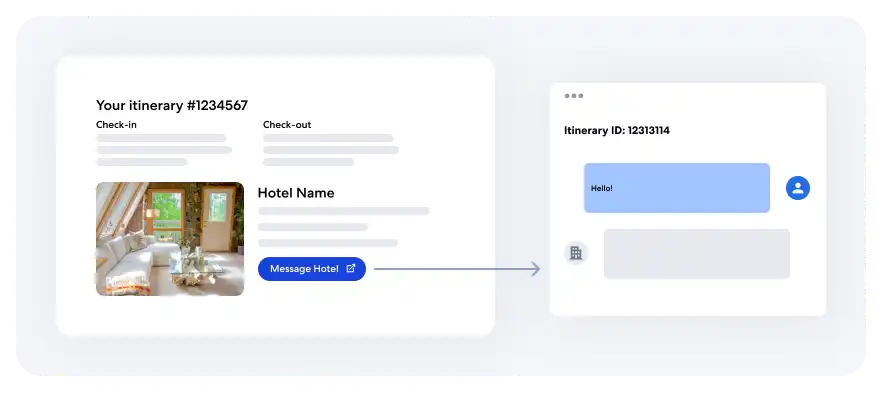
Add “Message Hotel” or “Message Host” button to reservation emails
This helps prompt the traveler to contact the property when they receive updates or reminders of their upcoming stay.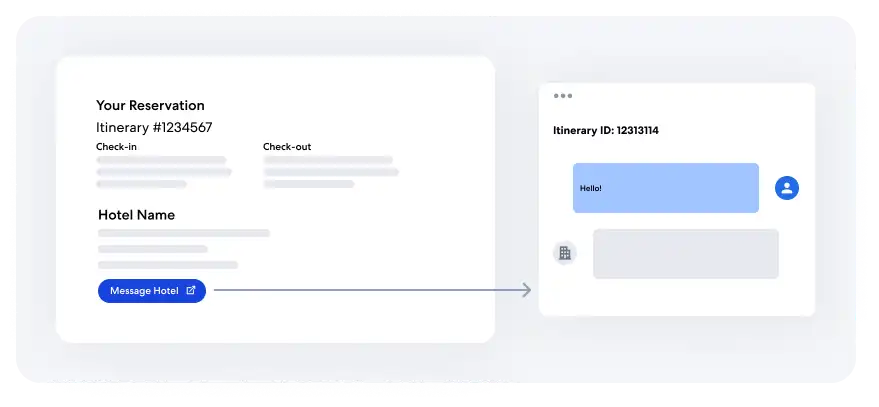
Conversation API error handling
There are several errors that can be returned in different scenarios, all coded as 400. Below is a list of common causes and the accompanying message returned with each error:
| Cause | Message |
|---|---|
| Invalid input | "Invalid JSON payload" |
| Token cannot be decoded or parsed | "Link is invalid" |
| Missing required token fields | "Link is invalid" |
| Confirmation ID mismatch between path and token | "Link is invalid" |
Token expiration time has passed (link.expired) | "The link you followed has expired. Please make another GET conversation request to refresh the link" |
| Request body is null | "Body of request is required" |
| Message text is blank or exceeds 20,192 characters | "Text must not be empty and must not exceed 20192 characters" |
| File size exceeds 5 MB | "File size exceeds the maximum limit of 5 MB." |
| Unsupported file type | "File type must be one of [application/pdf, image/jpeg, image/png]." |
| Unsupported conversation type for attachments | "Attachment is invalid" |
API details
Explore Conversation API definitions on this page, then use the API Explorer or another testing software to get an understanding of how the examples and schema definitions compare to the actual output.