
Testing with Rapid Lodging API and 3DS 2.0
Test your SCA implementation with specific scenarios supported by the APIs
To test Rapid Lodging API, include an additional HTTP header named test in the HTTP request, and use one of the supported values for that API to test a supported scenario.
Within the strong customer authentication (SCA) booking flow, test responses from Rapid API can also be used to test the 3D-Secure (3DS) connector library methods.
Register payment
The following test header values result in different encoded_init_config values in the API response and different HTTP response codes. The encoded_init_config can be passed in to the initSession call of the JavaScript library to trigger different test cases within the 3DS connector library.
| Test header value | HTTP code & response | initSession test case |
|---|---|---|
| standard | 201 – Standard response | SUCCESS |
init_skip | 201 – Response without encoded_init_config | Not supported |
init_fail | 201 – Standard response | FAILED |
init_timeout | 201 – standard Response | TIMEOUT |
internal_server_error | 500 – Internal server error | — |
internal_server_error | 503 - Server unavailable | — |
Note: Use init_skip for test cases within the 3DS Connector Library encoded_init_config that can be passed to initSession and force a statusCode of SKIPPED.
Create booking
In addition to the test headers defined in the Rapid Lodging API's test requests for the non-SCA booking flow, additional test header values are supported for the SCA workflow.
>> Read more about Lodging test requests
The test header values result in different encodedChallengeConfig values which can be passed in to the challenge call of the JavaScript library to trigger various test cases.
| Test header value | HTTP code & response | initSession test case |
|---|---|---|
complete_payment_session | 201 – Response with complete payment session link | SUCCESS without user iframe interaction |
complete_payment_session_show | 201 – Response with complete payment session link | SUCCESS/FAILED with user iframe interaction |
complete_payment_session_fail | 201 – Response with complete payment session link | FAILED without user iframe interaction |
complete_payment_session_timeout | 201 – Response with complete payment session link | TIMEOUT |
complete_payment_session_error | 201 – Response with complete payment session link | ERROR |
In addition to the test headers defined in the Rapid Lodging API's test requests for the non-SCA booking flow, additional test header values are supported for the SCA workflow.
>> Read more about Lodging test requests
The test header values result in different encodedChallengeConfig values which can be passed in to the challenge call of the JavaScript library to trigger various test cases.
| Test header value | HTTP code & response | initSession test case |
|---|---|---|
complete_payment_session | 201 – Response with complete payment session link | SUCCESS without user iframe interaction |
complete_payment_session_show | 201 – Response with complete payment session link | SUCCESS/FAILED with user iframe interaction |
complete_payment_session_fail | 201 – Response with complete payment session link | FAILED without user iframe interaction |
complete_payment_session_timeout | 201 – Response with complete payment session link | TIMEOUT |
complete_payment_session_error | 201 – Response with complete payment session link | ERROR |
Complete payment session
The test header values result in different error cases that can occur when trying to complete a payment and confirm a booking.
| Test header value | HTTP code & response |
|---|---|
payment_declined | 400 - Payment declined response |
price_mismatch | 409 - Price mismatch response |
rooms_unavailable | 410 - Rooms unavailable response |
3DS connector library and iframe
To test the 3DS connector without external dependencies, specific parameter values correspond to supported method responses. This behaviour is only supported when the iframe is loaded with the test sandbox URL.
Initialize session
The supported values of the initSessionResponse statusCode can be tested by varying the initSessionRequest encoded_init_config.
| statusCode value | Test encodedInitConfig value |
|---|---|
| SUCCESS | W3sicHJvdmlkZXJJZCI6IDAsICJzYW5kYm94SW5pdE91dHB1dENvbmZpZyI6ICJTVUNDRVNTIn1d |
| FAILED | W3sicHJvdmlkZXJJZCI6IDAsICJzYW5kYm94SW5pdE91dHB1dENvbmZpZyI6ICJGQUlMRUQifV0= |
| TIMEOUT | W3sicHJvdmlkZXJJZCI6IDAsICJzYW5kYm94SW5pdE91dHB1dENvbmZpZyI6ICJUSU1FT1VUIn1d |
| SKIPPED | Not supported at this time. |
Note: The encoded_init_config values can also be generated with the supported test headers of the Register Payments API.
Challenge
The supported values of the challengeResponse statusCode can be tested by varying the challengeRequest encoded_challenge_config.
| statusCode value | Test encoded_Challenge_config value | Description |
|---|---|---|
| SUCCESS | W3sicHJvdmlkZXJJZCI6IDAsICJzYW5kYm94Q2hhbGxlbmdlT3V0cHV0Q29uZmlnIjogIlNVQ0NFU1MifV0 | Without user iframe interaction |
| SUCCESS / FAILED | W3sicHJvdmlkZXJJZCI6IDAsICJzYW5kYm94Q2hhbGxlbmdlT3V0cHV0Q29uZmlnIjogIlNIT1cifV0 | Without user iframe interaction |
| FAILED | W3sicHJvdmlkZXJJZCI6IDAsICJzYW5kYm94Q2hhbGxlbmdlT3V0cHV0Q29uZmlnIjogIkZBSUxFRCJ9XQ | Without user iframe interaction |
| TIMEOUT | W3sicHJvdmlkZXJJZCI6IDAsICJzYW5kYm94Q2hhbGxlbmdlT3V0cHV0Q29uZmlnIjogIlRJTUVPVVQifV0 | |
| ERROR | W3sicHJvdmlkZXJJZCI6IDAsICJzYW5kYm94Q2hhbGxlbmdlT3V0cHV0Q29uZmlnIjogIkVSUk9SIn1d |
The encoded_init_config values can also be generated with the supported test headers for the SCA flow of the Booking API.
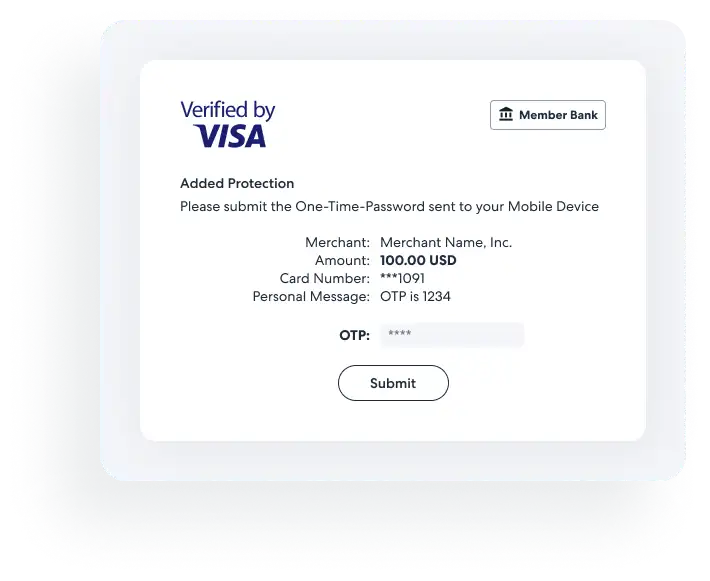
Note: When testing for challenge status code value of SUCCESS or FAILED based on user input to the iframe, the challenge method response will wait on the completion of the simulated authentication interface in the iframe.
Example of UI in 3DS iframe:
Example usage
This example demonstrates how to use the predefined parameter values to test the library for a 3DS challenge without the user needing to interact with the iframe.
var c = new PayThreeDSConnector.ThreeDSConnector('threedsiframe', 'https://static.pay.expedia.com'); // change to match the 3DS iframe ID
c.setup({ referenceId: '1000' })
    .then((setupResponse) => {
        console.log('Setup Output: ', setupResponse);
        return c.initSession({
            paymentSessionId: 1,
            encodedInitConfig: 'W3sicHJvdmlkZXJJZCI6IDAsICJzYW5kYm94SW5pdE91dHB1dENvbmZpZyI6ICJTVUNDRVNTIn1d',
        }); // SUCCESS
    })
    .then((initResponse) => {
        console.log('InitSession Output: ', initResponse);
        $('#threedsIframeModal').modal(); // replace with code to show the modal containing the 3DS iframe
        return c.challenge({
            paymentSessionId: 1,
            encodedChallengeConfig:
                'W3sicHJvdmlkZXJJZCI6IDAsICJzYW5kYm94Q2hhbGxlbmdlT3V0cHV0Q29uZmlnIjogIlNVQ0NFU1MifV0=',
        }); // SUCCESS
    })
    .then((challengeResponse) => {
        console.log('Challenge Output: ', challengeResponse);
    })
    .finally(() => {
        $('#threedsIframeModal').modal('hide'); // replace with code to hide the modal containing the 3DS iframe
    });
3DS authentication and pay later
When booking with a pay-later model, Expedia does not charge the card. Instead, we send it to the vendor for handling. The vendor may use this information to validate the card ahead of the booking. The traveler is expected to pay in person when they arrive.
However, sometimes plans change, in which case, the vendor may charge a no-show fee. These charges can be impacted by SCA regulations because they involve charging a card when the traveler is not present.
If transactions are impacted, payments can fail or vendors can face penalties from card brands if the charge is non-compliant.
To protect our relationship with our vendors and continue to serve our partners, Expedia Group is offering an optional path to compliance: Expedia Group can provide authentication on their behalf. This allows vendors to protect their business and ensures that Rapid API can continue to offer the same diverse range of options.
In the Rapid Lodging API, this is in the form of the flag payment_registration_recommended=true in the Property Content File and in Property Content, which can help you to identify a property when it is potentially involved in the project.
Possible impacts to an integration
If you want to offer vendors that can require secure authentication, then the booking path should support 3DS. Without supporting 3DS, booking these options may fail if the card-issuing bank determines authentication is necessary for the transaction.
When a no-show fee is charged, Rapid API will be the merchant of record. The charge's descriptor on the card's billing statement will be defined by your organization, not the property. To customize this text, contact Rapid Partner Support.
To remain compliant with the requirements of card brands and the Rapid API launch process, use the Accepted Payments API to display the processing_country on the check-out page in case of no-show. This is required for all transactions where Rapid API is the merchant of record, and it may occur if 3DS is used and a no-show occurs.
How to mitigate integration impacts
If a Rapid API integration does not support secure authentication in the booking flow, the risk of failed bookings can be reduced by eliminating vendors whose listings are not compliant. Contact Rapid Partner Support to have the affected rates removed from your Availability API responses.
When using an agent tool, the transaction is exempted from SCA in accordance with the regulations. Use the Availability API's sales_channel field to indicate this.
Error handling
The Create Booking API and Complete Payment Session API may result in confirmed bookings and payment transactions.
Your integration should consider the following instructions to avoid financial loss and customer operation cases:
| Source | Function | Suggested timeout setup | Error recovery process | Actions needed |
|---|---|---|---|---|
| Rapid API | Pre-Book Price Check for Register Payment Token | 10 seconds | Retry or select another property, room or rate | - |
| JavaScript | 3DS Connector Setup | 10 seconds | Retry the same request | - |
| Rapid API | Register Payment Session | 10 seconds | Retry the same request without the "Expect: 100-continue" process | - |
| JavaScript | Initiate Payment Session | 10 seconds | Retry the same request | - |
| Rapid API | Create Booking | 90 seconds | Retry the same request | For all errors: Retrieve Booking with affiliate_reference_id |
| JavaScript | Display authentication challenge | 10 seconds | Retry the same request | - |
| JavaScript | Wait for challenge.statusCode | 180 ~ 1200 seconds | Request Complete Payment Session | - |
| Rapid API | Complete Payment Session | 90 seconds | Retry the same request | For all errors: Retrieve Booking with affiliate_reference_id |
| Rapid API | For all errors: Retrieve Booking with affiliate_reference_id | 30 seconds | Retry the same request | For all errors: Wait 90 seconds before retrying, to confirm the final status of bookings by API Response Code 404 or 200 |