
Invoices and booking receipts
Overview
There are many instances where you, your corporate clients, or the traveler need access to booking receipts or invoices for lodging bookings:
- Business travelers may require proof of payment to claim travel expenses from their employer
- Your clients may need documents to help reconcile travel spending or for internal reporting purposes
- You may want documentation for financial reporting, sharing with corporate accounts, generating bill-back invoices, or booking reconciliation
- Leisure travelers may want a receipt for personal financial management or expense reporting
- There may be tax or legal obligations that need to be met
Invoices are legally compliant formal documents usually issued by a tax-registered seller at time of check-out for lodging bookings. We offer separate invoices for financial reporting and tax compliance. Booking receipts are proof of payment that can be issued any time post-payment.
The entity responsible for providing a booking receipt or invoice to the traveler for lodging bookings will depend on the payment model.
| Payment Model | Source of booking receipt | Source of invoice |
|---|---|---|
| Property Collect | Property delivers a booking receipt for booking amount and onsite charges. | Property issues a tax invoice for their services, which a Rapid partners can request through Rapid. |
| Updated Expedia Collect | Expedia delivers a booking receipt for booking amount, which Rapid partners can request through Rapid (see below). Property delivers booking receipt for onsite charges. | Property issues a tax invoice for their services, which a Rapid partners can request through Rapid. |
| Expedia Collect | Expedia delivers a booking receipt for booking amount, which Rapid partners can request through Rapid (see below). Property delivers booking receipt for onsite charges. | Property may issue a tax invoice for their services at their discretion, as they are not obligated to do so in many jurisdictions. |
How to identify Updated Expedia Collect properties
Updated Expedia Collect is represented as a subset of Expedia Collect properties in Rapid content. If a partner would like to identify an Updated Expedia Collect property, both expedia_collect and updated_expedia_collect must be true.
| Field | Type | Description |
|---|---|---|
Property_collect | boolean | Property collects payment directly from the guest. |
updated_expedia_collect | boolean | Expedia collects payment from the guest when they make the reservation, and the hotel receives the funds after the guest checks out. Includes new notification and payment features for the property. |
expedia_collect | boolean | Expedia collects payment from the guest when they make the reservation, and the hotel receives the funds after the guest checks out. |
Example business model object
{
  ...
    "business_model": {
      "expedia_collect": true,
      "property_collect": false,
      "updated_expedia_collect": true
    }
}
Booking receipts
The Rapid API Booking Receipt feature enables you to obtain a PDF representation of the Itinerary API response for Expedia Collect and Updated Expedia Collect bookings. You can then integrate these receipts into your workflows.
For instance, you might choose to:
- Email the receipts to clients or travelers
- Store and expose the document on trip management pages
- Make the PDF available to your support agents and business teams
By default, a Rapid API booking receipt includes:
- Property information including name, address, rate type, and room type
- Traveler details
- Stay dates
- A breakdown of the total booking cost, including nightly rate and any additional taxes or fees
- Current state of the booking (booked, changed, or canceled)
Booking receipts are available for multi-room bookings. Each room associated with the booking will be represented on a separate page of the document.
Enabling Rapid API booking receipts
Interested in enabling Rapid API Booking Receipts? Reach out to your Expedia Group representative.
Configuring your booking receipts
You have some flexibility in how the booking receipt is configured.
You can:
- Choose between defaulting to Expedia‑branded or unbranded versions of the document during your booking receipt onboarding
- Override this branding default by adjusting the parameters of the Retrieve API request
- Choose which client details should be included on the receipt, including company name and/or address by including these details in the Retrieve API request
- Include a recipient email address at time of book using the Rapid Book API
Booking receipts will be generated and automatically sent to the recipient at time of book, change, or cancel
Retrieving Rapid API booking receipts
You can access the booking receipt via a link in the non_vat_expedia_invoice itinerary-level field of the Rapid Itinerary API response.
Example Itinerary API response
{
  "itinerary_id": "8999989898988",
  "property_id": "8150374",
  "links": { "cancel": { ... },
  "non_vat_expedia_invoice": {
    "method": "GET",
    "href":
"/v3/itineraries/8999989898988/invoice?token=MY5S3j36cOcLfLBZjPYQ1abhfc8CqmjmFVzkk7euvWaunE57LLeDgaxm516m"
    }
  },
    ...
}
You can also choose to have the document emailed to a specific contact by including an email address in the Booking API request body.
Example Booking API request body
{
  "affiliate_reference_id": "4480ABC",
  ...
  "rooms": [ ... ],
  "payments": [ ... ],
  "invoicing": {
    "company_name": "My Employer",
    "company_address": {
      "line_1": "123 Employer Ave",
      "line_2": "Suite 742",
      "city": "Seattle",
      "state_province_code": "WA",
      "postal_code": "98121",
      "country_code": "US"
    },
    "point_of_sale_display": "My Corporate Travel Site",
    "email": "example@myemployer.com"
  },
  ...
  "traveler_handling_instructions": "Please use the card provided for payment."
}
If you require that the booking receipt be sent from your own email domain, we recommend you access the file using the link in the non_vat_expedia_invoice field of the Itinerary API response, and then utilize your own internal systems to email the receipt to the traveler or agent.
Optional details to include in Rapid API booking receipts
You have the option to provide additional company, client, or traveler details in your Booking API requests to further modify the booking receipt. These are optional parameters and are not required for booking receipt generation.
Please see the table below for more details on the optional parameters available to you.
| Optional parameter | Description | Example |
|---|---|---|
point_of_sale_display | Partner company name or legal entity to be displayed on the booking receipt document. | ABC Travel / ABC Travel LTD |
company_name | Client’s company name. | ACME Corp |
company_address | Client’s street address. | 100 Main St, Miami, FL 10000 US |
email | Email address where the booking receipt PDF should be delivered. This can include client and/or traveler contacts. | j.doe@acme.com |
Note: You should only provide the traveler’s email address or the traveler’s company email address in the email field. The email provided should never be your own or a contact within your organization.
Invoices
You can use the invoicing object in your Booking API requests to inform suppliers of the need for an invoice. For business travel, you can also include details of the traveler's employer on the invoice in addition to the traveler name. This is preferable to sending information in a PDF via email or fax, or by overloading the traveler instructions or special request fields.
Sending invoices is the responsibility of the property in most cases. For Updated Expedia Collect and Property Collect transactions, the invoice request in the Booking API call will be passed to the property to deliver on.
Expedia Collect bookings will follow a similar procedure, except for bookings at properties in Italy. Recent regulation changes in Italy specify that responsibility for sending invoices falls to Expedia Group starting in January 2027.
Example Booking API request snippet with invoicing object
{
  ...
  "invoicing": {
    "consent_to_share": true,
    "company_name": "alphaDemandPartner",
    "company_address": {
      "line_1": "555 1st St",
      "line_2": "10th Floor",
      "line_3": "Unit 12",
      "city": "Seattle",
      "state_province_code": "WA",
      "postal_code": "98121",
      "country_code": "US"
    },
    "email": "chucktesta@mydomain.com",
    "vat_number": "1234567890"
  }
}
Note: You should only provide the traveler’s email address or the traveler’s company email address in the email field. The email provided should never be your own or a contact within your organization.
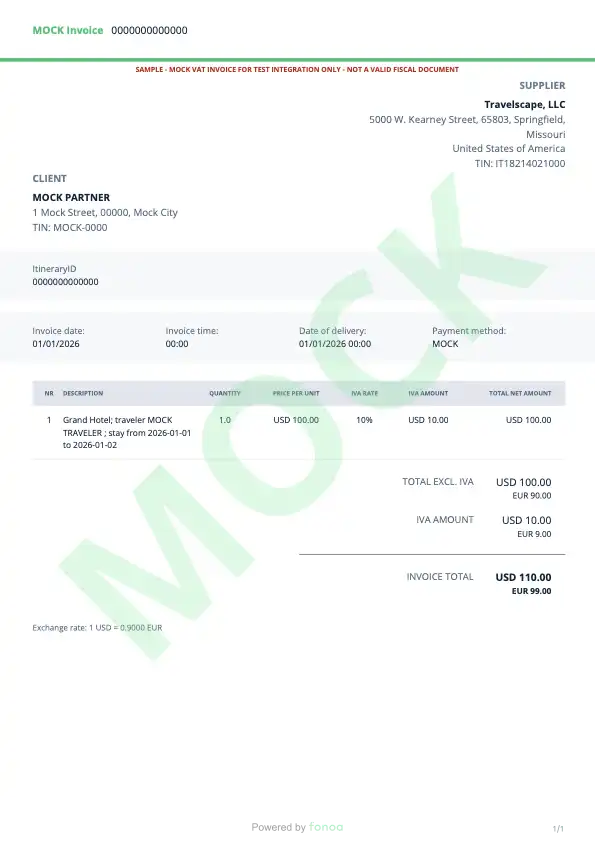
VAT invoices and updated regulations in Italy
Beginning in 2027, Expedia Group will support invoice generation, storage, and delivery for bookings made on Italian properties to comply with recent regulatory changes.
Note: VAT invoices are only available for Expedia Collect bookings at properties in Italy at this time.
Passing VAT invoice request fields with the Booking API will provide you with a link in the vat_expedia_invoice field of the Itinerary Retrieve API response. Passing an invoicing object does not trigger a notification to the property for these bookings.
When this functionality goes live, you will need to follow a slightly different protocol to access invoices for the affected bookings. To receive an invoice link, you must include the specific parameters listed below.
Step 1: Include the invoicing object parameters
On eligible bookings (Expedia Collect bookings at properties in Italy), you will need to include the following parameters in the Booking API request or the invoice will not be generated. Attempts to create an invoice without these details will result in a 422 error code with an operation_ineligible response.
company_namecompany_addressVAT_numberconsent_to_share(trueonly)
We also recommend that you include the travel_purpose=business parameter in your Shopping API request to flag the purpose of the travel to the property, but this is not a hard requirement.
Note: Any hard change requests must include all of the required invoicing object parameters.
Step 2: Call the Itinerary Retrieve API
When the booking has been created, call the Itinerary Retrieve API and inspect the links object in the response for the vat_expedia_invoice link. This link will only be included if the booking is eligible for a VAT invoice.
A POST link indicates that you will need to submit the invoice creation request. Always request the href (link) with no body or additional headers. A GET link indicates that the invoice request has already been submitted.
Example POST link
{
  "links": {
    "vat_expedia_invoice": {
      "method": "POST",
      "href": "/v3/itineraries/9104072674080/vat-invoice?token=VVVRDFoIWVxEDAALXxMEVV0dRQdUUANeFAlMSRtXDFVAWBJaW1wWAkYdZg1QWwoHCVEFU1YDVFUBAVIScQ5TUV9FQl4LAgYEA1cDUg0BUg=="
    }
  }
}
Example GET link
{
  "links": {
    "vat_expedia_invoice": {
      "method": "GET",
      "href": "/v3/itineraries/9104072674080/vat-invoice/0af794a3-de58-42f0-892f-96c2aef2ec7c?token=VVVRDFoIWVxEDAALXxMEVV0dRQdUUANeFAlMSRtXDFVAWBJaW1wWAkYdZg1QWwoHCVEFU1YDVFUBAVIScQ5TUV9FQl4LAgYEA1cDUg0BUg=="
    }
  }
}
Step 3: Get the invoice link
On a 200 response code, the response will include the pdf invoice link. On a 202 response code, you should treat the invoice creation as asynchronous. In that case, you will need to request the Itinerary Retrieve response later and use the GET link again.
Step 4: Store the invoice PDF and provide it to the traveler
PDF retrieval typically happens immediately, but can take up to 48 hours.
Requesting booking receipts and corporate invoicing on Updated Expedia Collect bookings
Partners that are enabled for both booking receipts and corporate invoicing can use both features on bookings.
If the partner provides consent_to_share for an Updated Expedia Collect booking:
- Rapid will pass the invoice request to the supplier to have an invoice issued at check-out, and
- The partner will also be able to retrieve the booking receipt for the booking.
If the partner does not provide consent_to_share no information will be sent to the supplier but the partner will still be able to obtain the booking receipt.