Developer Hub

Booking attribution overview

Report on ad conversion from sponsored content

Since advertisers use sponsored listings to drive visibility and bookings, reporting on conversions that are driven or influenced by a sponsored listing is essential to communicate the value of their ad spend. That value is determined by the bookings that happen after ads were seen or clicked. We report on both impression-driven and click-driven attribution, using a last-touch, 7-day attribution method.

Integrating with Rapid Lodging Sponsored Listings API requires you to send us conversion information attributed to sponsored listing clicks—even if the rate that was booked following a click was not an Expedia Group rate. The booking information should be provided regardless of whether the most recent click before the booking was on a sponsored listing or an organic search result.

There are two ways to provide conversion information back to us:

Information

Note

Expedia Group uses the AWS Clean Rooms solution, which is not available in all geographies. Check with your Expedia Group B2B consultant to confirm eligibility.

Data clean rooms

Data clean rooms (DCRs) offer a safe environment in which to analyze performance across shared data sets without exposing raw user-level data. This solution also lightens the load on your organization's development team by removing the need to build and maintain the logic of which booking information should be sent to Expedia Group and which should not.

We use an Amazon Web Services (AWS) clearn room solution for data transfer.

Sample AWS identity and access management policy

{
  "Version": "2012-10-17",
  "Statement": [
    {
      "Sid": "CleanRoomsCollaborationAccess",
      "Effect": "Allow",
      "Action": [
        "cleanrooms:ListCollaborations",
        "cleanrooms:GetCollaboration",
        "cleanrooms:GetConfiguredTable",
        "cleanrooms:ListConfiguredTables",
        "cleanrooms:CreateMembership",
        "cleanrooms:GetMembership",
        "cleanrooms:ListMemberships",
        "cleanrooms:StartAnalysis",
        "cleanrooms:GetAnalysisTemplate",
        "cleanrooms:ListAnalysisTemplates",
        "cleanrooms:GetSchema",
        "cleanrooms:ListSchemas"
      ],
      "Resource": "*"
    },
    {
      "Sid": "AllowReadAccessToGlueDataCatalog",
      "Effect": "Allow",
      "Action": [
        "glue:GetDatabase",
        "glue:GetDatabases",
        "glue:GetTable",
        "glue:GetTables",
        "glue:GetPartition",
        "glue:GetPartitions"
      ],
      "Resource": [
        "arn:aws:glue:REGION:YOUR_AWS_ACCOUNT_ID:catalog",
        "arn:aws:glue:REGION:YOUR_AWS_ACCOUNT_ID:database/YOUR_DATABASE_NAME",
        "arn:aws:glue:REGION:YOUR_AWS_ACCOUNT_ID:table/YOUR_DATABASE_NAME/YOUR_TABLE_NAME"
      ]
    },
    {
      "Sid": "AllowReadAccessToS3Data",
      "Effect": "Allow",
      "Action": [
        "s3:GetObject",
        "s3:GetObjectAcl",
        "s3:GetBucketLocation",
        "s3:ListBucket"
      ],
      "Resource": [
        "arn:aws:s3:::YOUR_BUCKET_NAME",
        "arn:aws:s3:::YOUR_BUCKET_NAME/YOUR_PREFIX/*"
      ]
    }
  ]
}

Clean room usage checklist

Before pushing your data to a clean room, you should check that this information is included:

  • Your AWS account information
  • Configured identity and access management roles and permissions
  • All property IDs mapped to Expedia Group's property IDs.
  • Prepared and registered Glue tables, which define the schema for accurate interpretation
  • Invitation to join collaboration
  • Validated schemas
  • Customer IDs
  • Encrypted (hashed) PII (personally identifiable information), usually email addresses

Conversion data

The data required by advertisers includes multiple parameters to report the value of the sponsored booking.

FieldRequiredDescriptionSample value
booking_date_timeYesDate and time the booking was made, using UTC time zone format.2024-12-25T12:30:00Z
customer_idYesUnique identifier for the user (used to join with other ad interaction events from this user). This is the ID set up and consistently provided by the publisher from all ad requests through to the bookings.e4dda90a-f31b-47f2-be4f-7e7289d224fa
property_idYesExpedia Group property ID for the booking. ONLY Expedia Group property IDs are accepted.8906878
number_of_room_nightsYesThe total number of nights booked, regardless of number of rooms. For example, if the traveler booked 2 rooms for 3 nights, the room nights value would be 3.3
number_of_roomsTotal number of rooms booked.2
gross_booking_amountYesFinal price paid by the traveler.200.00
currencyYesThe currency the gross_booking_amount is provided in.GBP
customer_email_hashSHA-256 encryption of the customer's email. Could be used to perform cross-site connection (between Expedia Group and a given publisher) for more robust performance attribution. Value can be null.

Booking Notification API endpoint

If you choose not to or are ineligible to use a DCR to communicate booking attributions with Expedia Group, you can use our Booking Notification endpoint instead.

Endpoint details

Like a DCR, the Booking Notification API reports booking data tied to a prior view or a click beacon triggered on a sponsored listing. You'll send attribution information to this API at the end of the booking journey on a regular basis. We recommend daily, but within 8 days of a sponsored listing view or click is acceptable.

Only send a request to the Booking Notification API when the booking is confirmed successful.

Sequence of events

Sequence is essential for the Booking Notification endpoint results. Do not change the sequence of events listed below when you make a request to the Lodging Sponsored Listings API.

  1. When a traveler performs a search on your site, you'll make 2 requests: 1 to the Lodging Sponsored Listings API to check availability and 1 to the Lodging Shopping Availability endpoint for Expedia Group availability and rates. Order doesn't matter here, but both must be called before moving on.
  2. The Lodging Sponsored Listings API runs an auction for sponsored listings.
  3. Sponsored results will be returned in the response if there is available inventory. The response will also include click, view, and render beacons.
    >> Read more about Tracking
  4. Sponsored listings are displayed on your site in the ranked order received back from Expedia Group. You choose whether to display the Expedia Group rate with the sponsored listing or a rate from another source.
  5. The render beacon (if using) is triggered as soon as the ads are rendered on the page by the browser.
  6. The view beacon is triggered when the sponsored listing comes into the viewport.
  7. The click beacon is triggered when the traveler clicks on the sponsored listing displayed on the search results page.
  8. Request the Booking Notification endpoint after a booking is completed and confirmed. No action is required if the booking is then cancelled.

Sequence flow chart
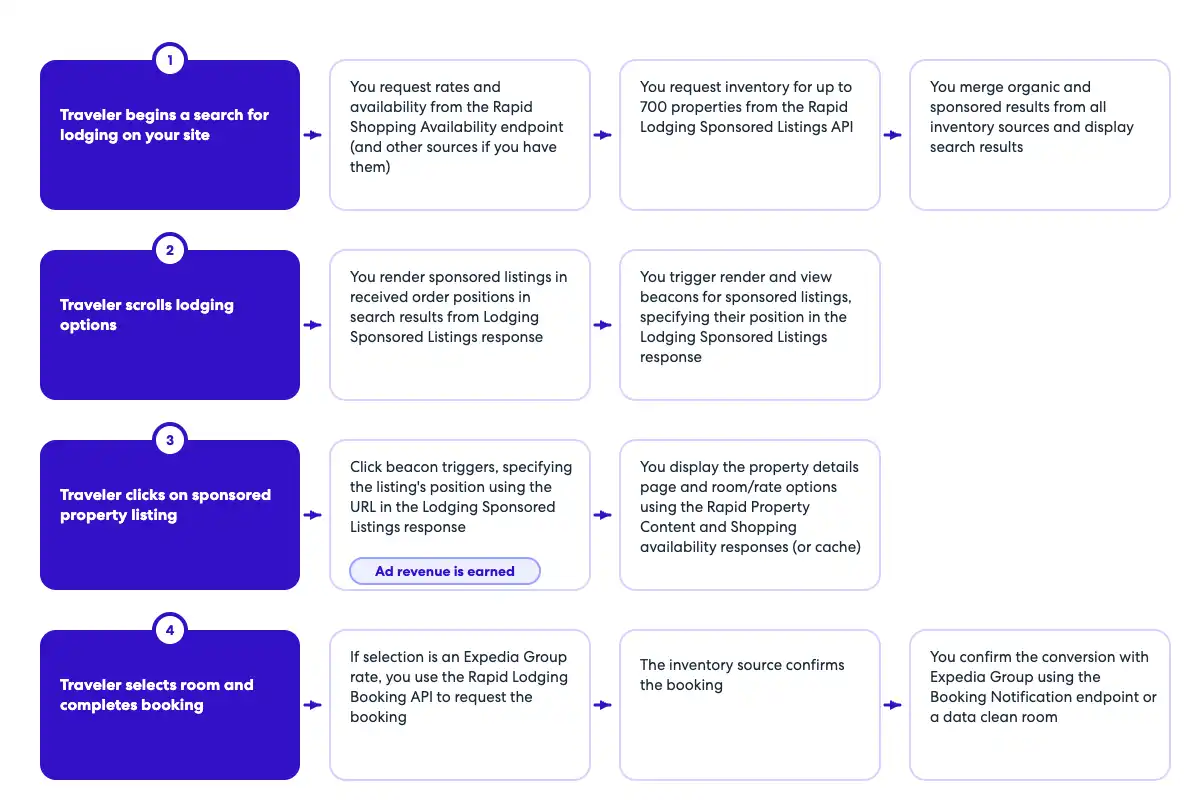
Tracking sequence flow chart

|

OpenAPI Booking Notification definition

openapi: 3.0.1
info:
  title: Booking Notification API
  version: v1
  description: Booking Notification API to capture booking notification data. The endpoint should be called whenever an ad of the 
    same property was viewed or clicked during the same session. For example, if the traveler saw an ad for a specific property,
    but clicked and booked the organic tile, the booking notification endpoint should still be called.
  contact:
    name: Media Solutions
    email: MediaSolutionsAPI1@expedia.com
tags:
  - name: Booking Notification
    description: API to post booking data
servers:
  - url: https://test.ean.com/v1
  - url: https://api.ean.com/v1
paths:
  /ads/booking-notification:
    post:
      tags:
        - Booking Notification
      description: Endpoint to capture booking notification data such as the booking date, the number of nights booked, the id of the property booked,
        the gross booked amount, and the currency of the gross booked amount.
      summary: Endpoint to capture booking data.
      operationId: booking-notification
      parameters:
        - name: Accept
          in: header
          description: Specifies the response format that the client would like to receive back. This must be application/json
          required: true
          schema:
            type: string
          example: 'application/json'
        - name: Accept-Encoding
          in: header
          description: Specifies the response encoding that the client would like to receive back. This must be gzip.
          required: true
          schema:
            type: string
          example: 'gzip'
        - name: User-Agent
          in: header
          description: The User-Agent header string from the customer's request, as captured by your integration.
          required: true
          schema:
            type: string
          example: 'Mozilla/5.0 (Linux; Android 13; SM-S901B) AppleWebKit/537.36 (KHTML, like Gecko) Chrome/112.0.0.0 Mobile Safari/537.36'
        - name: Content-Type
          in: header
          description: This parameter is to specify what format the request body is in. The only supported value is application/json.
          required: true
          schema:
            type: string
            example: application/json
        - name: Customer-Ip
          in: header
          description: IP address of the customer, as captured by your integration.
            Ensure your integration passes the customer's IP, not your own. This value helps
            determine their location for ad relevancy.
            Also used for fraud recovery and other important analytics.
          required: true
          schema:
            type: string
            format: ipv4
          example: 127.0.0.1
        - name: Customer-Session-Id
          in: header
          description: Insert your own unique value for each user session, beginning with the first API call. Continue to pass the
            same value for each subsequent API call during the user's session, using a new value for every new customer
            session. This should match the initial request and all subsequent requests to retrieve ads for the user's session.
          required: false
          schema:
            type: string
          example: '7f9a24ea-2145-4819-a7b7-2a4cbe1165ab'
        - name: Customer-Id
          in: header
          description: An obfuscated unique identifier for each customer. This should not contain any personal information such as email, first or last name.
          required: true
          schema:
            type: string
          example: '7f9a24ea-2145-4819-a7b7-2a4cbe1165ab'
        - name: billing_terms
          in: query
          description: This parameter is to specify the terms of how a resulting booking should be billed. If this field is
            needed, the value for this will be provided to you separately.
          schema:
            type: string
        - name: partner_point_of_sale
          in: query
          description: This parameter is to specify what point of sale is being used to shop and book. If this field is needed,
            the value for this will be provided to you separately.
          schema:
            type: string
        - name: payment_terms
          in: query
          description: This parameter is to specify what terms should be used when being paid for a resulting booking. If this
            field is needed, the value for this will be provided to you separately.
          schema:
            type: string
        - name: platform_name
          in: query
          description: This parameter is to specify what platform is being used to shop and book. If this field is needed, the
            value for this will be provided to you separately.
          schema:
            type: string
      requestBody:
        content:
          application/json:
            schema:
              $ref: '#/components/schemas/BookingRequest'
      responses:
        '204':
          description: No content - Successfully received the booking data.
          content: {}
        '400':
          description: Bad Request
          content:
            application/json:
              schema:
                $ref: '#/components/schemas/Error'
              example:
                type: 'invalid_input'
                message: 'An invalid request was sent in, please check the nested errors for details.'
                errors:
                  - type: 'item_id.required'
                    message: 'The item_id is required'
                    fields:
                      - name: 'item_id'
                        type: 'query'
        '401':
          description: Unauthorized
          content:
            application/json:
              schema:
                $ref: '#/components/schemas/Error'
              example:
                type: 'request_unauthenticated'
                message: 'Data required to authenticate your request is missing or inaccurate. 
                  Ensure that your request follows the guidelines in our documentation.'
                fields:
                  - name: 'apikey'
                    type: 'header'
                    value: 'jaj3982k239dka328e'
                  - name: 'signature'
                    type: 'header'
                    value: '129d75332614a5bdbe0c7eb540e95a65f9d85a5b53dabb38d19b37fad6312a2bd25c12ee5a82831d55112087e1b'
                  - name: 'timestamp'
                    type: 'header'
                    value: '198284729'
                  - name: 'servertimestamp'
                    type: 'server'
                    value: '198284729'
        '403':
          description: Forbidden
          content:
            application/json:
              schema:
                $ref: '#/components/schemas/Error'
              example:
                type: 'request_unauthorized'
                message: 'Your request could not be authorized.'
        '426':
          description: Upgrade Required
          content:
            application/json:
              schema:
                $ref: '#/components/schemas/Error'
              example:
                type: 'upgrade_required'
                message: 'This service requires the use of TLS.'
        '429':
          description: Too Many Requests
          content:
            application/json:
              schema:
                $ref: '#/components/schemas/Error'
              example:
                type: 'too_many_requests'
                message: 'You have reached your capacity for this type of request.'
        '500':
          description: Unknown Internal Error
          content:
            application/json:
              schema:
                $ref: '#/components/schemas/Error'
              example:
                type: 'unknown_internal_error'
                message: 'An internal server error has occurred.'
        '503':
          description: Service Unavailable
          content:
            application/json:
              schema:
                $ref: '#/components/schemas/Error'
              example:
                type: 'service_unavailable'
                message: 'This service is currently unavailable.'
components:
  schemas:
    BookingRequest:
      type: object
      required:
        - total
        - property_id
        - number_of_nights
        - creation_date_time
      properties:
        property_id:
          description: The property id that was booked.
          type: string
          example: 24323423
        number_of_nights:
          description: The total number of room nights booked. If multiple rooms were booked, this is rooms multiplied by nights.
          type: integer
          format: int32
          minimum: 1
          maximum: 20
          example: 10
        total:
          $ref: '#/components/schemas/Total'
        creation_date_time:
          description: The date and time of the booking in UTC.
          type: string
          format: date-time
          example: 2024-12-25T12:30:00Z
    Total:
      type: object
      required:
        - value
        - currency
      properties:
        value:
          description: The value.
          type: number
          format: float
          example: 34343.56
        currency:
          description: The currency of the value.
          type: string
          minLength: 3
          maxLength: 3
          example: USD
    Error:
      type: object
      properties:
        type:
          type: string
          description: The error type.
        message:
          type: string
          description: A human readable message giving details about this error.
        fields:
          type: array
          description: Details about the specific fields that had an error.
          items:
            $ref: '#/components/schemas/Field'
        errors:
          type: array
          description: An array of all the actual errors that occurred.
          items:
            $ref: '#/components/schemas/ErrorIndividual'
      description: The overall class of error that occurred.
    Field:
      type: object
      properties:
        name:
          type: string
          description: The field that had an error.
        type:
          type: string
          description: The type of the field that had an error.
        value:
          type: string
          description: The value of the field that had an error.
      description: An individual field that had an error.
    ErrorIndividual:
      type: object
      properties:
        type:
          type: string
          description: The error type.
        message:
          type: string
          description: A human readable message giving details about this error.
        fields:
          type: array
          description: Details about the specific fields that had an error.
          items:
            $ref: '#/components/schemas/Field'
      description: An individual error.

Sample Booking Notification request

{ 

  "property_id": "24323423", 
  "number_of_nights": 10, 
  "total": { 
    "value": 34343.56, 
    "currency": "USD" 
  }, 
  "creation_date_time": "2024-12-25T12:30:00Z" 
}

API details

Explore the endpoints on this page, then use testing software to get an understanding of how the examples and schema definitions compare to the actual output.

Note: Your launch manager will provide you with specific parameters to include in the header when calling this endpoint. If you don't include those parameters, your calls will be rejected.

Was this page helpful?
How can we improve this content?
Thank you for helping us improve!