
Cancel for any reason
Give travelers the flexibility to cancel a non-refundable booking and receive a refund for the full hotel price
The Trip Protection API is a new, optional capability for those who already integrated with the Rapid Lodging API. It allows eligible lodging bookings to be offered with a cancel for any reason (CFAR) upgrade, giving travelers the flexibility to cancel a non-refundable booking and receive a full refund of the price paid for the hotel.
What is CFAR?
With the addition of CFAR, travelers can cancel non-refundable lodging bookings before check‑in and receive a full hotel refund. CFAR is a travel service—not traditional travel insurance—and requires no qualifying reason or claims process; travelers may cancel for any reason without additional paperwork.
CFAR helps you:
- Increase conversion on lower-priced non-refundable inventory
- Give travelers confidence when booking non-refundable rates
- Reduce friction around cancellation
- Provide flexibility without introducing manual claims handling
Example CFAR display
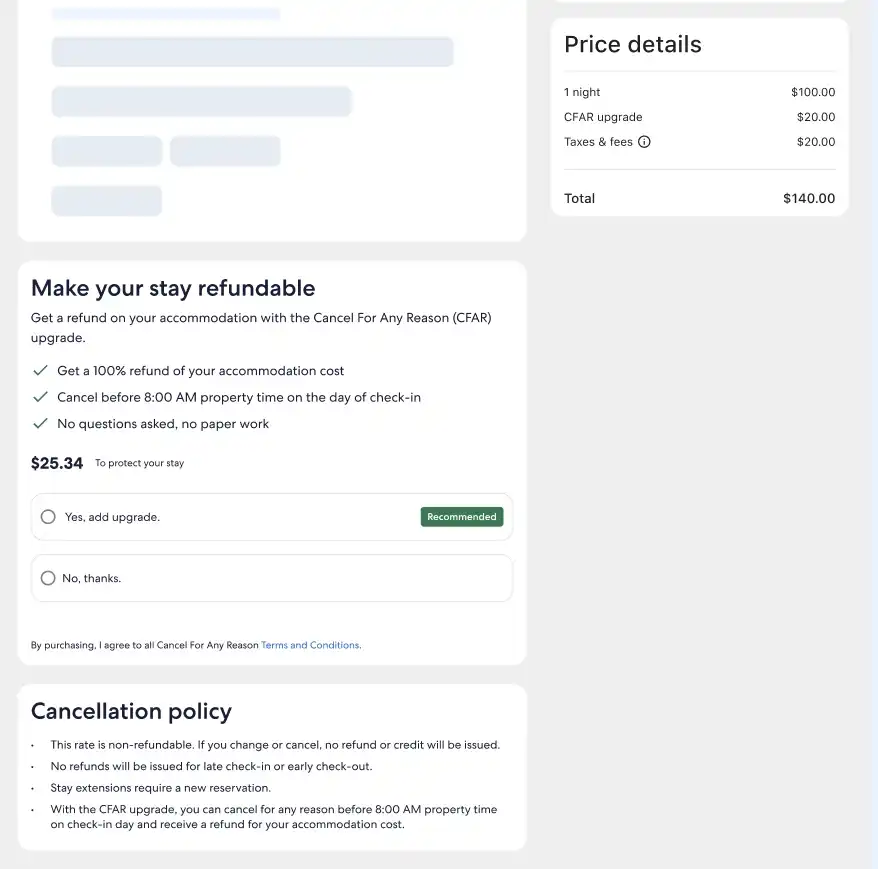
Please note: This sample is provided for illustrative purposes only.
Authentication
Before integrating the Trip Protection API, you must already be live on the Rapid Lodging API (Availability/Shopping, Price Check, and Booking endpoints). The authentication mechanism will be through signature authentication, as in the Rapid Lodging API.
>> Read about signature authentication
Contact your account manager to have this scope added to your credentials.
How it works
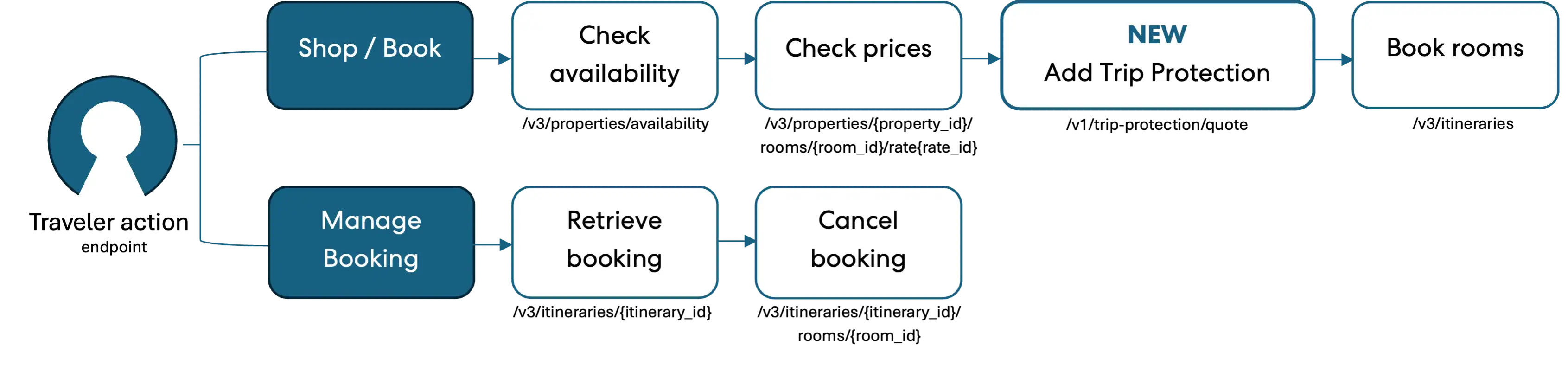
The CFAR integration is minimally disruptive. No changes are required to your existing Rapid Lodging request payloads for Availability/Shopping, Booking, and Cancellation (Steps 1, 4, and 6). The new behavior is additive, so if you don’t act on the CFAR offer, you'll see no change to your integration.
CFAR with Rapid Lodging
When using the CFAR functionality, there are two primary ways travelers will interact: The first is shopping for or booking, and the second is managing an existing booking.
Step 1: Search for lodging rates
No changes required.
This is the standard Rapid Lodging Availability/Shopping call. No modifications are needed to the request or response handling.
Step 2: Call the Price Check API
This is the standard Rapid Lodging price check call. No changes to the request are required.
When a rate is eligible for CFAR and available at the time of booking, the Price Check response will include an add_trip_protection link alongside the book link in the links object. You should use this link to offer the traveler the CFAR option.
Sample Price Check response links object (CFAR-eligible rate)
"links": {
  "book": {
    "method": "POST",
    "href": "/v3/itineraries?token=MY5S3j36cOcL",
    "expires": "2025-10-13T16:10:00.000+01:00"
  },
  "add_trip_protection": {
    "method": "GET",
    "href": "/v1/trip-protection/quote?token=MY5S3j36cOcLfLBZjPYQ1abhfc8CqmjmFVzkk7euvWaunE57LLeDgaxm516m",
    "expires": "2025-10-13T16:10:00.000+01:00"
  }
}
Note: The add_trip_protection link will only be present when the rate is both available and eligible for CFAR.
Step 3: Get a Trip Protection quote
Endpoint: GET /v1/trip-protection/quote?token={token}
This is an optional step that retrieves a full CFAR quote for the selected rate. Use the href from the add_trip_protection link returned in Step 2 as the request URL.
The response contains the product name, along with:
- Policy details: coverage dates, coverage percentage and limit, marketing copy (headline, overview, benefits), disclaimer, and a link to the policy wording document
- Pricing: the CFAR price (
trip_protection_price) and combined lodging + protection totals (totals), each expressed in both billable and request currencies (inclusive and exclusive of taxes/fees) - Cancel penalties: penalties that apply to the protection product itself if cancelled
- Booking link: the
links.book_with_trip_protectionparameter is used in Step 4 to book with CFAR
Required headers
| Header | Required | Notes |
|---|---|---|
Accept | Yes | Must be application/json |
Accept-Encoding | Yes | Must be gzip |
Customer-Ip | Yes | End-traveler's IPv4 address (not your server's) |
User-Agent | Yes | Customer's user-agent or {app-name}/{app-version} |
Customer-Session-Id | No | Unique per user session; re-use across calls in the same session |
Test | No | For sandbox testing: standard, service_unavailable, unknown_internal_error |
Example: Quote response
{
  "policy": {
    "start": "2026-09-28T13:23:37Z",
    "end": "2026-10-08T08:00:00+01:00",
    "coverage": {
      "limit": {
        "value": "709.72",
        "currency": "USD",
        "percent": "100%"
      }
    }
  },
  "content": {
    "product_name": "CFAR upgrade",
    "headline": "Make your stay refundable",
    "overview": "Get a refund on your accommodation with the Cancel For Any Reason (CFAR) upgrade.",
    "benefits": [
      {
        "title": "Get a 100% refund of your accommodation cost",
        "description": null
      },
      {
        "title": "Cancel before 8:00am property time on the day of check-in",
        "description": null
      },
      {
        "title": "No questions asked, no paperwork",
        "description": null
      }
    ],
    "disclaimer_html": "<p data-block-key=\"vkgdz\">By purchasing, I agree to all Cancel For Any Reason <a href=\"https://example.com" rel=\"noopener noreferrer\" target=\"_blank\">Terms and Conditions</a>.</p>",
    "links": {
      "terms_and_conditions": {
        "method": "GET",
        "href": "https://example.com
      }
    }
  },
  "pricing": {
    "trip_protection": {
      "inclusive": {
        "billable_currency": {
          "value": "149.04",
          "currency": "USD"
        },
        "request_currency": {
          "value": "149.04",
          "currency": "USD"
        }
      },
      "exclusive": {
        "billable_currency": {
          "value": "149.04",
          "currency": "USD"
        },
        "request_currency": {
          "value": "149.04",
          "currency": "USD"
        }
      }
    },
    "totals": {
      "inclusive": {
        "billable_currency": {
          "value": "858.76",
          "currency": "USD"
        },
        "request_currency": {
          "value": "858.76",
          "currency": "USD"
        }
      },
      "exclusive": {
        "billable_currency": {
          "value": "858.76",
          "currency": "USD"
        },
        "request_currency": {
          "value": "858.76",
          "currency": "USD"
        }
      }
    }
  },
  "refundable": false,
  "expires": "2026-10-07T22:59:59Z",
  "cancel_penalties": [
    {
      "start": "2026-09-28T13:23:37Z",
      "end": "2026-10-08T07:00:00Z",
      "currency": "USD",
      "amount": "709.72",
      "percent": "100%"
    }
  ],
  "links": {
    "book_with_trip_protection": {
      "method": "POST",
      "href": "/v3/itineraries?token=QldfCGlcUA4FVFBbDQ4JUwpDRwdWXBBLDwheZkFdBwVQU19RA1tUUBlXDQcGSwcHCwEYBl0NVUwFDgdVCwJSAlZSVAsQXlVHVApVC0BrDlBnQ1BWWxYBD3w9YHNxcSceQgVCVmgIV14KDFZTAg4EWApARgxFUmJmJ7IHpnIxJTSCpoNH5DNVUnOHclNCdQcFh9LWFfWwpzN1BkIDpMASo1ZkZWPg0nUUZTMicjCCA0Ml0vN0APLiZ0ZXByCXtwdmISVyVHB3IWJlAAVglDTA8EVV8KDgMDWg9UBQ=="
    }
  }
}
Step 4: Call the Booking API
If the traveler accepts the CFAR quote for an eligible booking, the booking will be made with a book_with_trip_protection link that embeds the quote context in the token. No changes are required to the book request schema.
The new link will be passed as part of the standard Rapid Lodging Booking call (POST /v3/itineraries). The booking link to use depends on whether the traveler opted into CFAR.
| Traveler choice | Booking link to use |
|---|---|
| With CFAR | links.book_with_trip_protection from the Step 3 quote response |
| Without CFAR | links.book from the Step 2 Price Check response |
No new fields are added to the booking request or response. CFAR is activated solely by which token is used in the booking link.
Note: The links.book_with_trip_protection token from the quote response expires after about 2 hours (see the expires_at field). If the token expires, you should resend the request.
Step 5: Retrieve the booking
No changes to the request.
This is the standard Rapid Lodging GET /v3/itineraries/{itinerary_id} call.
When CFAR was purchased, the Itinerary response will include an additional trip_protection object containing the policy and pricing details of the purchased product. If you did not purchase CFAR, you'll see no change to the Itinerary response.
Additionally, when CFAR is active, the cancel_penalties and refundable fields on the rate object in the itinerary will reflect the CFAR policy rather than the base rate's cancellation policy.
Example: Itinerary response showing the trip_protection object
{
  "trip_protection": {
    "product_name": "Cancel For Any Reason (100% Refund)",
    "product_type": "hotel_cancel_for_any_reason",
    "vendor": "[vendor]",
    "merchant_of_record": "expedia",
    "eligibility_status": "eligible",
    "policy": {
      "start": "2025-10-13T15:59:00.000Z",
      "end": "2025-10-18T08:00:00.000-08:00",
      "coverage": {
        "percentage": "100%",
        "limit": {
          "inclusive": {
            "billable_currency": {
              "value": "702.00",
              "currency": "USD"
            }
          },
          "exclusive": {
            "billable_currency": {
              "value": "702.00",
              "currency": "USD"
            }
          }
        }
      },
      "links": {
        "policy_wording": {
          "method": "GET",
          "href": "https://policy.example.com/pds/example?policy_type=cfar_v1",
        }
      }
    },
    "pricing": {
      "inclusive": {
        "billable_currency": {
          "value": "702.00",
          "currency": "USD"
        }
      },
      "exclusive": {
        "billable_currency": {
          "value": "702.00",
          "currency": "USD"
        }
      }
    }
  }
}
Note: The trip_protection pricing in the Retrieve response reflects the billable currency only. For the full breakdown including request currency, refer to the original quote response.
Step 6: Cancel the booking
No changes to the request.
This is the standard Rapid Lodging cancellation call. If CFAR was purchased for a booking, canceling will automatically trigger a refund claim on behalf of the traveler, subject to the eligibility terms. If the cancellation is attempted outside the eligibility window (for example, by 8:00 am on the day of check-in), no refund will be processed. No additional action is required for your implementation.
Refunds are processed entirely by Expedia Group. The traveler will receive the applicable refund through the standard claim settlement process.
API details
Explore the Trip Protection-related endpoint definitions on this page, then use the API Explorer or another testing software to get an understanding of how the examples and schema definitions compare to the actual output.