What you need to know to set up your implementation
Our Integration and Launch Management teams will work closely with your teams as you implement the Lodging Sponsored Listings API. With close collaboration, implementation is generally estimated as 8 weeks, including 2 weeks for end-to-end testing.
Decide where in the search results you'll display the sponsored listings and design your badge. Note: Don't change the order in which the ads have been ranked in the Lodging Sponsored Listings response. >> See information on UI requirements
With each eligible search, you'll send us a preselected list of Expedia Group property IDs. Use this opportunity to control what properties would be eligible for sponsored listings on your site.
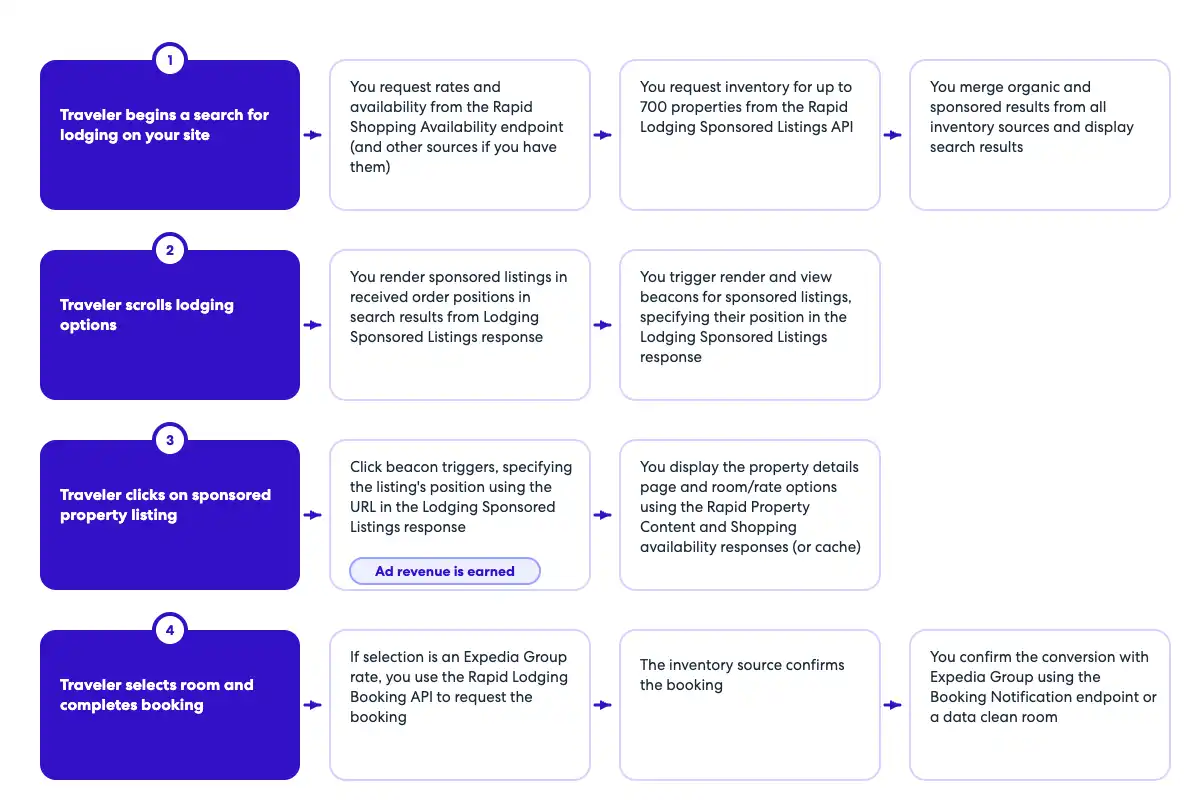
At a high level, this is the sequence of what happens on the traveler side, and what your system will be doing:
Step 1: Send a call to the Lodging Sponsored Listings API using the search context data
Note: This call is in no way connected to rate shopping calls you might be making, and can be made before, during or after the rates and availability have been fetched.
Aggregate and sort the availability results as you normally would.
Ensure that the customer ID is persistent across all requests.
Note on the customer ID: Advertisers who invest in clicks expect clear insights into the value generated from their spend. For Lodging Sponsored Listings, this value is measured by the bookings that result from an ad impression or click. But we can't provide comprehensive booking attribution data when lodging inventory is sourced from multiple channels, so we require a persistent customer ID in all ad requests. That ID must be maintained throughout the ad tracking process and included with booking attribution information so that we can accurately link ad interactions with the resulting bookings.
Step 2: Find the associated property in the availability results
For maximum ad coverage and optimal monetization, it's critical that you map your property IDs to Expedia property IDs, even for those properties that you do not shop with Expedia for. There's unlikely to be a complete mapping between the two sets of properties because not all properties participate in the sponsored listings program.
Compare the Expedia property IDs returned in the ad delivery response with your availability results.
Merge the property listing content with the sponsored listing. The results from the Lodging Sponsored Listings API only return the property ID and ad content, no other content.
Step 3: Interleave the sponsored listings into the availability results (optional)
Sponsored listing properties can be shown at the top of the search results or dispersed throughout the organic results. There is no requirement on where the listings are placed, as long as the order is maintained.
Choose how you want to display sponsored listings.
Ensure that the order the sponsored listings appear in is not changed.
Although both ad rank and ad position relate to an ad’s placement, they are not the same thing.
Ad rank determines the ad’s standing after the auction. The winning ad receives rank 1, the next highest rank 2, and so on, sequentially up to rank 25 (the maximum number of ads returned).
Ad position, on the other hand, refers to the ad’s actual placement on the page, typically numbered from 1 (top) downward. In paginated results, positions continue sequentially across pages. For example, if you show 10 property listings per page and place ads at positions 1 and 10 on each page, the first ad on page 2 should be assigned position 11. It's important to include ad position in all tracking beacons to ensure accurate measurement and reporting.
|
OpenAPI Ads definition
openapi: 3.0.1
info:
  title: Ad Delivery API
  version: v1
  description: Retrieves ads.
  contact:
    name: 'Media Solutions'
    email: 'MediaSolutionsAPI1@expedia.com'
    url: 'https://test.developers.expediagroup.com/docs/'
tags:
  - name: Ad Delivery
    description: API to retrieve ads
servers:
  - url: https://test.ean.com/v1
  - url: https://api.ean.com/v1
paths:
  /ads:
    post:
      tags:
        - Ad Delivery
      description: Returns relevant ads.
      operationId: getAds
      parameters:
        - name: Accept
          in: header
          description: Specifies the response format that the client would like to receive back. This must be application/json
          required: true
          schema:
            type: string
          example: 'application/json'
        - name: Authorization
          in: header
          description: EAN token, format is <pre>EAN APIKey=<APIKey>,Signature=<Encoded Signature>,timestamp=<timestamp></pre>
          required: true
          schema:
            type: string
        - name: Accept-Encoding
          in: header
          description: Specifies the response encoding that the client would like to receive back. This must be gzip.
          required: true
          schema:
            type: string
          example: 'gzip'
        - name: User-Agent
          in: header
          description: The User-Agent header string from the customer's request, as captured by your integration.
          required: true
          schema:
            type: string
          example: 'Mozilla/5.0 (Linux; Android 13; SM-S901B) AppleWebKit/537.36 (KHTML, like Gecko) Chrome/112.0.0.0 Mobile Safari/537.36'
        - name: Customer-Ip
          in: header
          description: IP address of the customer, as captured by your integration.
            Ensure your integration passes the customer's IP, not your own. Used for fraud recovery and other important analytics.
          required: false
          schema:
            type: string
          example: '192.168.123.132'
        - name: Customer-Session-Id
          in: header
          description: Insert your own unique value for each user session, beginning with the first API call.
            Continue to pass the same value for each subsequent API call during the user's session, using a new value for every new customer session.
          required: false
          schema:
            type: string
          example: '7f9a24ea-2145-4819-a7b7-2a4cbe1165ab'
        - name: Customer-Id
          in: header
          description: An obfuscated unique identifier for each customer. This should not contain any personal information such as email, first or last name.
          required: true
          schema:
            type: string
          example: '7f9a24ea-2145-4819-a7b7-2a4cbe1165ab'
        - name: Test
          in: header
          description: Ads calls have a test header that can be used to return set responses with the following keywords:<br>
              * `standard`
              * `service_unavailable`
              * `unknown_internal_error`
          schema:
            type: string
            enum:
              - standard
              - service_unavailable
              - unknown_internal_error
        - name: billing_terms
          in: query
          description: This parameter is to specify the terms of how a resulting booking should be billed. If this field is
            needed, the value for this will be provided to you separately.
          schema:
            type: string
        - name: partner_point_of_sale
          in: query
          description: This parameter is to specify what point of sale is being used to shop and book. If this field is needed,
            the value for this will be provided to you separately.
          schema:
            type: string
        - name: payment_terms
          in: query
          description: This parameter is to specify what terms should be used when being paid for a resulting booking. If this
            field is needed, the value for this will be provided to you separately.
          schema:
            type: string
        - name: platform_name
          in: query
          description: This parameter is to specify what platform is being used to shop and book. If this field is needed, the
            value for this will be provided to you separately.
          schema:
            type: string
      requestBody:
        content:
          application/json:
            schema:
              $ref: '#/components/schemas/AdsRequest'
      responses:
        '200':
          description: OK
          content:
            application/json:
              schema:
                $ref: '#/components/schemas/AdsResponse'
        '400':
          description: Bad Request
          content:
            application/json:
              schema:
                $ref: '#/components/schemas/Error'
              example:
                type: 'invalid_input'
                message: 'An invalid request was sent in, please check the nested errors for details.'
                errors:
                  - type: 'language.required'
                    message: 'A language is required. Supported languages are:
                      [ar-SA, cs-CZ, da-DK, de-DE, el-GR, en-US, es-ES, es-MX, fi-FI, fr-CA, fr-FR, hr-HR, hu-HU, id-ID,
                      is-IS, it-IT, ja-JP, lt-LT, ko-KR, ms-MY, nb-NO, nl-NL, pl-PL, pt-BR, pt-PT, ru-RU, sk-SK, sv-SE,
                      th-TH, tr-TR, uk-UA, vi-VN, zh-CN, zh-TW]'
                    fields:
                      - name: 'language'
                        type: 'request'
        '401':
          description: Unauthorized
          content:
            application/json:
              schema:
                $ref: '#/components/schemas/Error'
              example:
                type: 'request_unauthenticated'
                message: 'Data required to authenticate your request is missing or inaccurate.
                  Ensure that your request follows the guidelines in our documentation.'
                fields:
                  - name: 'apikey'
                    type: 'header'
                    value: 'jaj3982k239dka328e'
                  - name: 'signature'
                    type: 'header'
                    value: '129d75332614a5bdbe0c7eb540e95a65f9d85a5b53dabb38d19b37fad6312a2bd25c12ee5a82831d55112087e1b'
                  - name: 'timestamp'
                    type: 'header'
                    value: '198284729'
                  - name: 'servertimestamp'
                    type: 'server'
                    value: '198284729'
        '403':
          description: Forbidden
          content:
            application/json:
              schema:
                $ref: '#/components/schemas/Error'
              example:
                type: 'request_unauthorized'
                message: 'Your request could not be authorized.'
        '426':
          description: Upgrade Required
          content:
            application/json:
              schema:
                $ref: '#/components/schemas/Error'
              example:
                type: 'upgrade_required'
                message: 'This service requires the use of TLS.'
        '429':
          description: Too Many Requests
          content:
            application/json:
              schema:
                $ref: '#/components/schemas/Error'
              example:
                type: 'too_many_requests'
                message: 'You have reached your capacity for this type of request.'
        '500':
          description: Unknown Internal Error
          content:
            application/json:
              schema:
                $ref: '#/components/schemas/Error'
              example:
                type: 'unknown_internal_error'
                message: 'An internal server error has occurred.'
        '503':
          description: Service Unavailable
          content:
            application/json:
              schema:
                $ref: '#/components/schemas/Error'
              example:
                type: 'service_unavailable'
                message: 'This service is currently unavailable.'
components:
  schemas:
    PageType:
      type: string
      enum:
        - other
        - search_results
        - details
        - confirmation
      example: 'search_results'
      description: The type of page the ads will be rendered on.
    SortType:
      type: string
      enum:
        - default
      example: default
      description: The sort type selected for the organic results.
    ProductLine:
        type: string
        enum:
          - car
          - flight
          - lodging
        example: lodging
        description: The different types of travel product lines a traveler can search for.
    SalesChannel:
      type: string
      enum:
        - website
        - mobile_app
        - mobile_web
      example: 'mobile_app'
      description: The sales channel for the request.
    GuestCounts:
      type: object
      required:
        - adult_count
      properties:
        adult_count:
          type: integer
          format: int32
          example: 2
        child_count:
          type: integer
          format: int32
          example: 1
    AdsRequest:
      type: object
      required:
        - sales_channel
        - language
        - country_code
        - page_type
        - search_product_lines
        - checkin
        - checkout
        - occupancies
        - property_ids
      properties:
        country_code:
          type: string
          example: 'US'
          pattern: '^[A-Z]{2}$'
          description: "The country code of the traveler's point of sale, in ISO 3166-1 alpha-2 format.
            This should represent the country where the shopping transaction is taking place.
            For more information see: https://www.iso.org/obp/ui/#search/code/"
        language:
          type: string
          example: 'en-US'
          pattern: '^[a-z]{2}-[A-Z]{2}$'
          description: 'Desired language for the response as a subset of BCP47 format that only uses hyphenated pairs of two-digit language and country codes.
            Use only ISO 639-1 alpha-2 language codes and ISO 3166-1 alpha-2 country codes.
            See https://www.w3.org/International/articles/language-tags/
            Language Options: https://developers.expediagroup.com/docs/rapid/resources/reference/language-options'
        sales_channel:
          $ref: '#/components/schemas/SalesChannel'
        page_type:
          $ref: '#/components/schemas/PageType'
        sort_type:
          $ref: '#/components/schemas/SortType'
        search_product_lines:
          example: [ 'lodging', 'flight' ]
          description: The product lines the traveler is searching for. lodging indicates hotel_standalone. lodging and
            flight would indicate a lodging_package.
          type: array
          items:
            $ref: '#/components/schemas/ProductLine'
        checkin:
          type: string
          description: Check-in date, in ISO 8601 format (YYYY-MM-DD).
          pattern: '^\d{4}-\d{2}-\d{2}$'
          example: '2025-01-01'
        checkout:
          type: string
          description: Check-out date, in ISO 8601 format (YYYY-MM-DD).
          pattern: '^\d{4}-\d{2}-\d{2}$'
          example: '2025-01-05'
        occupancies:
          type: array
          items:
            $ref: '#/components/schemas/GuestCounts'
          description: Each array item represents guests of one room.
        focused_property_id:
          type: string
          description: The property id the ranking of ads should be based on. Examples of a focused property are a
            customer searching for a specific property and it being pinned to the top of a page or the property
            recommendation carousel based on the currently or previously viewed property. The focused_property_id itself
            will be excluded from the ranking.
          example: '23433'
        property_ids:
          type: array
          items:
            type: string
          example: [ '2717582', '16159546', '2025453' ]
          description: The list of property ids eligible for returning sponsored listings. These are the potential
            candidates that could be included in the auction. The maximum number of property_ids that can be sent in a
            request is 700.
        experiment_ids:
          description: A list of experiment ids that can be used for testing different behavior. The ids can be associated
            with different tests ran by the publisher and are completely arbitrary. The experiment ids will
            be included reports back to the publisher.
          type: array
          items:
            type: string
          example: [ '324324.1', '2423423.3', '3242343.5' ]
      additionalProperties: false
    Image:
      type: object
      properties:
        caption:
          type: string
          description: The image caption.
          example: 'Hotel Lobby'
        link:
          type: object
          additionalProperties:
            $ref: '#/components/schemas/Link'
          description: The url to retrieve the image.
          example:
            "70px":
              method: GET
              href: https://i.travelapi.com/hotels/1000000/20000/15300/15237/bef1b976_t.jpg
      description: An individual image.
    Creative:
      type: object
      properties:
        image:
          $ref: '#/components/schemas/Image'
      description: The image to be rendered for the sponsored listing.
      additionalProperties: false
    Link:
      type: object
      properties:
        method:
          type: string
          description: The request method used to access the link.
          example: 'POST'
        href:
          type: string
          description: The URL for the link. This can be absolute or relative. Placeholders will be need to be populated by the client.
          example: 'https://advertising.expedia.com/sponsoredcontent/v1/View?position=[position]&data=AAAAAQAAAAEAAA'
        expires:
          type: string
          description: If the link expires, this will be the UTC date the link will expire, in ISO 8601 format.
          example: '2025-07-10 15:00:00.000'
      description: An individual link.
    Beacons:
      type: object
      required:
        - view
        - render
        - click
      properties:
        view:
          $ref: '#/components/schemas/Link'
        render:
          $ref: '#/components/schemas/Link'
        click:
          $ref: '#/components/schemas/Link'
    SponsoredListing:
      description: The sponsored listing which advertises a specific property.
      type: object
      required:
        - rank
        - property_id
        - beacons
      properties:
        rank:
          type: integer
          pattern: int32
          minimum: 0
          example: 1
          description: The sponsored listing should adhere to the rank and not be re-ranked. This field is 0-based.
        property_id:
          type: string
          example: '13243534'
        creative:
          $ref: '#/components/schemas/Creative'
        beacons:
          $ref: '#/components/schemas/Beacons'
        ad_transparency_url:
          type: string
          example: 'https://advertising.expedia.com/sponsoredcontent/dsa/id=123'
          description: The url used to retrieve digital services act information regarding why the ad was selected.
      additionalProperties: false
    AdsResponse:
      type: object
      properties:
        sponsored_listings:
          type: array
          items:
            $ref: '#/components/schemas/SponsoredListing'
      additionalProperties: false
    Error:
      type: object
      properties:
        type:
          type: string
          description: The error type.
        message:
          type: string
          description: A human readable message giving details about this error.
        fields:
          type: array
          description: Details about the specific fields that had an error.
          items:
            $ref: '#/components/schemas/Field'
        errors:
          type: array
          description: An array of all the actual errors that occured.
          items:
            $ref: '#/components/schemas/ErrorIndividual'
      description: The overall class of error that occured.
    Field:
      type: object
      properties:
        name:
          type: string
          description: The field that had an error.
        type:
          type: string
          description: The type of the field that had an error.
        value:
          type: string
          description: The value of the field that had an error.
      description: An individual field that had an error.
    ErrorIndividual:
      type: object
      properties:
        type:
          type: string
          description: The error type.
        message:
          type: string
          description: A human readable message giving details about this error.
        fields:
          type: array
          description: Details about the specific fields that had an error.
          items:
            $ref: '#/components/schemas/Field'
      description: An individual error.
Property IDs: Only Expedia property IDs will be recognized when calling the Lodging Sponsored Listings API. Any non-Expedia Group IDs will either return no ad inventory or could mistakenly match a different, irrelevant Expedia Group property.
Property count limit: You can include up to 700 property IDs in a single request.
Property rates and availability: The Lodging Sponsored Listings API doesn't assume or check availability, because you can choose to display Expedia Group rates or rates sourced elsewhere in the sponsored listings in the search results. This is why you make a request to both the Lodging Sponsored Listings API and the Shopping Availability API and combine the results.
Batching and caching: The Lodging Sponsored Listings API doesn't support batch requests, and Expedia Group discourages caching of sponsored listings inventory.
The sponsored listings auction needs to be run for each search and can't be reused, so make a Lodging Sponsored Listings endpoint request each time a customer searches. If the customer's search criteria change (for example, travel dates or room count), make additional requests to ensure that the information is up to date.
Although you may cache your rates and availability for organic search, Lodging Sponsored Listings API calls should be made in real time. Advertising properties typically set up maximum daily budgets that are spent in real time. If ad details are not refreshed frequently, by the time the click happens, the advertiser may have no budget left. This is called overspend, and even though an ad is displayed and a customer clicks on it, no revenue will be generated.
Ranked ad order: You can choose which positions in your search results you reserve for sponsored listings, but you can't re-sort or apply a selection algorithm, as you might for Shopping API responses. This is because the order of sponsored listings delivered in the API represents the results of the live auction, with properties bidding certain cost-per-click amounts for placement.
If you don't want a specific property to be featured in a sponsored listing, you can exclude that property ID in your Lodging Sponsored Listings API request.
Ad coverage: Additional search parameters, such as filters, limit the number of properties that can be eligible for a particular search. We recommend maximizing the number of properties you include in your request. Applying any additional filters beyond the traveler's inputs could lead to missed ad revenue opportunities.
Property hero image: It's not mandatory to use the property-selected hero images sent through the API response, but we recommend that you do.
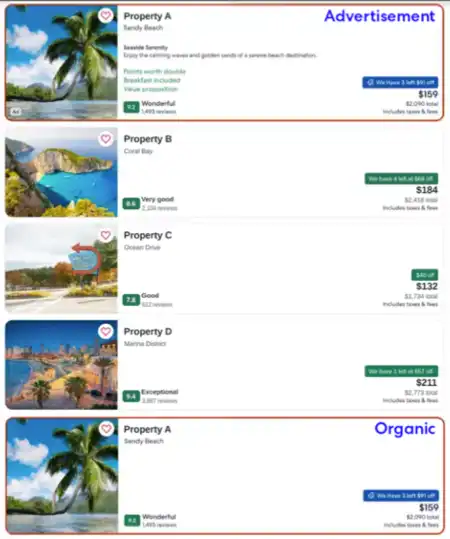
Property duplication in sponsored listing and organic results: It is industry standard that properties featured in sponsored listings should also appear in a second, organic listing in search results. Properties are willing to place higher bids in exchange for additional visibility in sort.
For example, you reserve Position 1 of search results for a sponsored listing and Hotel A wins the auction and is featured in Position 1 as a sponsored listing. In your organic inventory selection and sort order, Hotel A is featured a second time in search results in Position 7, lower down the page.
It's rare for a sponsored listing to appear directly above or below its corresponding organic listing in search results—happening at the top of search results in only 2% to 3% of searches. When it does happen, one option is to push the organic listing down by a few positions, adjusting the offset to a level that maintains a good user experience.
Example of a sponsored listing in sort
With ad blockers sometimes detecting and removing sponsored listings from search results, removing the organic duplication would mean high-quality properties are not being surfaced to travelers.
Alignment with Shopping API requests: The Lodging Sponsored Listings API is designed to be used in conjunction with the Rapid Lodging Shopping API. The API request order does not matter—Lodging Sponsored Listings API and Shopping Availability API requests can be made in parallel or sequentially.
The last step before taking your Lodging Sponsored Listings API implementation live is to ensure that you move from testing to production endpoints:
Change the Ad Delivery API from https://test.ean.com/v1/ads to https://api.ean.com/v1/ads.
Change the Booking Notification endpoint (if using) from https://test.ean.com/v1/ads/booking-notification to https://api.ean.com/v1/ads/booking-notification.