Developer Hub
这是自动生成的译文

预订归因概览

赞助内容广告转化率报告

由于广告商使用赞助列表来提高曝光率和预订量,因此报告由赞助列表驱动或影响的转化情况对于传达其广告支出的价值至关重要。该价值取决于广告被看到或点击后发生的预订量。我们报告了 impression-driven 和 click-driven 的归因情况,采用 last-touch 的 7 天归因方法。

与 Rapid Lodging Sponsored Listings API 集成需要您向我们发送归因于赞助列表点击的转化信息——即使点击后预订的价格不是 Expedia Group 价格。无论预订前的最近一次点击是在赞助商广告还是自然搜索结果中,都应该提供预订信息。

您可以通过两种方式向我们提供转化信息:

Information

注意

Expedia Group 使用了 AWS Clean Rooms 解决方案,但该解决方案并非在所有地区都可用。请与您的 Expedia Group B2B 顾问确认资格。

数据洁净室

数据洁净室 (DCR) 提供了一个安全的环境,可以在不暴露原始 user-level 数据的情况下分析共享数据集的性能。该解决方案还减轻了贵组织开发团队的负担,因为它消除了构建和维护哪些预订信息应该发送到 Expedia Group 以及哪些不应该发送到 Expedia Group 的逻辑的需求。

我们使用亚马逊网络服务(AWS)的净室解决方案进行数据传输。

AWS 身份和访问管理策略示例

{
  "Version": "2012-10-17",
  "Statement": [
    {
      "Sid": "CleanRoomsCollaborationAccess",
      "Effect": "Allow",
      "Action": [
        "cleanrooms:ListCollaborations",
        "cleanrooms:GetCollaboration",
        "cleanrooms:GetConfiguredTable",
        "cleanrooms:ListConfiguredTables",
        "cleanrooms:CreateMembership",
        "cleanrooms:GetMembership",
        "cleanrooms:ListMemberships",
        "cleanrooms:StartAnalysis",
        "cleanrooms:GetAnalysisTemplate",
        "cleanrooms:ListAnalysisTemplates",
        "cleanrooms:GetSchema",
        "cleanrooms:ListSchemas"
      ],
      "Resource": "*"
    },
    {
      "Sid": "AllowReadAccessToGlueDataCatalog",
      "Effect": "Allow",
      "Action": [
        "glue:GetDatabase",
        "glue:GetDatabases",
        "glue:GetTable",
        "glue:GetTables",
        "glue:GetPartition",
        "glue:GetPartitions"
      ],
      "Resource": [
        "arn:aws:glue:REGION:YOUR_AWS_ACCOUNT_ID:catalog",
        "arn:aws:glue:REGION:YOUR_AWS_ACCOUNT_ID:database/YOUR_DATABASE_NAME",
        "arn:aws:glue:REGION:YOUR_AWS_ACCOUNT_ID:table/YOUR_DATABASE_NAME/YOUR_TABLE_NAME"
      ]
    },
    {
      "Sid": "AllowReadAccessToS3Data",
      "Effect": "Allow",
      "Action": [
        "s3:GetObject",
        "s3:GetObjectAcl",
        "s3:GetBucketLocation",
        "s3:ListBucket"
      ],
      "Resource": [
        "arn:aws:s3:::YOUR_BUCKET_NAME",
        "arn:aws:s3:::YOUR_BUCKET_NAME/YOUR_PREFIX/*"
      ]
    }
  ]
}

洁净室使用检查清单

在将数据推送到洁净室之前,您应该检查是否包含以下信息:

  • 您的 AWS 账户信息
  • 配置身份和访问管理角色及权限
  • 所有房产 ID 都映射到 Expedia Group 的房产 ID。
  • 已准备并注册 Glue 表,这些表定义了准确解释的模式
  • 邀请您加入合作
  • 已验证的模式
  • 客户 ID
  • 加密(哈希处理)的个人身份信息 (PII),通常是电子邮件地址

转换数据

广告商需要的数据包括多个参数,用于报告赞助预订的价值。

字段必填说明示例值
booking_date_time预订日期和时间,采用 UTC 时区格式。2024-12-25T12:30:00Z
customer_id用户的唯一标识符(用于与该用户的其他广告互动事件关联)。这是发布商设置并持续提供的 ID,用于处理所有广告请求和预订。e4dda90a-f31b-47f2-be4f-7e7289d224fa
property_idExpedia Group 是预订的房产 ID。仅接受 Expedia Group 属性 ID。8906878
number_of_room_nights预订的总晚数,不考虑房间数量。例如,如果旅客预订了 2 间客房,入住 3 晚,则房间晚数价值为 3。3
number_of_rooms预订房间总数。2
gross_booking_amount旅行者最终支付的价格。200.00
currencygross_booking_amount提供的货币。GBP
customer_email_hashSHA-256 对客户电子邮件进行加密。可用于执行 cross-site 连接(在 Expedia Group 和给定发布商之间),以实现更强大的性能归因。值可以为空。

预订通知 API 端点

如果您选择不使用或不符合使用 DCR 通过 Expedia Group 传递预订归因的条件,您可以改用我们的预订通知端点。

端点详情

与 DCR 类似,预订通知 API 会报告与先前查看或赞助列表中触发的点击信标相关的预订数据。在预订流程结束时,您将定期向此 API 发送归因信息。我们建议每天查看,但赞助商广告浏览或点击后 8 天内查看也是可以接受的。

仅当预订确认成功后才向预订通知 API 发送请求。

事件顺序

顺序对于预订通知端点结果至关重要。向住宿赞助列表 API 发出请求时,请勿更改以下列出的事件顺序。

  1. 当旅行者在您的网站上进行搜索时,您将发出 2 个请求:1 个请求到住宿赞助列表 API 以检查可用性,1 个请求到住宿购物可用性端点以获取 Expedia Group 的可用性和价格。顺序并不重要,但必须先叫出这两个名字才能继续下一步。
  2. 住宿赞助列表 API 运行赞助列表的竞价机制。
  3. 如有库存,赞助搜索结果将在响应中返回。响应还将包括点击、查看和渲染信标。

>> 阅读更多关于追踪的信息 4. 赞助商列表将按照从 Expedia Group 返回的排名顺序显示在您的网站上。您可以选择在赞助商列表中显示 Expedia Group 价格,还是显示来自其他来源的价格。 5. 当浏览器在页面上渲染广告时,渲染信标(如果使用)会立即触发。 6. 当赞助商广告进入视口时,视图信标就会被触发。 7. 当旅行者点击搜索结果页面上显示的赞助商列表时,点击信标就会被触发。 8. 预订完成后,请求预订通知端点。如果预订随后被取消,则无需采取任何行动。

顺序流程图
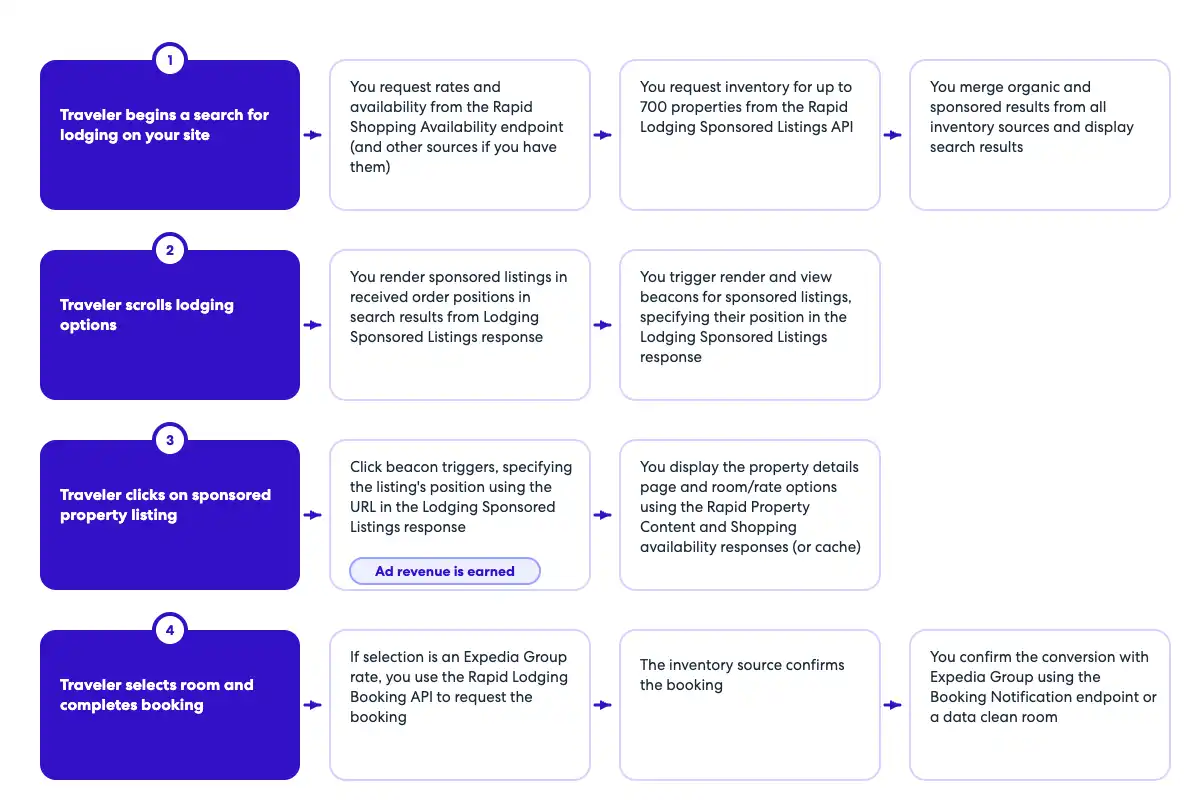
跟踪序列流程图

|

OpenAPI 预订通知定义

openapi: 3.0.1
info:
  title: Booking Notification API
  version: v1
  description: Booking Notification API to capture booking notification data. The endpoint should be called whenever an ad of the 
    same property was viewed or clicked during the same session. For example, if the traveler saw an ad for a specific property,
    but clicked and booked the organic tile, the booking notification endpoint should still be called.
  contact:
    name: Media Solutions
    email: MediaSolutionsAPI1@expedia.com
tags:
  - name: Booking Notification
    description: API to post booking data
servers:
  - url: https://test.ean.com/v1
  - url: https://api.ean.com/v1
paths:
  /ads/booking-notification:
    post:
      tags:
        - Booking Notification
      description: Endpoint to capture booking notification data such as the booking date, the number of nights booked, the id of the property booked,
        the gross booked amount, and the currency of the gross booked amount.
      summary: Endpoint to capture booking data.
      operationId: booking-notification
      parameters:
        - name: Accept
          in: header
          description: Specifies the response format that the client would like to receive back. This must be application/json
          required: true
          schema:
            type: string
          example: 'application/json'
        - name: Accept-Encoding
          in: header
          description: Specifies the response encoding that the client would like to receive back. This must be gzip.
          required: true
          schema:
            type: string
          example: 'gzip'
        - name: User-Agent
          in: header
          description: The User-Agent header string from the customer's request, as captured by your integration.
          required: true
          schema:
            type: string
          example: 'Mozilla/5.0 (Linux; Android 13; SM-S901B) AppleWebKit/537.36 (KHTML, like Gecko) Chrome/112.0.0.0 Mobile Safari/537.36'
        - name: Content-Type
          in: header
          description: This parameter is to specify what format the request body is in. The only supported value is application/json.
          required: true
          schema:
            type: string
            example: application/json
        - name: Customer-Ip
          in: header
          description: IP address of the customer, as captured by your integration.
            Ensure your integration passes the customer's IP, not your own. This value helps
            determine their location for ad relevancy.
            Also used for fraud recovery and other important analytics.
          required: true
          schema:
            type: string
            format: ipv4
          example: 127.0.0.1
        - name: Customer-Session-Id
          in: header
          description: Insert your own unique value for each user session, beginning with the first API call. Continue to pass the
            same value for each subsequent API call during the user's session, using a new value for every new customer
            session. This should match the initial request and all subsequent requests to retrieve ads for the user's session.
          required: false
          schema:
            type: string
          example: '7f9a24ea-2145-4819-a7b7-2a4cbe1165ab'
        - name: Customer-Id
          in: header
          description: An obfuscated unique identifier for each customer. This should not contain any personal information such as email, first or last name.
          required: true
          schema:
            type: string
          example: '7f9a24ea-2145-4819-a7b7-2a4cbe1165ab'
        - name: billing_terms
          in: query
          description: This parameter is to specify the terms of how a resulting booking should be billed. If this field is
            needed, the value for this will be provided to you separately.
          schema:
            type: string
        - name: partner_point_of_sale
          in: query
          description: This parameter is to specify what point of sale is being used to shop and book. If this field is needed,
            the value for this will be provided to you separately.
          schema:
            type: string
        - name: payment_terms
          in: query
          description: This parameter is to specify what terms should be used when being paid for a resulting booking. If this
            field is needed, the value for this will be provided to you separately.
          schema:
            type: string
        - name: platform_name
          in: query
          description: This parameter is to specify what platform is being used to shop and book. If this field is needed, the
            value for this will be provided to you separately.
          schema:
            type: string
      requestBody:
        content:
          application/json:
            schema:
              $ref: '#/components/schemas/BookingRequest'
      responses:
        '204':
          description: No content - Successfully received the booking data.
          content: {}
        '400':
          description: Bad Request
          content:
            application/json:
              schema:
                $ref: '#/components/schemas/Error'
              example:
                type: 'invalid_input'
                message: 'An invalid request was sent in, please check the nested errors for details.'
                errors:
                  - type: 'item_id.required'
                    message: 'The item_id is required'
                    fields:
                      - name: 'item_id'
                        type: 'query'
        '401':
          description: Unauthorized
          content:
            application/json:
              schema:
                $ref: '#/components/schemas/Error'
              example:
                type: 'request_unauthenticated'
                message: 'Data required to authenticate your request is missing or inaccurate. 
                  Ensure that your request follows the guidelines in our documentation.'
                fields:
                  - name: 'apikey'
                    type: 'header'
                    value: 'jaj3982k239dka328e'
                  - name: 'signature'
                    type: 'header'
                    value: '129d75332614a5bdbe0c7eb540e95a65f9d85a5b53dabb38d19b37fad6312a2bd25c12ee5a82831d55112087e1b'
                  - name: 'timestamp'
                    type: 'header'
                    value: '198284729'
                  - name: 'servertimestamp'
                    type: 'server'
                    value: '198284729'
        '403':
          description: Forbidden
          content:
            application/json:
              schema:
                $ref: '#/components/schemas/Error'
              example:
                type: 'request_unauthorized'
                message: 'Your request could not be authorized.'
        '426':
          description: Upgrade Required
          content:
            application/json:
              schema:
                $ref: '#/components/schemas/Error'
              example:
                type: 'upgrade_required'
                message: 'This service requires the use of TLS.'
        '429':
          description: Too Many Requests
          content:
            application/json:
              schema:
                $ref: '#/components/schemas/Error'
              example:
                type: 'too_many_requests'
                message: 'You have reached your capacity for this type of request.'
        '500':
          description: Unknown Internal Error
          content:
            application/json:
              schema:
                $ref: '#/components/schemas/Error'
              example:
                type: 'unknown_internal_error'
                message: 'An internal server error has occurred.'
        '503':
          description: Service Unavailable
          content:
            application/json:
              schema:
                $ref: '#/components/schemas/Error'
              example:
                type: 'service_unavailable'
                message: 'This service is currently unavailable.'
components:
  schemas:
    BookingRequest:
      type: object
      required:
        - total
        - property_id
        - number_of_nights
        - creation_date_time
      properties:
        property_id:
          description: The property id that was booked.
          type: string
          example: 24323423
        number_of_nights:
          description: The total number of room nights booked. If multiple rooms were booked, this is rooms multiplied by nights.
          type: integer
          format: int32
          minimum: 1
          maximum: 20
          example: 10
        total:
          $ref: '#/components/schemas/Total'
        creation_date_time:
          description: The date and time of the booking in UTC.
          type: string
          format: date-time
          example: 2024-12-25T12:30:00Z
    Total:
      type: object
      required:
        - value
        - currency
      properties:
        value:
          description: The value.
          type: number
          format: float
          example: 34343.56
        currency:
          description: The currency of the value.
          type: string
          minLength: 3
          maxLength: 3
          example: USD
    Error:
      type: object
      properties:
        type:
          type: string
          description: The error type.
        message:
          type: string
          description: A human readable message giving details about this error.
        fields:
          type: array
          description: Details about the specific fields that had an error.
          items:
            $ref: '#/components/schemas/Field'
        errors:
          type: array
          description: An array of all the actual errors that occurred.
          items:
            $ref: '#/components/schemas/ErrorIndividual'
      description: The overall class of error that occurred.
    Field:
      type: object
      properties:
        name:
          type: string
          description: The field that had an error.
        type:
          type: string
          description: The type of the field that had an error.
        value:
          type: string
          description: The value of the field that had an error.
      description: An individual field that had an error.
    ErrorIndividual:
      type: object
      properties:
        type:
          type: string
          description: The error type.
        message:
          type: string
          description: A human readable message giving details about this error.
        fields:
          type: array
          description: Details about the specific fields that had an error.
          items:
            $ref: '#/components/schemas/Field'
      description: An individual error.

预订通知样本请求

{ 

  "property_id": "24323423", 
  "number_of_nights": 10, 
  "total": { 
    "value": 34343.56, 
    "currency": "USD" 
  }, 
  "creation_date_time": "2024-12-25T12:30:00Z" 
}

API 详情

探索此页面上的端点,然后使用测试软件来了解示例和模式定义与实际输出的比较情况。

注意: 您的启动管理器将为您提供在调用此端点时要包含在标头中的特定参数。如果您不提供这些参数,您的调用将被拒绝。

该页面有帮助吗?
我们该如何改进这些内容?
感谢您帮助我们改进!