광고주들은 스폰서 링크를 통해 노출과 예약을 늘리기 때문에, 스폰서 링크에 의해 유도되거나 영향을 받은 전환에 대한 보고는 광고 지출의 가치를 입증하는 데 필수적입니다. 해당 수치는 광고를 노출하거나 클릭한 후 발생한 예약에 따라 결정됩니다. 본 보고서에서는 ‘ impression-driven ’과 ‘ click-driven ’의 기여도 분석을 모두 다루며, ‘ last-touch, ’의 7일 기여도 분석 방법을 적용하였습니다.
Rapid Lodging 스폰서 광고 API와 연동하려면, 클릭 후 예약된 요금이 ‘ Expedia Group ’ 요금이 아니었던 경우에도 스폰서 광고 클릭으로 인한 전환 정보를 당사에 전송해야 합니다. 예약 전 가장 최근에 클릭한 항목이 유료 광고였는지, 아니면 자연 검색 결과였는지에 관계없이 예약 정보를 제공해야 합니다.
데이터 클린룸(DCR)은 원시 user-level 데이터를 노출하지 않고도 공유 데이터 세트 전반에 걸친 성과를 분석할 수 있는 안전한 환경을 제공합니다. 또한 이 솔루션은 어떤 예약 정보를 Expedia Group 으로 전송해야 하고 어떤 정보는 전송하지 말아야 하는지에 대한 로직을 직접 구축하고 유지 관리할 필요가 없도록 함으로써, 귀사의 개발 팀의 업무 부담을 덜어줍니다.
DCR과 마찬가지로, 예약 알림 API는 이전 조회 내역이나 스폰서 목록에서 트리거된 클릭 비콘과 연계된 예약 데이터를 보고합니다. 예약 절차가 끝날 때마다 이 API로 귀속 정보를 정기적으로 전송하게 됩니다. 매일 진행하는 것을 권장하지만, 스폰서 게시물을 조회하거나 클릭한 날로부터 8일 이내라면 괜찮습니다.
예약 알림 엔드포인트의 결과에서는 순서가 매우 중요합니다. Lodging Sponsored Listings API에 요청을 보낼 때, 아래에 나열된 이벤트 순서를 변경하지 마십시오.
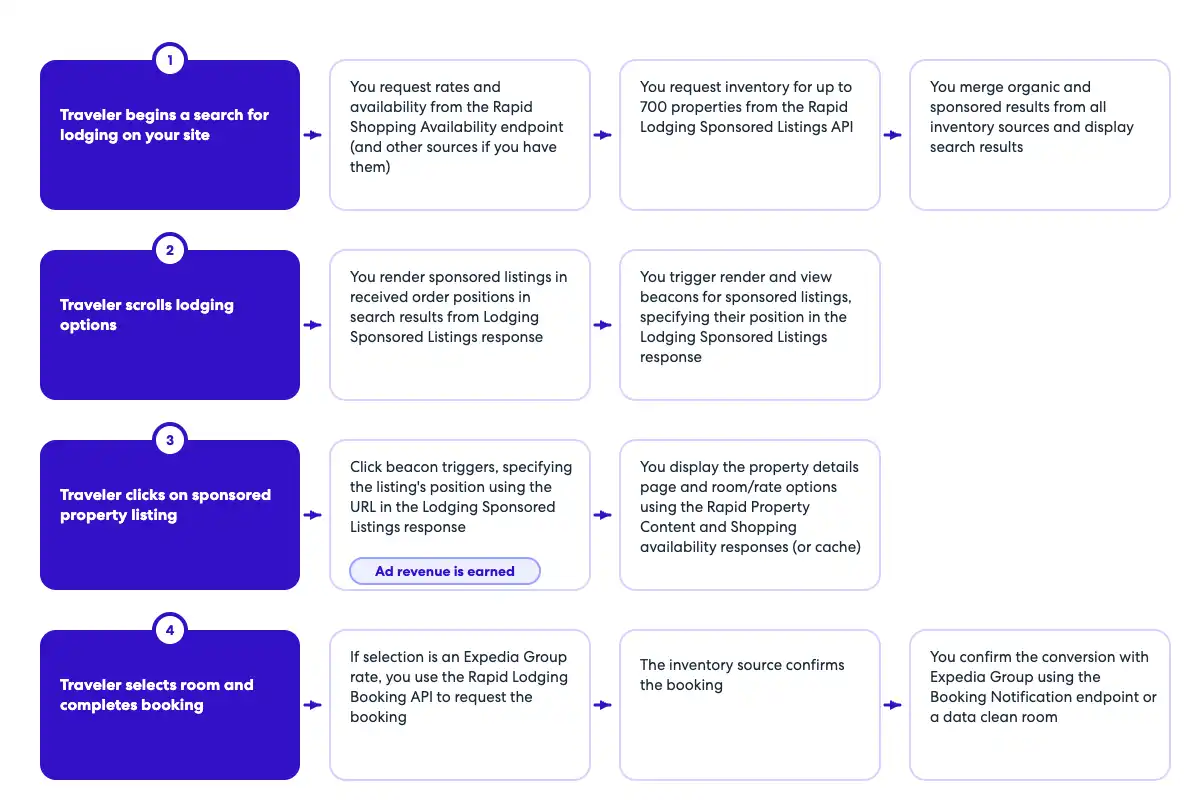
여행자가 귀하의 사이트에서 검색을 수행하면, 귀하는 두 건의 요청을 보내게 됩니다. 하나는 숙박 스폰서드 리스팅 API에 대한 요청으로 예약 가능 여부를 확인하기 위한 것이며, 다른 하나는 ‘ Expedia Group ’의 예약 가능 여부와 요금을 확인하기 위한 ‘Lodging Shopping Availability’ 엔드포인트에 대한 요청입니다. 여기서는 순서는 중요하지 않지만, 다음 단계로 넘어가기 전에 두 가지 모두를 호출해야 합니다.
‘숙박 스폰서 광고’ API는 스폰서 광고에 대한 경매를 진행합니다.
사용 가능한 광고 공간이 있는 경우, 응답에 스폰서 검색 결과가 포함됩니다. 이 응답에는 클릭, 조회 및 렌더링 비콘도 포함됩니다.
>> 추적에 대해 더 알아보기 4. 스폰서 게시물은 귀사의 사이트에 다음에서 반환된 순위 순서대로 표시됩니다. Expedia Group. 스폰서 목록과 함께 ‘ Expedia Group ’ 요금을 표시할지, 아니면 다른 출처의 요금을 표시할지는 귀하가 선택할 수 있습니다. 5. 렌더 비콘(사용하는 경우)은 브라우저가 페이지에 광고를 렌더링하는 즉시 트리거됩니다. 6. 스폰서 게시물이 뷰포트에 들어오면 뷰 비콘이 트리거됩니다. 7. 여행자가 검색 결과 페이지에 표시된 스폰서 광고를 클릭하면 클릭 비콘이 작동합니다. 8. 예약이 완료되고 확정된 후, 예약 알림 엔드포인트를 호출하십시오. 그 후 예약이 취소되는 경우 별도의 조치가 필요하지 않습니다.
시퀀스 흐름도
|
OpenAPI 예약 알림 정의
openapi: 3.0.1
info:
  title: Booking Notification API
  version: v1
  description: Booking Notification API to capture booking notification data. The endpoint should be called whenever an ad of the
    same property was viewed or clicked during the same session. For example, if the traveler saw an ad for a specific property,
    but clicked and booked the organic tile, the booking notification endpoint should still be called.
  contact:
    name: Media Solutions
    email: MediaSolutionsAPI1@expedia.com
tags:
  - name: Booking Notification
    description: API to post booking data
servers:
  - url: https://test.ean.com/v1
  - url: https://api.ean.com/v1
paths:
  /ads/booking-notification:
    post:
      tags:
        - Booking Notification
      description: Endpoint to capture booking notification data such as the booking date, the number of nights booked, the id of the property booked,
        the gross booked amount, and the currency of the gross booked amount.
      summary: Endpoint to capture booking data.
      operationId: booking-notification
      parameters:
        - name: Accept
          in: header
          description: Specifies the response format that the client would like to receive back. This must be application/json
          required: true
          schema:
            type: string
          example: 'application/json'
        - name: Accept-Encoding
          in: header
          description: Specifies the response encoding that the client would like to receive back. This must be gzip.
          required: true
          schema:
            type: string
          example: 'gzip'
        - name: User-Agent
          in: header
          description: The User-Agent header string from the customer's request, as captured by your integration.
          required: true
          schema:
            type: string
          example: 'Mozilla/5.0 (Linux; Android 13; SM-S901B) AppleWebKit/537.36 (KHTML, like Gecko) Chrome/112.0.0.0 Mobile Safari/537.36'
        - name: Content-Type
          in: header
          description: This parameter is to specify what format the request body is in. The only supported value is application/json.
          required: true
          schema:
            type: string
            example: application/json
        - name: Customer-Ip
          in: header
          description: IP address of the customer, as captured by your integration.
            Ensure your integration passes the customer's IP, not your own. This value helps
            determine their location for ad relevancy.
            Also used for fraud recovery and other important analytics.
          required: true
          schema:
            type: string
            format: ipv4
          example: 127.0.0.1
        - name: Customer-Session-Id
          in: header
          description: Insert your own unique value for each user session, beginning with the first API call. Continue to pass the
            same value for each subsequent API call during the user's session, using a new value for every new customer
            session. This should match the initial request and all subsequent requests to retrieve ads for the user's session.
          required: false
          schema:
            type: string
          example: '7f9a24ea-2145-4819-a7b7-2a4cbe1165ab'
        - name: Customer-Id
          in: header
          description: An obfuscated unique identifier for each customer. This should not contain any personal information such as email, first or last name.
          required: true
          schema:
            type: string
          example: '7f9a24ea-2145-4819-a7b7-2a4cbe1165ab'
        - name: billing_terms
          in: query
          description: This parameter is to specify the terms of how a resulting booking should be billed. If this field is
            needed, the value for this will be provided to you separately.
          schema:
            type: string
        - name: partner_point_of_sale
          in: query
          description: This parameter is to specify what point of sale is being used to shop and book. If this field is needed,
            the value for this will be provided to you separately.
          schema:
            type: string
        - name: payment_terms
          in: query
          description: This parameter is to specify what terms should be used when being paid for a resulting booking. If this
            field is needed, the value for this will be provided to you separately.
          schema:
            type: string
        - name: platform_name
          in: query
          description: This parameter is to specify what platform is being used to shop and book. If this field is needed, the
            value for this will be provided to you separately.
          schema:
            type: string
      requestBody:
        content:
          application/json:
            schema:
              $ref: '#/components/schemas/BookingRequest'
      responses:
        '204':
          description: No content - Successfully received the booking data.
          content: {}
        '400':
          description: Bad Request
          content:
            application/json:
              schema:
                $ref: '#/components/schemas/Error'
              example:
                type: 'invalid_input'
                message: 'An invalid request was sent in, please check the nested errors for details.'
                errors:
                  - type: 'item_id.required'
                    message: 'The item_id is required'
                    fields:
                      - name: 'item_id'
                        type: 'query'
        '401':
          description: Unauthorized
          content:
            application/json:
              schema:
                $ref: '#/components/schemas/Error'
              example:
                type: 'request_unauthenticated'
                message: 'Data required to authenticate your request is missing or inaccurate.
                  Ensure that your request follows the guidelines in our documentation.'
                fields:
                  - name: 'apikey'
                    type: 'header'
                    value: 'jaj3982k239dka328e'
                  - name: 'signature'
                    type: 'header'
                    value: '129d75332614a5bdbe0c7eb540e95a65f9d85a5b53dabb38d19b37fad6312a2bd25c12ee5a82831d55112087e1b'
                  - name: 'timestamp'
                    type: 'header'
                    value: '198284729'
                  - name: 'servertimestamp'
                    type: 'server'
                    value: '198284729'
        '403':
          description: Forbidden
          content:
            application/json:
              schema:
                $ref: '#/components/schemas/Error'
              example:
                type: 'request_unauthorized'
                message: 'Your request could not be authorized.'
        '426':
          description: Upgrade Required
          content:
            application/json:
              schema:
                $ref: '#/components/schemas/Error'
              example:
                type: 'upgrade_required'
                message: 'This service requires the use of TLS.'
        '429':
          description: Too Many Requests
          content:
            application/json:
              schema:
                $ref: '#/components/schemas/Error'
              example:
                type: 'too_many_requests'
                message: 'You have reached your capacity for this type of request.'
        '500':
          description: Unknown Internal Error
          content:
            application/json:
              schema:
                $ref: '#/components/schemas/Error'
              example:
                type: 'unknown_internal_error'
                message: 'An internal server error has occurred.'
        '503':
          description: Service Unavailable
          content:
            application/json:
              schema:
                $ref: '#/components/schemas/Error'
              example:
                type: 'service_unavailable'
                message: 'This service is currently unavailable.'
components:
  schemas:
    BookingRequest:
      type: object
      required:
        - total
        - property_id
        - number_of_nights
        - creation_date_time
      properties:
        property_id:
          description: The property id that was booked.
          type: string
          example: 24323423
        number_of_nights:
          description: The total number of room nights booked. If multiple rooms were booked, this is rooms multiplied by nights.
          type: integer
          format: int32
          minimum: 1
          maximum: 20
          example: 10
        total:
          $ref: '#/components/schemas/Total'
        creation_date_time:
          description: The date and time of the booking in UTC.
          type: string
          format: date-time
          example: 2024-12-25T12:30:00Z
    Total:
      type: object
      required:
        - value
        - currency
      properties:
        value:
          description: The value.
          type: number
          format: float
          example: 34343.56
        currency:
          description: The currency of the value.
          type: string
          minLength: 3
          maxLength: 3
          example: USD
    Error:
      type: object
      properties:
        type:
          type: string
          description: The error type.
        message:
          type: string
          description: A human readable message giving details about this error.
        fields:
          type: array
          description: Details about the specific fields that had an error.
          items:
            $ref: '#/components/schemas/Field'
        errors:
          type: array
          description: An array of all the actual errors that occurred.
          items:
            $ref: '#/components/schemas/ErrorIndividual'
      description: The overall class of error that occurred.
    Field:
      type: object
      properties:
        name:
          type: string
          description: The field that had an error.
        type:
          type: string
          description: The type of the field that had an error.
        value:
          type: string
          description: The value of the field that had an error.
      description: An individual field that had an error.
    ErrorIndividual:
      type: object
      properties:
        type:
          type: string
          description: The error type.
        message:
          type: string
          description: A human readable message giving details about this error.
        fields:
          type: array
          description: Details about the specific fields that had an error.
          items:
            $ref: '#/components/schemas/Field'
      description: An individual error.