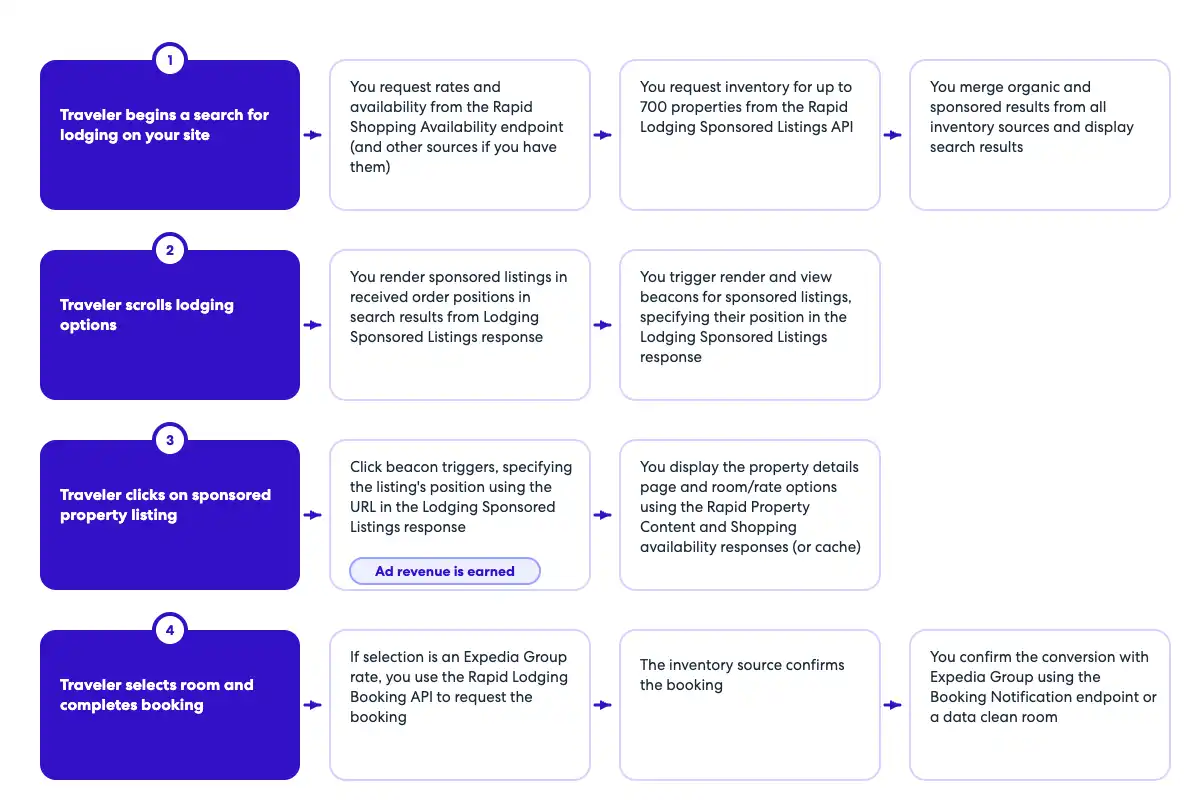
openapi: 3.0.1
info:
  title: Booking Notification API
  version: v1
  description: Booking Notification API to capture booking notification data. The endpoint should be called whenever an ad of the
    same property was viewed or clicked during the same session. For example, if the traveler saw an ad for a specific property,
    but clicked and booked the organic tile, the booking notification endpoint should still be called.
  contact:
    name: Media Solutions
    email: MediaSolutionsAPI1@expedia.com
tags:
  - name: Booking Notification
    description: API to post booking data
servers:
  - url: https://test.ean.com/v1
  - url: https://api.ean.com/v1
paths:
  /ads/booking-notification:
    post:
      tags:
        - Booking Notification
      description: Endpoint to capture booking notification data such as the booking date, the number of nights booked, the id of the property booked,
        the gross booked amount, and the currency of the gross booked amount.
      summary: Endpoint to capture booking data.
      operationId: booking-notification
      parameters:
        - name: Accept
          in: header
          description: Specifies the response format that the client would like to receive back. This must be application/json
          required: true
          schema:
            type: string
          example: 'application/json'
        - name: Accept-Encoding
          in: header
          description: Specifies the response encoding that the client would like to receive back. This must be gzip.
          required: true
          schema:
            type: string
          example: 'gzip'
        - name: User-Agent
          in: header
          description: The User-Agent header string from the customer's request, as captured by your integration.
          required: true
          schema:
            type: string
          example: 'Mozilla/5.0 (Linux; Android 13; SM-S901B) AppleWebKit/537.36 (KHTML, like Gecko) Chrome/112.0.0.0 Mobile Safari/537.36'
        - name: Content-Type
          in: header
          description: This parameter is to specify what format the request body is in. The only supported value is application/json.
          required: true
          schema:
            type: string
            example: application/json
        - name: Customer-Ip
          in: header
          description: IP address of the customer, as captured by your integration.
            Ensure your integration passes the customer's IP, not your own. This value helps
            determine their location for ad relevancy.
            Also used for fraud recovery and other important analytics.
          required: true
          schema:
            type: string
            format: ipv4
          example: 127.0.0.1
        - name: Customer-Session-Id
          in: header
          description: Insert your own unique value for each user session, beginning with the first API call. Continue to pass the
            same value for each subsequent API call during the user's session, using a new value for every new customer
            session. This should match the initial request and all subsequent requests to retrieve ads for the user's session.
          required: false
          schema:
            type: string
          example: '7f9a24ea-2145-4819-a7b7-2a4cbe1165ab'
        - name: Customer-Id
          in: header
          description: An obfuscated unique identifier for each customer. This should not contain any personal information such as email, first or last name.
          required: true
          schema:
            type: string
          example: '7f9a24ea-2145-4819-a7b7-2a4cbe1165ab'
        - name: billing_terms
          in: query
          description: This parameter is to specify the terms of how a resulting booking should be billed. If this field is
            needed, the value for this will be provided to you separately.
          schema:
            type: string
        - name: partner_point_of_sale
          in: query
          description: This parameter is to specify what point of sale is being used to shop and book. If this field is needed,
            the value for this will be provided to you separately.
          schema:
            type: string
        - name: payment_terms
          in: query
          description: This parameter is to specify what terms should be used when being paid for a resulting booking. If this
            field is needed, the value for this will be provided to you separately.
          schema:
            type: string
        - name: platform_name
          in: query
          description: This parameter is to specify what platform is being used to shop and book. If this field is needed, the
            value for this will be provided to you separately.
          schema:
            type: string
      requestBody:
        content:
          application/json:
            schema:
              $ref: '#/components/schemas/BookingRequest'
      responses:
        '204':
          description: No content - Successfully received the booking data.
          content: {}
        '400':
          description: Bad Request
          content:
            application/json:
              schema:
                $ref: '#/components/schemas/Error'
              example:
                type: 'invalid_input'
                message: 'An invalid request was sent in, please check the nested errors for details.'
                errors:
                  - type: 'item_id.required'
                    message: 'The item_id is required'
                    fields:
                      - name: 'item_id'
                        type: 'query'
        '401':
          description: Unauthorized
          content:
            application/json:
              schema:
                $ref: '#/components/schemas/Error'
              example:
                type: 'request_unauthenticated'
                message: 'Data required to authenticate your request is missing or inaccurate.
                  Ensure that your request follows the guidelines in our documentation.'
                fields:
                  - name: 'apikey'
                    type: 'header'
                    value: 'jaj3982k239dka328e'
                  - name: 'signature'
                    type: 'header'
                    value: '129d75332614a5bdbe0c7eb540e95a65f9d85a5b53dabb38d19b37fad6312a2bd25c12ee5a82831d55112087e1b'
                  - name: 'timestamp'
                    type: 'header'
                    value: '198284729'
                  - name: 'servertimestamp'
                    type: 'server'
                    value: '198284729'
        '403':
          description: Forbidden
          content:
            application/json:
              schema:
                $ref: '#/components/schemas/Error'
              example:
                type: 'request_unauthorized'
                message: 'Your request could not be authorized.'
        '426':
          description: Upgrade Required
          content:
            application/json:
              schema:
                $ref: '#/components/schemas/Error'
              example:
                type: 'upgrade_required'
                message: 'This service requires the use of TLS.'
        '429':
          description: Too Many Requests
          content:
            application/json:
              schema:
                $ref: '#/components/schemas/Error'
              example:
                type: 'too_many_requests'
                message: 'You have reached your capacity for this type of request.'
        '500':
          description: Unknown Internal Error
          content:
            application/json:
              schema:
                $ref: '#/components/schemas/Error'
              example:
                type: 'unknown_internal_error'
                message: 'An internal server error has occurred.'
        '503':
          description: Service Unavailable
          content:
            application/json:
              schema:
                $ref: '#/components/schemas/Error'
              example:
                type: 'service_unavailable'
                message: 'This service is currently unavailable.'
components:
  schemas:
    BookingRequest:
      type: object
      required:
        - total
        - property_id
        - number_of_nights
        - creation_date_time
      properties:
        property_id:
          description: The property id that was booked.
          type: string
          example: 24323423
        number_of_nights:
          description: The total number of room nights booked. If multiple rooms were booked, this is rooms multiplied by nights.
          type: integer
          format: int32
          minimum: 1
          maximum: 20
          example: 10
        total:
          $ref: '#/components/schemas/Total'
        creation_date_time:
          description: The date and time of the booking in UTC.
          type: string
          format: date-time
          example: 2024-12-25T12:30:00Z
    Total:
      type: object
      required:
        - value
        - currency
      properties:
        value:
          description: The value.
          type: number
          format: float
          example: 34343.56
        currency:
          description: The currency of the value.
          type: string
          minLength: 3
          maxLength: 3
          example: USD
    Error:
      type: object
      properties:
        type:
          type: string
          description: The error type.
        message:
          type: string
          description: A human readable message giving details about this error.
        fields:
          type: array
          description: Details about the specific fields that had an error.
          items:
            $ref: '#/components/schemas/Field'
        errors:
          type: array
          description: An array of all the actual errors that occurred.
          items:
            $ref: '#/components/schemas/ErrorIndividual'
      description: The overall class of error that occurred.
    Field:
      type: object
      properties:
        name:
          type: string
          description: The field that had an error.
        type:
          type: string
          description: The type of the field that had an error.
        value:
          type: string
          description: The value of the field that had an error.
      description: An individual field that had an error.
    ErrorIndividual:
      type: object
      properties:
        type:
          type: string
          description: The error type.
        message:
          type: string
          description: A human readable message giving details about this error.
        fields:
          type: array
          description: Details about the specific fields that had an error.
          items:
            $ref: '#/components/schemas/Field'
      description: An individual error.