
SCA 实施
使用 Rapid API 生成 SCA-compliant 预订
无论您是使用 Rapid API 作为记录商户,还是允许旅客到达时付款,您都可以采用 Rapid 的 API 解决方案来生成符合 SCA 法规的预订。我们的 API 通过在预订流程中使用 3D-Secure (3DS) 2.0 来支持 SCA 合规性。3DS 2.0 支持 risk-based 身份验证,通过赋予银行何时要求旅客进行安全身份验证的自主权,减少了旅客的摩擦。
3DS 2.0 的解决方案包含三个不同的步骤:
您将向 check-out 页面添加一个 iframe,该页面用于托管发卡银行为旅行者提供的身份验证体验。在集成文档中,这被称为 3DS iframe。
>>了解更多关于 iframe 的信息您还将在 check-out 页面上添加一个新的 client-side JavaScript 库,该库用于收集浏览器数据、与 iframe 通信以及在 iframe 中显示 SCA 体验。在集成文档中,这被称为 3DS 连接器库。
Rapid API 将接受银行的付款人信息,并在安全认证完成后完成预订。
当同时使用 JavaScript 和 Rapid API 时,使用 SCA 的预订流程现在将在调用 Booking API 之前和之后增加一些步骤。下图描绘了这个更新后的预订流程。
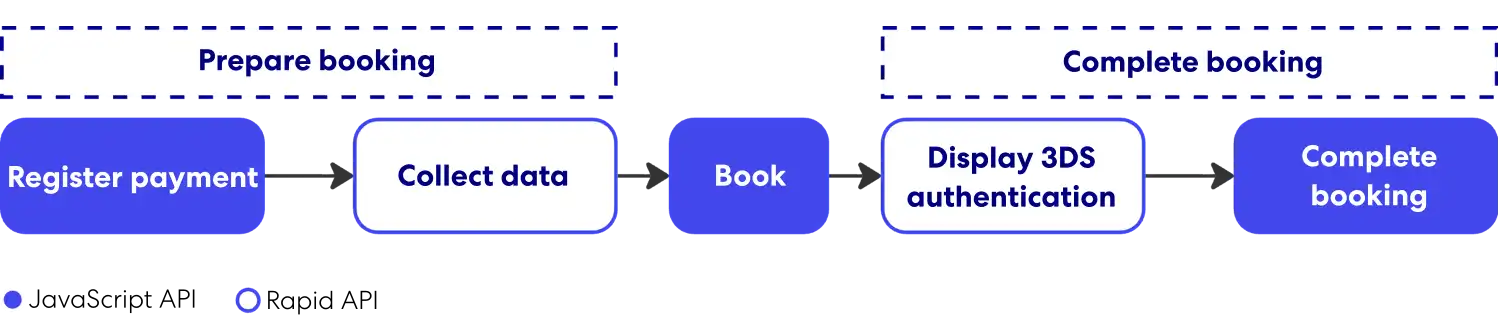
在修订后预订流程的每个步骤中,一个步骤的输出中包含着用作下一步输入的数据。数据将需要在浏览器上的 JavaScript 和 Rapid 之间传递。
集成组件详细信息
SCA 的实现始于浏览器 check-out 体验,然后进入 Rapid API 流程。
浏览器
放置在 check-out 体验中的 iframe 承载着向用户显示的身份验证体验,并将任何 traveler-supplied 信息直接传输到他们的银行;内容由旅行者的 card-issuing 银行拥有的 URL 提供。Iframe 最初应该隐藏,但在预订尝试后需要进行身份验证时,可以将其覆盖在页面上方。
JavaScript 库
该库已添加到 check-out 页面,并在预订时调用以支持身份验证过程。该库的 API 支持以下描述的功能。
旅行者设备信息
在尝试预订之前,必须收集有关旅行者设备的信息,以便准备预订进行身份验证。该信息将发送给旅行者的银行,以评估风险,决定交易是否需要 3DS 2.0 认证,并确保其正确显示。根据 3DS 2.0 规范,将从旅行者的浏览器收集以下数据:语言、颜色深度、屏幕高度、屏幕宽度、时区、用户代理以及是否启用 Java。
身份验证显示
预订尝试完成后,该库用于显示 iframe 叠加层并将银行的内容加载到其中。在身份验证过程中,银行可能会收集有关旅行者设备的其他信息,以支持其风险评估。此流程是完成预订的必要步骤。
Rapid API
Rapid API 包含与 client-side JavaScript 库协同工作的 API。这些 API 现在支持下述功能。
旅客和付款详情
在尝试预订之前,Rapid API 需要收集有关旅行者的其他信息,以便进行身份验证,包括有关旅行者的信息,例如销售点和付款方式。之后,这些数据将被发送到旅行者的银行,以评估风险并决定交易是否需要安全认证。了解更多信息,请查看快速预订 API 中的注册支付 API。
付款和预订确认
预订尝试完成后,当浏览器中的 SCA 流程完成后,必须再次调用 Rapid API。后台,我们会确认身份验证是否成功,以便确认预订。请查看 Rapid Booking API 中的“完成付款”部分,了解更多信息。
预订流程
下面图示为旅客发起预订后所需的 API 调用顺序。该序列涉及对 JavaScript 库和 Rapid API 的调用。
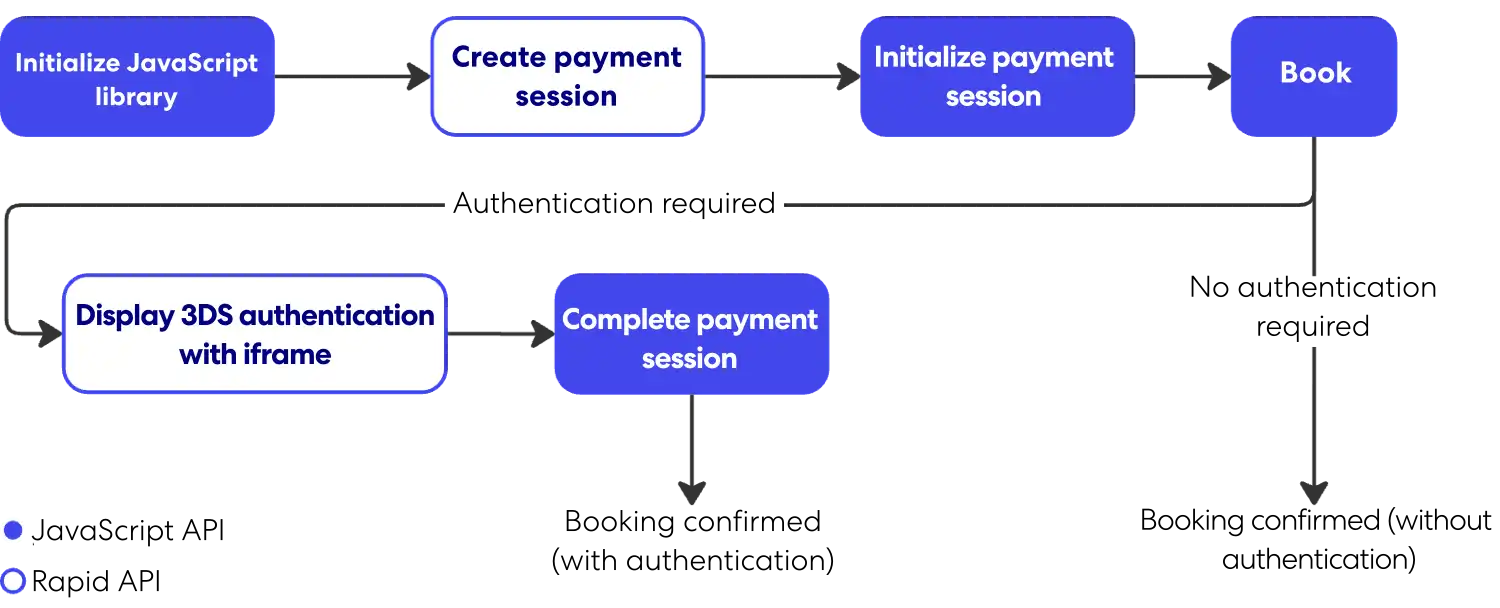
准备进行身份验证的预订信息可能并非总是需要验证的。是否需要进行身份验证由用于支付的信用卡的发卡银行决定。该判断是在交易过程中进行的,并在创建预订 API 响应中指示。
Rapid Lodging API 还提供暂停和恢复功能。以下是该功能所需的 API 调用顺序。
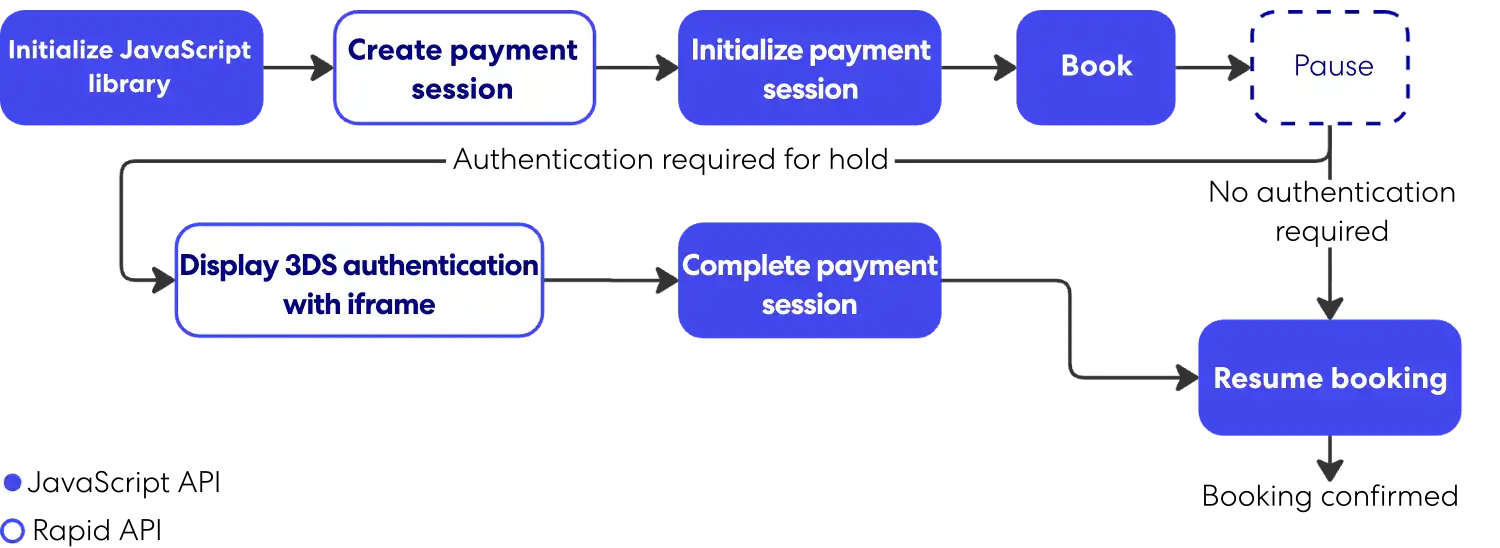
有关 3DS 2.0 体验的技术要求的更多信息,请查看 EMVCo 的 3D 安全协议和核心功能规范。
3DS 2.0 集成指南
支持 SCA 将需要将 Rapid API 与新的 JavaScript 库(称为 3DS 连接器)集成。两者结合使用,可在 check-out 页面上显示 3DS 2.0 并确认预订。该解决方案同时支持 Expedia 先收后付的商业模式。
注意: 3DS 2.0 必须由 Rapid Partner Support 为各个合作伙伴配置文件启用,才能允许修改后的预订流程。
步骤 1:调用可用性 API
API 请求中的 sales_channel 字段的值必须准确,才能在法规允许的情况下获得身份验证豁免。该数值以及许多其他因素,都会由发卡银行在预订时进行审核并做出决定。只有代理工具可以免于 SCA 的约束。要指明这一点,请将 sales_channel 的值设置为 agent_tool。
JavaScript 库是预订流程中其余步骤的先决条件。您将使用 JavaScript API 初始化支付会话,然后通过 Rapid API 进行预订。
步骤 2:调用价格检查或详细信息 API
对于住宿 API,SCA 的价格检查 API 响应将包含指向注册付款 API 的链接。
住宿 API 的 3DS 2.0 响应示例
{
    "status": "matched",
    "occupancies": {
        //...(example omitted for length)
    },
    "links": {
        "payment_session": {
            "method": "POST",
            "href": "/v3/payment-sessions?token=QldfCGlcUAVgBDRwdWXBBL"
        }
    }
}
汽车和活动 API 的 SCA 流的详细信息端点响应与其 non-SCA 流的响应相同。
步骤 3:调用注册支付 API
对于住宿 API,您需要专门进行此调用。汽车和活动 API 将此调用集成到详细信息或创建预订 API 中。该请求将包含 non-SCA 预订流程中的付款详情以及支持成功身份验证的新字段。其中两个字段,encoded_browser_metadata和version,是从 JavaScript API 的 setup 方法返回的。
响应将包含 payment_session_id 和 encoded_init_config。这些被指定为 JavaScript 库 initSession 方法的输入。响应中包含的 Booking 链接应在 initSession 方法之后使用。
住宿 API 请求示例
{
    "version": "1",
    "browser_accept_header": "*/*",
    "encoded_browser_metadata": "ZW5jb2RlZF9icm93c2VyX21ldGFkYXRh",
    "preferred_challenge_window_size": "medium",
    "merchant_url": "https://server.adomainname.net",
    "customer_account_details": {
        "authentication_method": "guest",
        "authentication_timestamp": "2027-02-12T11:59:00.000Z",
        "create_date": "2027-09-15",
        "change_date": "2027-09-17",
        "password_change_date": "2027-09-17",
        "add_card_attempts": 1,
        "account_purchases": 1
    },
    "payments": [
        {
            "type": "customer_card",
            "card_type": "VI",
            "number": "4111111111111111",
            "security_code": "123",
            "expiration_month": "08",
            "expiration_year": "2027",
            "billing_contact": {
                "given_name": "John",
                "family_name": "Smith",
                "email": "smith@example.com",
                "phone": "4875550077",
                "address": {
                    "line_1": "555 1st St",
                    "line_2": "10th Floor",
                    "line_3": "Unit 12",
                    "city": "Seattle",
                    "state_province_code": "WA",
                    "postal_code": "98121",
                    "country_code": "US"
                }
            },
            "enrollment_date": "2027-09-15"
        }
    ]
}
示例住宿 API 响应
{
    "payment_session_id": "76d6aaea-c1d5-11e8-a355-529269fb1459",
    "encoded_init_config": "QSBiYXNlNjQgZW5jb2RlZCBvYmplY3Qgd2hpY2ggY29udGFpbnMgY29uZmlndXJhdGlvbiBuZWVkZWQgdG8gcGVyZm9ybSBkZXZpY2UgZmluZ2VycHJpbnRpbmcgYW5kL29yIDNEUyBNZXRob2Qu",
    "links": {
        "book": {
            "method": "POST",
            "href": "/v3/itineraries?token=MY5S3j36cOcLfLBZjPYQ1abhfc8CqmjmFVzkk7euvWaunE57LLeDgaxm516m"
        }
    }
}
示例汽车或活动 API 请求
{
  "type": "customer_card",
  "number": "4111111111111111",
  "security_code": "123",
  "expiration_month": "08",
  "expiration_year": "2028",
  "billing_contact": {
    "given_name": "John",
    "family_name": "Smith",
    "email": "smith@example.com",
    "phone": {
      "country_code": "1",
      "area_code": "487",
      "number": "5550077"
    },
    "address": {
      "line_1": "555 1st St",
      "city": "Seattle",
      "state_province_code": "WA",
      "postal_code": "98121",
      "country_code": "US"
    }
  },
  "strong_customer_authentication": {
    "rapid": {
      "version": "2.0.1",
      "browser_accept_header": "*/*",
      "encoded_browser_metadata": "ZW5jb2RlZF9icm93c2VyX21ldGFkYXRh",
      "preferred_challenge_window_size": "medium",
      "merchant_url": "https://server.adomainname.net",
      "enrollment_date": "2024-05-08",
      "customer_account_details": {
        "authentication_method": "guest",
        "authentication_timestamp": "2026-02-12T11:59:00.000Z",
        "create_date": "2025-09-15",
        "change_date": "2025-09-17",
        "password_change_date": "2025-09-17",
        "add_card_attempts": 1,
        "account_purchases": 1
      }
    }
  }
}
示例汽车或活动 API 响应
{
  "payment_token": "K~IjM455rG_zUnz9LlKCw8bbLfxqk2Kb...",
  "expires": "2026-01-30T16:32:10.557287774Z",
  "payment_session_id": "ern:pay:pa:sec::5bcca93d-cdae-00b7-2cd4-d72d84cb2665",
  "encoded_init_config": "W3sicHJvdmlkZXJJZCI6IjEiLCJwYXlt..."
}
步骤 4:调用创建预订 API
此请求不会包含任何 SCA 的新字段——所有必要信息都包含在预订链接的令牌中。对于住宿 API,该信息可在注册付款 API 响应中找到;对于汽车或活动 API,该信息可在详细信息端点中找到。如果成功,响应将始终包含 itinerary_id。然而,仅凭这一点并不能表明预订已确认,因为可能需要 3DS 2.0 认证。
如果需要,回复中还会包含一个encoded_challenge_config。从注册支付 API 返回的 encoded_challenge_config 和 payment_session_id 需要作为参数传递给 JavaScript 挑战方法。
回复中还将包含一个新链接,用于 complete_payment_session(住宿或活动)或 resume_after_payment_challenge(租车)。此链接应在 JavaScript 库的挑战方法之后使用。
如果不需要 3DS 2.0 身份验证,则预订将被确认,响应将包含 retrieve、cancel 和(住宿 API 请求)的链接resume。
示例住宿 API 响应
{
    "itinerary_id": "8999989898988",
    "links": {
        "complete_payment_session": {
            "method": "PUT",
            "href": "/v3/itineraries/8999989898988/payment-sessions?token=MY5S3j36cOcLfLBZjPYQ1abhfc8CqmjmFVzkk7euvWaunE57LLeDgaxm516m"
        }
    },
    "encoded_challenge_config": "ABElifsiejfacies2@033asfe="
}
示例活动 API 请求
{
   "email": "traveler@example.com",
   "payment_token": "K~xxxxxxxxxxxxxxxxxxxx",
   "affiliate_reference_id": "AFF-REF-12345",
   "primary_traveler": {
     "name": {
       "given_name": "Jane",
       "family_name": "Doe"
     },
     "phone": {
       "country_code": "1",
       "number": "5551234567"
     },
     "ticket_id": "182552"
   }
 }
示例活动 API 响应包含挑战
{
   "itinerary_id": "9045006342737",
   "encoded_challenge_config": "<opaque challenge config from issuing bank>",
   "links": {
     "complete_payment_session": {
       "method": "PUT",
       "href": "/v2/itineraries/9045006342737/activity/payment-sessions?token=<token>"
     }
   }
 }
第五步:完成预订
预订流程的这一部分发生在 JavaScript 挑战方法之后。要完成付款并通知 Rapid API 已尝试进行安全身份验证(成功或失败),需要完整的付款会话 API(住宿和活动)或付款挑战后恢复 API(汽车)的响应。
该请求不会包含任何新的 SCA 字段。
如果成功,响应将包含预订的确认信息,包括 itinerary_id 和 retrieve、cancel 的链接,以及(用于住宿 API 请求)resume。
示例住宿 API 响应
{
    "itinerary_id": "8999989898988",
    "links": {
        "retrieve": {
            "method": "GET",
            "href": "/v3/itineraries/8999989898988?token=MY5S3j36cOcLfLBZjPYQ1abhfc8CqmjmFVzkk7euvWaunE57LLeDgaxm516m"
        }
    }
}
示例活动 API 响应
{
   "itinerary_id": "9045006342737",
   "links": {
     "retrieve": {
       "method": "GET",
       "href": "/v2/itineraries/9045006342737/activity"
     }
   }
 }
Iframe 和 JavaScript 库实现
使用 SCA 预订工作流程时,check-out 页面必须包含一个新的 iframe 和 JavaScript 库。该 iframe(称为 3DS iframe)将使用 3D-Secure 2.0 显示身份验证体验。JavaScript 库(称为 3DS 连接器库)将支持向发卡银行传输信息,并将银行的内容加载到 iframe 中。
添加 iframe
应将 3DS 内嵌框架包装在一个容器中,最初为隐藏状态,但在需要身份验证挑战以处理付款时可以显示。
容器的设计可以自定义,以适应托管页面需求。以下例子展示了一个使用 bootstrap 模式窗口的实施示例,仅作参考。
<div id="threeDsIframeModal" class="modal" role="dialog">
    <div class="modal-dialog" role="document">
        <div class="modal-content">
            <div class="modal-body iframe-container">
                <div class="embed-responsive embed-responsive-16by9">
                    <iframe id="threeDsIframe" src="<<3DS iframe URL>>"> </iframe>
                </div>
            </div>
        </div>
    </div>
</div>
内嵌框架的源必须设置为以下两个值之一:
| URL 类型 | URL | 备注 |
|---|---|---|
| 生产 | https://static.pay.expedia.com/3ds/threeDsIframe.html | 支持生产环境身份验证 |
| 测试沙盒 | https://static.pay.expedia.com/3ds/sandboxThreeDsIframe.html | 支持身份验证测试 |
测试网址支持测试。您可以使用以下命令在测试期间将 iframe 的内容限制在沙箱中:
sandbox = 'allow-scripts allow-forms allow-same-origin';添加 JavaScript 库
3DS 连接器库与 3DS 内嵌框架通信并将数据发送到提供内嵌框架内容的发卡银行。下面的例子展示了如何将库添加到付款页面的示例。
<head>
    <script src="<<3DS connector script URL>>" integrity="<<actual integrity value>>"></script>
</head>
脚本元素的源值和完整性值应设置为以下值。
| 库版本 | 属性 | 值 |
|---|---|---|
| 1.3.39 | src | https://static.pay.expedia.com/3ds/1.3.39/pay-3ds-js-libs-connector.min.js |
| integrity | sha384-par0I4Q5cfljwzqw2mAggM4dKdYzGyj4uZiL4cMviGjI3qVzEgWGuZ2075mYutbT | |
| 1.3.65 | src | https://static.pay.expedia.com/3ds/1.3.65/pay-3ds-js-libs-connector.min.js |
| integrity | sha384-gYopPw6xE5DZwnZXGavkwnvs3NkDOobnHqjroUnSHpGXvs/J9xjHX/8aGzKtSgWI | |
| 2.0.1 | src | https://static.pay.expedia.com/3ds/2.0.1/pay-3ds-js-libs-connector.min.js |
| integrity | sha384-1ntftSOl8ZSqJ/m7qqxXTNGOx3JLbF7Uw5YX8i/ageTjgmTnUMZ3ROpxxMiUkYma |
**注意:**随着未来版本的发布,源 URL 和完整性值将会改变。较新的版本应该不会破坏现有的集成。较旧版本的脚本仍然可以访问。
使用 3DS 和 JavaScript 进行 SCA
3DS 连接器库需要使用 JavaScript promises。下面的示例演示了 JavaScript 方法和 Rapid 之间如何交换数据。此示例仅供参考。
// Initialize the library
let connector = new PayThreeDSConnector.ThreeDSConnector("threedsiframe", "https://static.pay.expedia.com");
RapidIntegration.priceCheck(priceCheckLink)
  .then(priceCheckResponse => {
    paymentSessionLink = priceCheckResponse.links.payment_session.href;
    // Setup an authentication session with the library
    return connector.setup({ referenceId: '1000' })
  }).then(setupResponse => {
    console.log("Setup Response: ", setupResponse);

    // Send information from setup to Rapid's Register Payments API
    return RapidIntegration.registerPayment(paymentSessionLink,
           setupResponse);
  }).then(paymentSessionResponse => {
    console.log("Register Payments Response: ", paymentSessionResponse);
    paymentSessionId = paymentSessionResponse.paymentSessionId;
    bookLink = paymentSessionResponse.links.book.href;
    if (paymentSessionResponse.encoded_init_config) {
      // If the payment session response contains an encoded_init_config
      // field, initialize an authentication session with the library
      // using information returned from Rapid's Register Payments API
      connector.initSession({
        paymentSessionId: paymentSessionId,
        encodedInitConfig: paymentSessionResponse.encodedInitConfig
      }).then(initSessionResponse => {
        console.log("Init Session Response: ", initSessionResponse);
        // Then create a booking with Rapid's Book API
        return RapidIntegration.createBooking(bookLink,
               paymentSessionId);
      })
    } else {
      // Otherwise, create a booking with Rapid's Book API directly
      return RapidIntegration.createBooking(bookLink, paymentSessionId);
    }
  }).then(createBookingResponse => {
    console.log("Create Booking Response: ", createBookingResponse);
    itineraryId = createBookingResponse.itinerary_id;
    if (createBookingResponse.encoded_challenge_config) {
      // If the Create Booking API contains an encoded_challenge_config field,
      // display the authentication challenge window
      $('#threeDsIframeModal').modal('show');
      completePaymentSessionLink = createBookingResponse.links.complete_payment_session.href;
      // Perform the challenge using the information returned from Rapid's Register Payments API
      // and Create Booking API
      connector.challenge({
        paymentSessionId: paymentSessionId,
        encodedChallengeConfig: createBookingResponse.encodedChallengeConfig
      }).then(challengeResponse => {
        console.log("Challenge Response: ", challengeResponse);
        // Complete a booking with Rapid's Complete Payment Session API
        return RapidIntegration.completePaymentSession(completePaymentSessionLink, itineraryId);
      }).then(completePaymentSessionResponse => {
        console.log("Complete Payment Session Response: ", completePaymentSessionResponse);
        return completePaymentSessionResponse;
      }).finally(() => {
        // Close the authentication challenge window
        $('#threeDsIframeModal').modal('hide');
      });
    } else {
      return createBookingResponse;
    }
  }).then(bookingResponse => {
    ...
  });
**注意:对 ** 类的引用不属于 3DS 连接器库。RapidIntegration 旨在演示支持将信息传输到 API 的包装器。该示例还使用了静态值来表示应该在运行时确定的参数,例如referenceId。
Check-out 页面设计指南
支持 3DS 认证的卡片品牌可能会要求按照其指南展示其标志和品牌标识。
**注:**其他卡品牌的标志和指南将在可用时添加。