
SCA implementation
Generate SCA-compliant bookings with Rapid API
Whether you use Rapid API as the merchant of record or allow travelers to pay when they arrive, you can adopt Rapid's API solution to generate bookings that are compliant with SCA regulations. Our APIs support SCA compliance by using 3D-Secure (3DS) 2.0 in the booking flow. With 3DS 2.0 we support risk-based authentication, which reduces friction with travelers by granting the banks discretion about when to challenge travelers to securely authenticate.
The solution for 3DS 2.0 is comprised of three distinct steps:
You'll add an iframe to the check-out page that's used to host an issuing bank's authentication experience for the traveler. In the integration documentation this is referred to as the 3DS iframe.
>> Learn more about iframesYou'll also include a new client-side JavaScript library on the check-out page that's used to collect browser data, communicate with the iframe, and display the SCA experience within the iframe. In the integration documentation this is referred to as the 3DS Connector Library.
Rapid API will accept the payer information for the bank and complete the booking after secure authentication is complete.
When using JavaScript and Rapid API together, the booking flow with SCA will now include a few additional steps before and after the Booking API is called. Below is a diagram that depicts this updated booking flow.
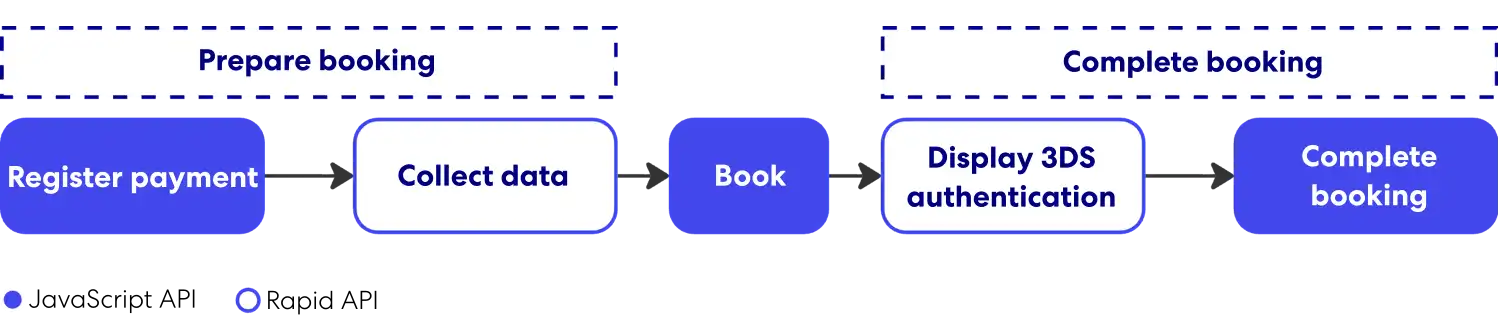
During each step of the revised booking flow, the output of one step contains data that is used as input into the next step. Data will need to be passed between the JavaScript on the browser and Rapid.
Integration component details
SCA implementation starts in the browser check-out experience and is then fed into the Rapid API flow.
Browser
The iframe, placed in the check-out experience, hosts the authentication experience that is displayed to the user and transfers any traveler-supplied information directly to their bank; the content is served from a URL owned by the traveler’s card-issuing bank. The iframe should be hidden initially, with the ability to overlay it on top of the page when an authentication challenge is required after a booking attempt.
JavaScript library
This library is added to the check-out page and is invoked at the time of booking to support the authentication process. The library's APIs support the capabilities described below.
Traveler device information
Before a booking attempt, information about the traveler’s device must be collected to prepare a booking for authentication. That information is sent to the traveler’s bank to assess risk, decide whether 3DS 2.0 authentication is required for the transaction, and ensure that it’s displayed correctly. In accordance with the 3DS 2.0 specifications, the following data will be collected from the traveler’s browser: language, color depth, screen height, screen width, time zone, user agent, and whether Java is enabled.
Authentication display
After a booking attempt, the library is used to display the iframe overlay and load the bank’s content into it. During the authentication process, the bank’s content may collect additional information about the traveler’s device to support their risk assessment. This process is necessary to complete a booking.
Rapid API
Rapid API includes APIs that work in conjunction with the client-side JavaScript library. The APIs now support the capabilities described below.
Traveler and payment details
Before a booking attempt, Rapid API will need to collect additional information about the traveler to prepare for authentication, including information about the traveler such as the point of sale and payment method. This data is later sent to the traveler’s bank to assess risk and decide whether secure authentication is required for the transaction. Learn more by reviewing the Register Payment API that's part of the Rapid Booking API.
Payment and confirmation of booking
After a booking attempt, when the SCA process is completed in the browser, Rapid API must be invoked once more. Behind the scenes, we’ll confirm that the authentication was successful so that the booking can be confirmed. Learn more by reviewing the Complete Payments section in the Rapid Booking API.
Booking flow
Below is a diagram of the required API call sequence after a booking is initiated by a traveler. The sequence involves both calls to the JavaScript Library and to Rapid API.
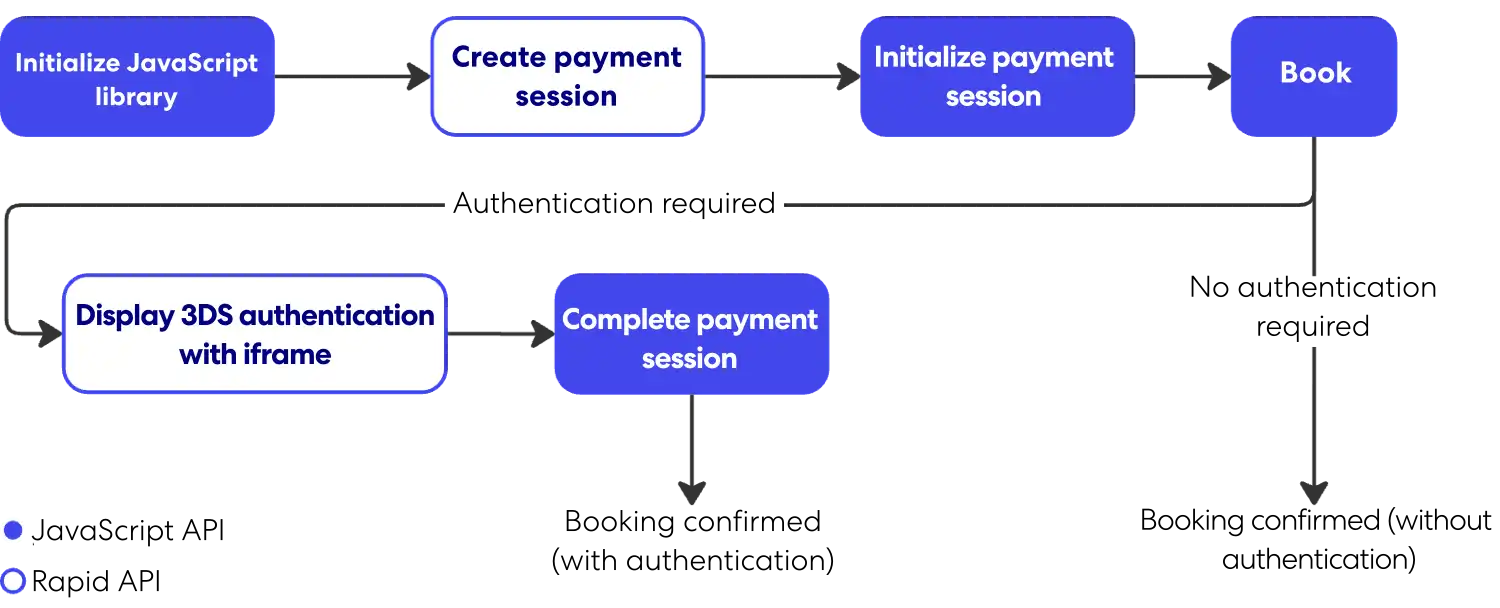
When a booking is prepared for authentication, it may not always be required. The need for authentication is determined by the issuing bank of the credit card used for payment. This determination occurs during the transaction and is indicated in the Create Booking API response.
Rapid Lodging API also offers a hold and resume functionality. Here’s the API call sequence that feature requires.
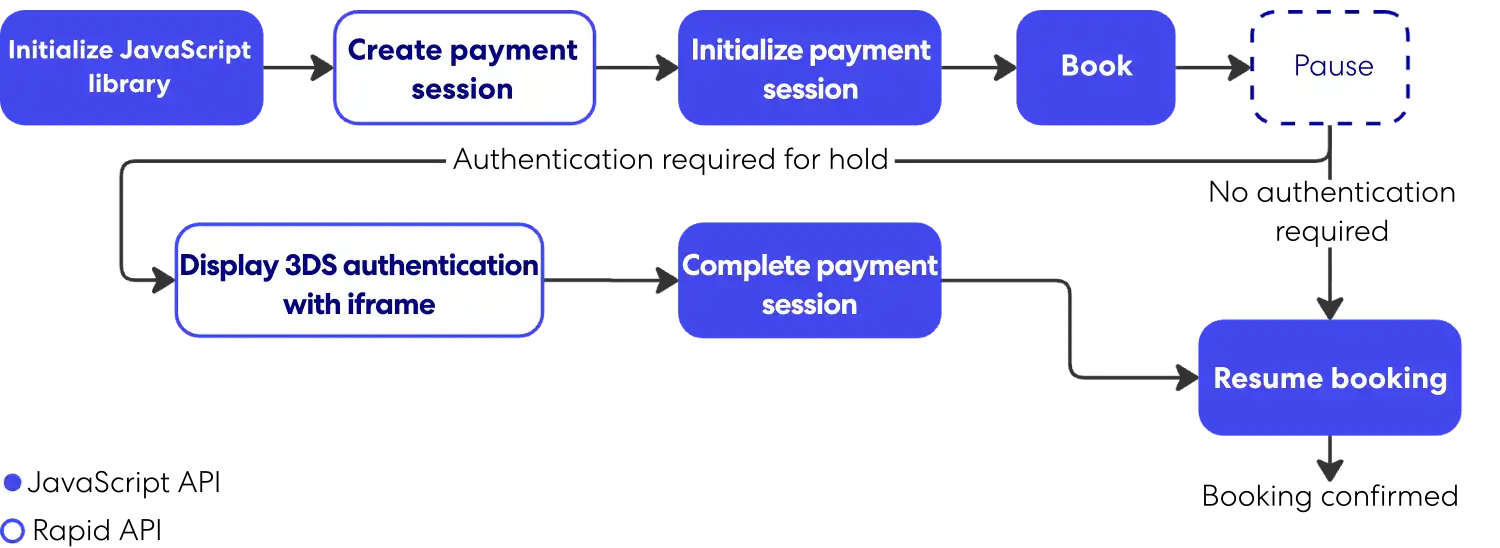
>> Learn about Lodging API Hold and Resume
For further information on the technical requirements for the 3DS 2.0 experience, review the EMVCo's 3D secure protocol and core functions specification.
3DS 2.0 integration guide
Supporting SCA will require integrating Rapid API with a new JavaScript library, referred to as the 3DS Connector. The two are used in conjunction to present 3DS 2.0 on the check-out page and confirm a booking. This solution supports both Expedia collect and pay later business models.
Note: 3DS 2.0 must be enabled by Rapid Partner Support for individual partner profiles to allow the revised booking flow.
Step 1: Call the Availability API
The value of the sales_channel field in the API request must be accurate to obtain an authentication exemption when it's permissible by the regulations. This value, along with many other factors, is reviewed by the card's issuing bank to make their decision during booking. Only agent tools are exempt from SCA. To specify this, set the value of sales_channel to agent_tool.
The JavaScript library is a precursor to the rest of the steps in the booking process. You’ll initialize a payment session with the JavaScript API, then book via the Rapid API.
>> Learn how to initialize the JavaScript library
Step 2: Call the Price Check or Details API
For the Lodging API, the Price Check API response for SCA will include a link to the Register Payments API.
Example 3DS 2.0 response for the Lodging API
{
    "status": "matched",
    "occupancies": {
        //...(example omitted for length)
    },
    "links": {
        "payment_session": {
            "method": "POST",
            "href": "/v3/payment-sessions?token=QldfCGlcUAVgBDRwdWXBBL"
        }
    }
}
The Car and Activities APIs’ Details endpoint response for the SCA flow is the same as that of its non-SCA flow.
Step 3: Call the Register Payments API
For the Lodging API, you'll need to make this call specifically. The Car and Activities APIs incorporate this call into the Details or Create Booking APIs. The request will include payment details that are part of the non-SCA booking flow and new fields that support a successful authentication. Two of these fields, encoded_browser_metadata and version, are returned from the JavaScript API's setup method.
The response will include a payment_session_id and encoded_init_config. These are specified as inputs into the initSession method of the JavaScript library. The Booking link included in the response should be used after the initSession method.
Example Lodging API request
{
    "version": "1",
    "browser_accept_header": "*/*",
    "encoded_browser_metadata": "ZW5jb2RlZF9icm93c2VyX21ldGFkYXRh",
    "preferred_challenge_window_size": "medium",
    "merchant_url": "https://server.adomainname.net",
    "customer_account_details": {
        "authentication_method": "guest",
        "authentication_timestamp": "2027-02-12T11:59:00.000Z",
        "create_date": "2027-09-15",
        "change_date": "2027-09-17",
        "password_change_date": "2027-09-17",
        "add_card_attempts": 1,
        "account_purchases": 1
    },
    "payments": [
        {
            "type": "customer_card",
            "card_type": "VI",
            "number": "4111111111111111",
            "security_code": "123",
            "expiration_month": "08",
            "expiration_year": "2027",
            "billing_contact": {
                "given_name": "John",
                "family_name": "Smith",
                "email": "smith@example.com",
                "phone": "4875550077",
                "address": {
                    "line_1": "555 1st St",
                    "line_2": "10th Floor",
                    "line_3": "Unit 12",
                    "city": "Seattle",
                    "state_province_code": "WA",
                    "postal_code": "98121",
                    "country_code": "US"
                }
            },
            "enrollment_date": "2027-09-15"
        }
    ]
}
Example Lodging API response
{
    "payment_session_id": "76d6aaea-c1d5-11e8-a355-529269fb1459",
    "encoded_init_config": "QSBiYXNlNjQgZW5jb2RlZCBvYmplY3Qgd2hpY2ggY29udGFpbnMgY29uZmlndXJhdGlvbiBuZWVkZWQgdG8gcGVyZm9ybSBkZXZpY2UgZmluZ2VycHJpbnRpbmcgYW5kL29yIDNEUyBNZXRob2Qu",
    "links": {
        "book": {
            "method": "POST",
            "href": "/v3/itineraries?token=MY5S3j36cOcLfLBZjPYQ1abhfc8CqmjmFVzkk7euvWaunE57LLeDgaxm516m"
        }
    }
}
Example Car or Activities API request
{
  "type": "customer_card",
  "number": "4111111111111111",
  "security_code": "123",
  "expiration_month": "08",
  "expiration_year": "2028",
  "billing_contact": {
    "given_name": "John",
    "family_name": "Smith",
    "email": "smith@example.com",
    "phone": {
      "country_code": "1",
      "area_code": "487",
      "number": "5550077"
    },
    "address": {
      "line_1": "555 1st St",
      "city": "Seattle",
      "state_province_code": "WA",
      "postal_code": "98121",
      "country_code": "US"
    }
  },
  "strong_customer_authentication": {
    "rapid": {
      "version": "2.0.1",
      "browser_accept_header": "*/*",
      "encoded_browser_metadata": "ZW5jb2RlZF9icm93c2VyX21ldGFkYXRh",
      "preferred_challenge_window_size": "medium",
      "merchant_url": "https://server.adomainname.net",
      "enrollment_date": "2024-05-08",
      "customer_account_details": {
        "authentication_method": "guest",
        "authentication_timestamp": "2026-02-12T11:59:00.000Z",
        "create_date": "2025-09-15",
        "change_date": "2025-09-17",
        "password_change_date": "2025-09-17",
        "add_card_attempts": 1,
        "account_purchases": 1
      }
    }
  }
}
Example Car or Activities API response
{
  "payment_token": "K~IjM455rG_zUnz9LlKCw8bbLfxqk2Kb...",
  "expires": "2026-01-30T16:32:10.557287774Z",
  "payment_session_id": "ern:pay:pa:sec::5bcca93d-cdae-00b7-2cd4-d72d84cb2665",
  "encoded_init_config": "W3sicHJvdmlkZXJJZCI6IjEiLCJwYXlt..."
}
Step 4: Call the Create Booking API
This request will not include any new fields for SCA—all necessary information is contained within the token of the Booking link. For the Lodging API, this will be found in the Register Payment API response, and for the Car or Activities API in the Details endpoint. The response, if successful, will always contain an itinerary_id. However, this alone does not indicate that a booking is confirmed because 3DS 2.0 authentication may be required.
If it is required, the response will also include an encoded_challenge_config. The encoded_challenge_config and the payment_session_id returned from the Register Payment API will need to be passed as parameters into the JavaScript challenge method.
The response will also include a new link for complete_payment_session (Lodging or Activities) or resume_after_payment_challenge (Car). This link should be used after the challenge method of the JavaScript library.
If 3DS 2.0 authentication is not required, the booking is confirmed and the response will include links for retrieve, cancel, and (for Lodging API requests) resume.
Example Lodging API response
{
    "itinerary_id": "8999989898988",
    "links": {
        "complete_payment_session": {
            "method": "PUT",
            "href": "/v3/itineraries/8999989898988/payment-sessions?token=MY5S3j36cOcLfLBZjPYQ1abhfc8CqmjmFVzkk7euvWaunE57LLeDgaxm516m"
        }
    },
    "encoded_challenge_config": "ABElifsiejfacies2@033asfe="
}
Example Activities API request
{
   "email": "traveler@example.com",
   "payment_token": "K~xxxxxxxxxxxxxxxxxxxx",
   "affiliate_reference_id": "AFF-REF-12345",
   "primary_traveler": {
     "name": {
       "given_name": "Jane",
       "family_name": "Doe"
     },
     "phone": {
       "country_code": "1",
       "number": "5551234567"
     },
     "ticket_id": "182552"
   }
 }
Example Activities API response with challenge
{
   "itinerary_id": "9045006342737",
   "encoded_challenge_config": "<opaque challenge config from issuing bank>",
   "links": {
     "complete_payment_session": {
       "method": "PUT",
       "href": "/v2/itineraries/9045006342737/activity/payment-sessions?token=<token>"
     }
   }
 }
Step 5: Complete the booking
This part of the booking flow occurs after the JavaScript challenge method. The Complete Payment Session API (Lodging and Activities) or Resume After Payment Challenge API (Car) response is required to complete the payment and inform Rapid API that a secure authentication attempt was attempted, successfully or not.
The request will not include any new fields for SCA.
The response, if successful, will contain confirmation information for the booking, including an itinerary_id and links for retrieve, cancel, and (for Lodging API requests) resume.
Example Lodging API response
{
    "itinerary_id": "8999989898988",
    "links": {
        "retrieve": {
            "method": "GET",
            "href": "/v3/itineraries/8999989898988?token=MY5S3j36cOcLfLBZjPYQ1abhfc8CqmjmFVzkk7euvWaunE57LLeDgaxm516m"
        }
    }
}
Example Activities API response
{
   "itinerary_id": "9045006342737",
   "links": {
     "retrieve": {
       "method": "GET",
       "href": "/v2/itineraries/9045006342737/activity"
     }
   }
 }
Iframe and JavaScript library implementation
When using the SCA booking workflow, the check-out page must include a new iframe and JavaScript library. The iframe, referred to as the 3DS iframe, will display the authentication experience using 3D-Secure 2.0. The JavaScript library, referred to as the 3DS Connector Library, will support the transfer of information to issuing banks and load the banks' content into the iframe.
Adding the iframe
The 3DS iframe should be wrapped in a container that is initially hidden but can be displayed when an authentication challenge is required to process a payment.
The design of the container can be customized to suit the hosting page. The sample below shows an example implementation meant for guidance only, using a bootstrap modal.
<div id="threeDsIframeModal" class="modal" role="dialog">
    <div class="modal-dialog" role="document">
        <div class="modal-content">
            <div class="modal-body iframe-container">
                <div class="embed-responsive embed-responsive-16by9">
                    <iframe id="threeDsIframe" src="<<3DS iframe URL>>"> </iframe>
                </div>
            </div>
        </div>
    </div>
</div>
The source of the iframe must be set to one of two values:
| URL type | URL | Notes |
|---|---|---|
| Production | https://static.pay.expedia.com/3ds/threeDsIframe.html | Supports production authentication |
| Testing sandbox | https://static.pay.expedia.com/3ds/sandboxThreeDsIframe.html | Supports testing of authentication |
The test URL supports testing. You can restrict the contents of the iframe to the sandbox during testing with this command:
sandbox = 'allow-scripts allow-forms allow-same-origin';Adding the JavaScript library
The 3DS connector library communicates with the 3DS iframe and sends data to the issuing bank, which provides the iframe content. The sample below shows an example of how to add the library to the check-out page.
<head>
    <script src="<<3DS connector script URL>>" integrity="<<actual integrity value>>"></script>
</head>
The source and integrity values of the script element should be set to the below values.
| Library version | Attribute | Value |
|---|---|---|
| 1.3.39 | src | https://static.pay.expedia.com/3ds/1.3.39/pay-3ds-js-libs-connector.min.js |
| integrity | sha384-par0I4Q5cfljwzqw2mAggM4dKdYzGyj4uZiL4cMviGjI3qVzEgWGuZ2075mYutbT | |
| 1.3.65 | src | https://static.pay.expedia.com/3ds/1.3.65/pay-3ds-js-libs-connector.min.js |
| integrity | sha384-gYopPw6xE5DZwnZXGavkwnvs3NkDOobnHqjroUnSHpGXvs/J9xjHX/8aGzKtSgWI | |
| 2.0.1 | src | https://static.pay.expedia.com/3ds/2.0.1/pay-3ds-js-libs-connector.min.js |
| integrity | sha384-1ntftSOl8ZSqJ/m7qqxXTNGOx3JLbF7Uw5YX8i/ageTjgmTnUMZ3ROpxxMiUkYma |
Note: The source URL and integrity values will change as future versions are available for adoption. Newer versions should not break existing integration. Older versions of the script will still be accessible.
Using 3DS and JavaScript for SCA
The 3DS connector library requires the use of JavaScript promises. The sample below demonstrates how data is exchanged between the JavaScript methods and Rapid. This example is intended only for guidance.
// Initialize the library
let connector = new PayThreeDSConnector.ThreeDSConnector("threedsiframe", "https://static.pay.expedia.com");
RapidIntegration.priceCheck(priceCheckLink)
  .then(priceCheckResponse => {
    paymentSessionLink = priceCheckResponse.links.payment_session.href;
    // Setup an authentication session with the library
    return connector.setup({ referenceId: '1000' })
  }).then(setupResponse => {
    console.log("Setup Response: ", setupResponse);

    // Send information from setup to Rapid's Register Payments API
    return RapidIntegration.registerPayment(paymentSessionLink,
           setupResponse);
  }).then(paymentSessionResponse => {
    console.log("Register Payments Response: ", paymentSessionResponse);
    paymentSessionId = paymentSessionResponse.paymentSessionId;
    bookLink = paymentSessionResponse.links.book.href;
    if (paymentSessionResponse.encoded_init_config) {
      // If the payment session response contains an encoded_init_config
      // field, initialize an authentication session with the library
      // using information returned from Rapid's Register Payments API
      connector.initSession({
        paymentSessionId: paymentSessionId,
        encodedInitConfig: paymentSessionResponse.encodedInitConfig
      }).then(initSessionResponse => {
        console.log("Init Session Response: ", initSessionResponse);
        // Then create a booking with Rapid's Book API
        return RapidIntegration.createBooking(bookLink,
               paymentSessionId);
      })
    } else {
      // Otherwise, create a booking with Rapid's Book API directly
      return RapidIntegration.createBooking(bookLink, paymentSessionId);
    }
  }).then(createBookingResponse => {
    console.log("Create Booking Response: ", createBookingResponse);
    itineraryId = createBookingResponse.itinerary_id;
    if (createBookingResponse.encoded_challenge_config) {
      // If the Create Booking API contains an encoded_challenge_config field,
      // display the authentication challenge window
      $('#threeDsIframeModal').modal('show');
      completePaymentSessionLink = createBookingResponse.links.complete_payment_session.href;
      // Perform the challenge using the information returned from Rapid's Register Payments API
      // and Create Booking API
      connector.challenge({
        paymentSessionId: paymentSessionId,
        encodedChallengeConfig: createBookingResponse.encodedChallengeConfig
      }).then(challengeResponse => {
        console.log("Challenge Response: ", challengeResponse);
        // Complete a booking with Rapid's Complete Payment Session API
        return RapidIntegration.completePaymentSession(completePaymentSessionLink, itineraryId);
      }).then(completePaymentSessionResponse => {
        console.log("Complete Payment Session Response: ", completePaymentSessionResponse);
        return completePaymentSessionResponse;
      }).finally(() => {
        // Close the authentication challenge window
        $('#threeDsIframeModal').modal('hide');
      });
    } else {
      return createBookingResponse;
    }
  }).then(bookingResponse => {
    ...
  });
Note: References to the RapidIntegration class are not part of the 3DS connector library. They are meant to demonstrate a wrapper that supports the transfer of information to the APIs. The sample also uses static values for parameters that should be determined at run time, like referenceId.
Check-out page design guidelines
Card brands that support 3DS authentication may require that their logos and branding be displayed in accordance with their guidelines.
| Card brand | Authentication branding | Branding website |
|---|---|---|
| Mastercard | Mastercard identity check | Mastercard brand guidelines |
| Visa | Visa secure | Visa brand guidelines |
Note: Logos and guidance for other card brands will be included as they become available.