
Conversation solutions
Facilitate seamless conversations between travelers and properties, via API or prebuilt UI
Conversation API
With the Conversation API, you can facilitate seamless communication between travelers (or agents) and properties. Once integrated, you can retrieve conversations for hotel, vacation rental, and Vrbo supply, as well as create and view messages via API.
This feature enables post-booking messages via an end-to-end API experience. You can control the front-end experience by embedding conversations into your own traveler-facing and agent-facing tools to build trust with travelers, reduce cancellations and servicing costs, and streamline support workflows.
The Conversation API also supports topic tagging functionality via notifications. Topic tags are one- or two-word descriptions of message content that can help you automate support and ensure messages are routed to the right channels.
The Conversation API is the only conversation solution that supports Vrbo inventory.
How the Conversation API works
The Conversation API can be configured to enable messaging between the property and the traveler directly or between the property and your support agents, depending on your needs. In either scenario, you will access the Conversation API link via the Manage Booking retrieve response for that booking, then surface the conversation entry point to the traveler or agent. When a supplier sends a new message, you will be notified immediately via the Rapid Notifications API.
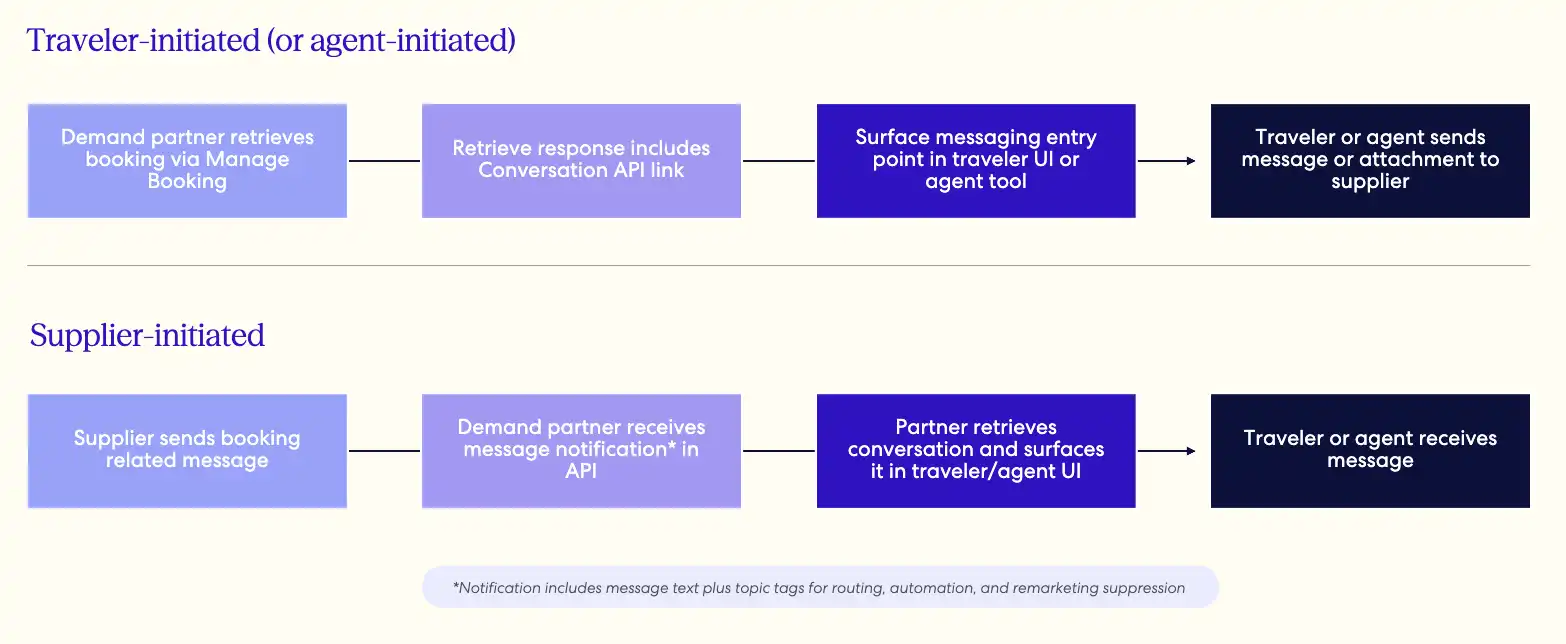
Subscribe to Notifications for new messages
Subscribe to the following conversation-related events in the Rapid Notifications API to receive supplier-initiated messages as push notifications:
itinerary.message.received: Triggered when the property sends a new message to the demand partner or traveler. It includes the full content of the new message.itinerary.message.rejected: Triggered when a traveler or demand partner message is suppressed when it's identified as fraudulent or phishing in nature. The message is blocked and not delivered to the supplier.itinerary.conversation.attachment.success: Triggered when an attachment sent by a traveler or demand partner (as part of an agent message) has been successfully uploaded and processed.itinerary.conversation.attachment.failure: Triggered when an attachment upload fails.
>> Read more about the Notifications API
Retrieve the booking via Manage Booking
When you request booking details from the Retrieve Booking endpoint of the Manage Booking API, the response will include a link to the Conversation API in the conversations object.
There is one conversation per booked room. This is important for multi-room bookings, which can have a different conversation for each room.
>> Find out more about the Manage Booking API
Example of a conversation link in the Retrieve Booking response
{
"itinerary_id": "1231546897894",
  "creation_date_time": "2026-10-09T14:20:00.202Z",
  "property_id": "1234569",
  "affiliate_reference_id": "1a5e1452g-8rt9-843c-8f15-b7fb",
  "billing_contact": {
    "given_name": "Jane",
    "family_name": "Doe",
    "address": {
      "line_1": "123 Anywhere Street",
      "city": "Any City",
      "postal_code": "123456",
      "country_code": "US"
    }
  },
  "rooms": [
    {
      "links": {
        "conversation": {
          "method": "GET",
          "href": "/v3/conversations/2598994365?token=Ql1HSKJFUKEPOFD156SDASFE1F984E54DF98FD54F4RF5E4FD2FD55SAF6654DFDSF56R1heBFUJUQMMUQBWBw=="
}
Retrieve the conversation
When you call the GET conversation link provided in the booking, the Conversation API returns the message history for the booking in a single response, including both messages travelers/agents sent and replies from the property. Property messages may include attachments and links to access them. Possible attachment types include PNG, PDF, and JPEG. Properties can also send HTML messages.
Example conversation response
{
  "itinerary_id": "7654321098765",
  "expedia_confirmation_id": "1234567890",
  "property_id": "12345678",
  "messages": [
    {
      "text": "Hi! Is early check-in possible? We land around 10am.",
      "participant": {
        "role": "traveler",
        "given_name": "Jane",
        "family_name": "Doe"
      },
      "creation_date_time": "2026-11-05T14:02:11Z",
      "message_type": "free_text",
      "delivery_status": "accepted",
      "attachments": []
    },
    {
      "text": "Welcome! Early check-in from 11am is fine. Here is our arrival map.",
      "participant": {
        "role": "supplier",
        "given_name": "Grand",
        "family_name": "Hotel"
      },
      "creation_date_time": "2026-11-05T15:30:45Z",
      "message_type": "free_text_with_attachment",
      "delivery_status": "accepted",
      "attachments": [
        {
          "name": "arrival-map.pdf",
          "size": 48213,
          "link": {
            "method": "GET",
            "href": "/v3/conversations/1234567890/messages/msg-abc123/attachments/att-789?token=<encoded-token>",
            "expires": "2026-11-07T15:31:00.123456Z"
          }
        }
      ]
    }
  ],
  "links": {
    "add_message": {
      "method": "POST",
      "href": "/v3/conversations/1234567890/message?token=<encoded-token>",
      "expires": "2026-11-06T16:31:00.123Z"
    },
    "add_attachment": {
      "method": "POST",
      "href": "/v3/conversations/1234567890/messages/attachments?token=<encoded-token>",
      "expires": "2026-11-06T16:31:00.123Z"
    }
  }
}
Surface a conversation to the traveler or agent
You can either:
- Build and embed a messaging UI in your traveler-facing interface so travelers can send or receive messages directly with the property. Common entry points include the booking confirmation page, trip details page, or confirmation email.
>> See best practices for exposing the entry point - Build and embed a messaging UI in your agent tools so your support teams can communicate with properties.
Note: The Conversation API does not include a prebuilt messaging UI experience. You will either need to develop that experience or connect the Conversation API to your existing messaging UI experience.
>> For a prebuilt UI, read about the Property Message Center
Sending messages to properties
The Conversation API response also includes the links you'll use to send messages: one for plain text, and one to initiate an attachment upload.
Sending a plain text message
To initiate a new message or reply to the property, use the add_message link to add a message to the conversation. A successful response returns a refreshed conversation link, which you should persist and use for your next read to keep your token state current.
When an agent sends a message on behalf of a traveler, it will appear to have been sent by the traveler, both in the API and to the property. The message text must indicate that it was sent by an agent, so it should include a note such as: "This message is being sent by a [Partner name] agent on behalf of the traveler."
Sending an attachment
Attachments are uploaded directly to Amazon S3. The flow starts with an Attachments API request that includes the file metadata and, optionally, the accompanying message text. The response returns a secured S3 URL, its expiry, and the form fields AWS requires for authentication. Those fields are prepopulated in the response. The file binary must be populated in the call to the S3 URL to initiate a file upload. Supported file types include PNG, PDF, and JPEG. Maximum file size is 5 MB.
Note: The text supplied in this call is carried with the upload and posted as the message when the file is delivered. A separate add_message call is therefore unnecessary, and issuing one will produce a duplicate message in the thread.
Before the secured S3 URL expires, POST the file to it with the form fields supplied by the previous Attachments API response.
>> Refer to AWS documentation for more details
The successful S3 upload triggers a malware scan:
- If the file is clean: it is stored, a message carrying the attachment and its accompanying text is delivered to the property, and you'll receive an
itinerary.conversation.attachment.successnotification. - If a threat is detected, the file is deleted, the associated message is suppressed, and you'll receive an
itinerary.conversation.attachment.failurenotification.
Example attachment payload
POST {{eanapi_url}}{{add_attachment_link}}?token={{add_attachment_token}}
Content-Type: application/json
Authorization: {{authorization}}

{
  "text": "Can I have an early check-in?",
  "file_name": "parking_verification.jpg",
  "file_type": "image/jpeg",
  "file_size": 1048576
}
Example S3 link returned from the attachment call
{
  "url": "https://conversation-api-attachments.s3.us-west-2.amazonaws.com/",
  "fields": {
    "key": "conversations/<conversation-id>/attachments/<attachment-id>",
    "X-Amz-Algorithm": "AWS4-HMAC-SHA256",
    "X-Amz-Credential": "<temporary-credential>",
    "X-Amz-Date": "20260826T180000Z",
    "X-Amz-Security-Token": "<temporary-session-token>",
    "Policy": "<base64-policy>",
    "X-Amz-Signature": "<signature>"
  }
}
Example curl request for posting to S3 bucket
curl --request POST \
  "https://conversation-api-attachments.s3.us-west-2.amazonaws.com/" \
  --form "key=conversations/<conversation-id>/attachments/<attachment-id>" \
  --form "X-Amz-Algorithm=AWS4-HMAC-SHA256" \
  --form "X-Amz-Credential=<temporary-credential>" \
  --form "X-Amz-Date=20260826T180000Z" \
  --form "X-Amz-Security-Token=<temporary-session-token>" \
  --form "Policy=<base64-policy>" \
  --form "X-Amz-Signature=<signature>" \
  --form "file=@parking_verification.jpg;type=image/jpeg"
Attachment upload error handling
Receiving a 204 No Content response as transport-level acknowledgement confirms that the S3 upload request was sent and received, but it does not by itself confirm end-to-end attachment success.
The attachment is processed asynchronously after the S3 upload, including scanning and downstream association. You must subscribe to two attachment notifications:
itinerary.conversation.attachment.successitinerary.conversation.attachment.failure
Only the success notification should be treated as confirmation that the attachment was successfully processed and added.
Link validity and token expiry
The links for add_message and add_attachment are temporary, and will expore one hour after retrieval. Evaluate the expires field value before every call. If it has passed, or you receive 401 or 403 errors, re-run the Retrieve Booking or Conversation calls to get fresh links.
The conversation link itself remains valid and new messages can be added up to 90 days post-stay. The conversation and its attachments can be retrieved for up to three years.
Message topic tagging and AI-powered remarketing suppression
To enable easier, more scalable consumption of property-initiated messages, our conversation solutions employ an AI-driven model that identifies the main topics of a message and delivers those topics as tags in the itinerary.message.received notification event. You can use these tags to power search, routing, automation, and suppression logic in your own systems.
Property-initiated messages identified as "remarketing" (messages promoting booking direct or otherwise off-platform) are automatically suppressed by both the Conversation API and Property Message Center.
Potential property message topic tags
| Tag | Description |
|---|---|
| Check-in instructions | The message includes essential information or instructions the traveler needs for check-in or their stay, like access codes, front desk hours, deposit information, ID requirements, etc. Note: The check-in instructions tag will always supersede the remarketing suppression tag, so that if a supplier sends a message that contains both check-in details and remarketing verbiage, the traveler will still receive the message. |
| Early check-in or late check-out | The message includes information related to cost of adjusting check-in or check-out times. |
| Food / beverage | The message includes information on restaurant or bar availability or hours, menu items, or other dining details. |
| Maintenance / closure | The message includes updates on specific portions of the property that are under maintenance, construction, or otherwise temporarily closed, such as include pool, beach, gym, or other facility closures. |
| Parking | The message includes instructions on parking, reservations, hours, or specific nightly or hourly costs. |
| Pet policy | The message includes the property's pet policy or costs associated with a pet staying in the room or unit. |
| Request for info / arrival time | The message includes a request for more information from the traveler on their stay details or arrival time so the property can best manage and plan for the stay. |
| Review request | The message includes a request for the traveler to leave a review of their stay. These messages most often are sent post-stay. |
| Transportation | The message includes information regarding airport pickup or drop-off options, shuttle availability, or scheduling instructions, etc. |
| Other | If a message does not have any of the aforementioned tags, it will be labeled as "Other" by default. These messages can relate to baggage, housekeeping, extra beds, sanitation, cleanliness, elevator, electricity, kitchen/utensils, terms and conditions, and more. |
Example message received notification payload with topic tags
{
  "event_id": "493ae7d4-fb3c-49fb-b180-0d7f4030aaeb",
  "event_type": "itinerary.message.received",
  "event_time": "2024-09-16T15:22:42.783857461Z",
  "itinerary_id": "9025294229844",
  "email": "test@travelnow.com",
  "message": "Please check in before 12:00 PM.",
  "topic_tags": "Check-in",
  "affiliate_reference_id": "b086d299-2f1f-4134-a23c-f4a1c9286fac"
}
Exposing the conversation entry point
Here is some guidance on where you can place the Conversation API link to travelers once they’ve completed their booking.
Add a “Message Hotel” or “Message Host” button to the booking confirmation page
This enables travelers who need to make a request or ask for information from the property immediately after making a booking.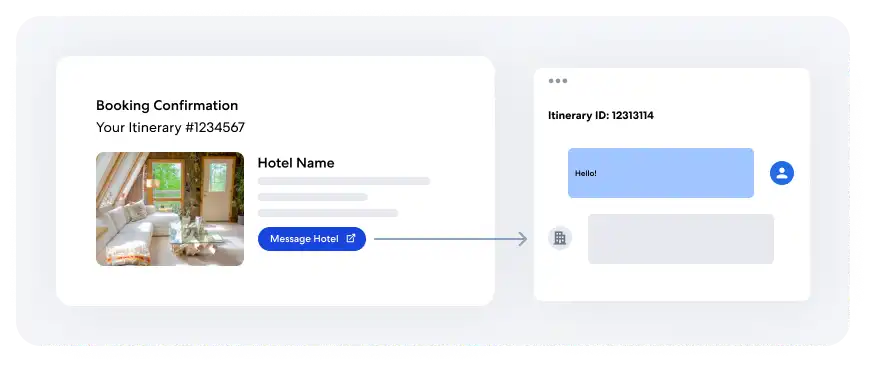
Add “Message Hotel” or “Message Host” button to the itinerary page
This enables travelers to contact the property directly from their reservation page.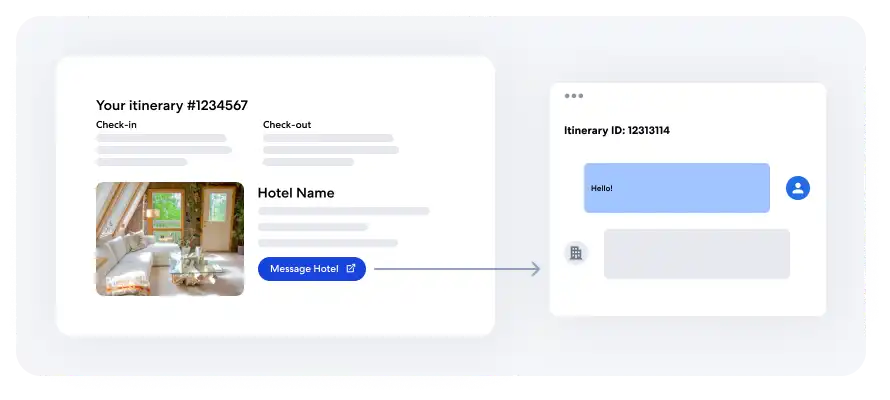
Add “Message Hotel” or “Message Host” button to reservation emails
This helps prompt the traveler to contact the property when they receive updates or reminders of their upcoming stay.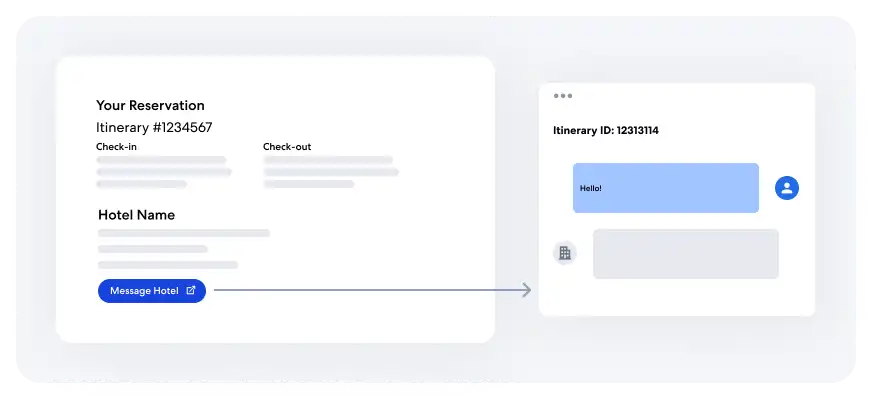
Vacation rentals
Enabling direct messaging with vacation rental properties is essential because 84% of the vacation rentals available on Rapid API don't have a front desk. These properties often rely on direct messaging to provide guests with:
- Personalized access codes to gain entry to the property
- Guidance on unique or available amenities at the property
- Parking instructions or assignments
Note: Property Message Center is not compatible with Vrbo listings. If you currently distribute or plan to distribute Vrbo inventory, we recommend you integrate the Conversation API.
Error handling
There are several errors that can be returned in different scenarios that are all coded as 400. Below is a list of common causes and the accompanying message returned with each error.
| Cause | Message |
|---|---|
| Invalid input | "Invalid JSON payload" |
| Token cannot be decoded or parsed | "Link is invalid" |
| Missing required token fields | "Link is invalid" |
| Confirmation ID mismatch between path and token | "Link is invalid" |
Token expiration time has passed (link.expired) | "The link you followed has expired. Please make another GET conversation request to refresh the link" |
| Request body is null | "Body of request is required" |
| Message text is blank or exceeds 20,192 characters | "Text must not be empty and must not exceed 20192 characters" |
| File size exceeds 5 MB | "File size exceeds the maximum limit of 5 MB." |
| Unsupported file type | "File type must be one of [application/pdf, image/jpeg, image/png]." |
| Unsupported conversation type for attachments | "Attachment is invalid" |
Property Message Center
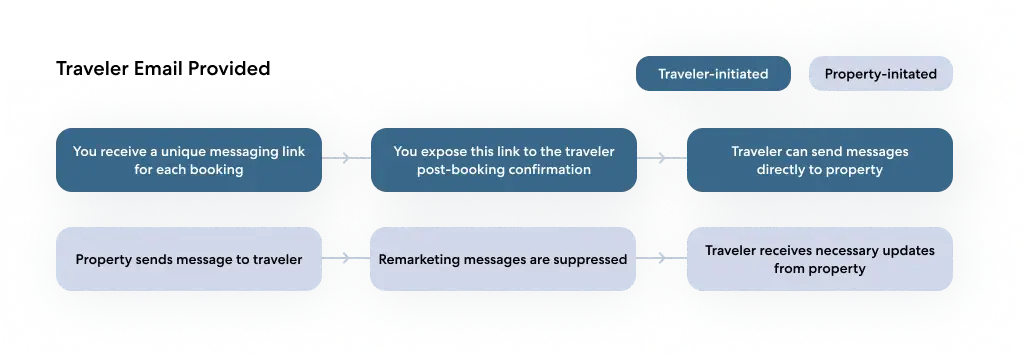
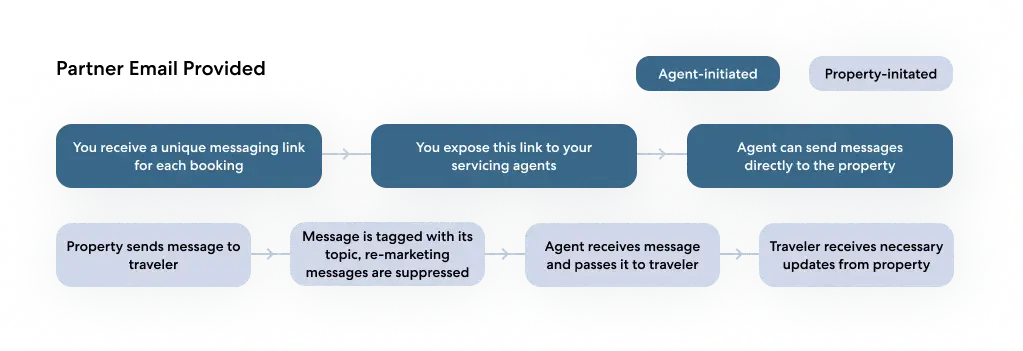
The Property Message Center is a two-way messaging tool that facilitates direct interaction between properties and travelers or agents via a prebuilt messaging UI, for a more streamlined post-booking experience.
The Property Message Center can be configured to enable messaging between the property and the traveler directly, by providing a traveler email in the booking request, or between the property and your support agents, by providing an agent email in the booking request.
Examples of Property Message Center conversations
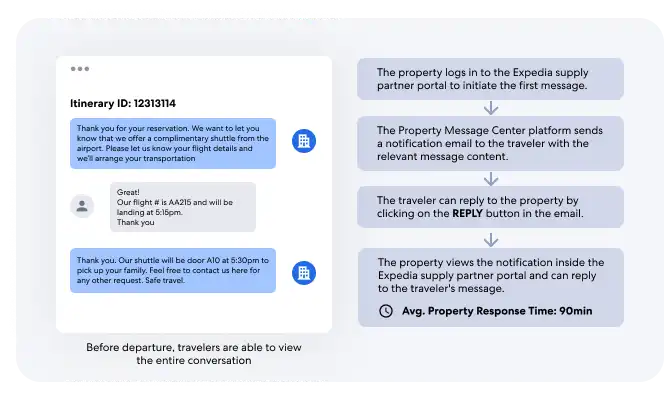
Property-initiated messaging: The property wants to inform the traveler that they provide a complimentary round-trip shuttle to and from the airport.
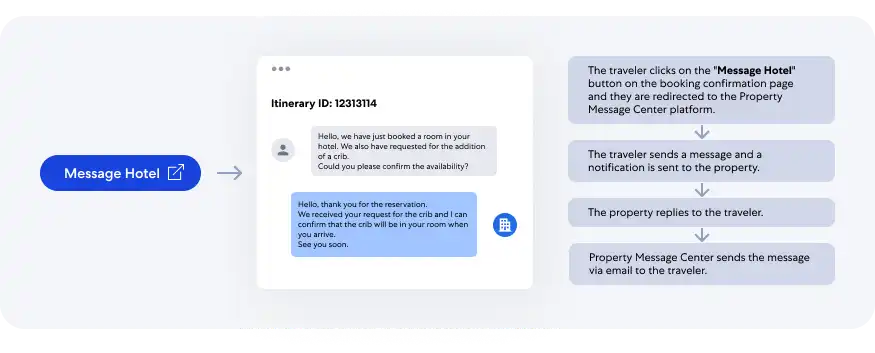
Traveler-initiated messaging: The traveler requested crib accommodations for their booking and wants to reconfirm this request with the property before they arrive.
Access the Property Message Center and agree to all launch requirements on Expedia Partner Solutions.
>> Learn about Traveler-model launch requirements
>> Read about Agent-model launch requirements
API details
Explore Conversation API definitions on this page, then use the API Explorer or another testing software to get an understanding of how the examples and schema definitions compare to the actual output.
API testing collection
We've created a collection of Conversation API calls formatted in a yaml file that can be imported into an API testing tool like Postman. The collection will allow you to test Conversation API before implementing calls in your codebase.