
 Reservation update
The reservation management capability enables lodging partners to
- Cancel a reservation
- Update a reservation after its check-in date
- Refund a reservation's rate on or after a reservation’s check-in date (Expedia Collect only)
- Validate credit card status and recapture payment, if necessary (Hotel Collect only)
If you intend to implement the reservation update feature, you must implement the reservations query, which enables lodging partners to determine whether reservations are eligible for reconciliation. Partners will not need to rely on error messaging or hard-coded reconciliation criteria in their systems. Instead, they can proactively query for eligibility criteria so that they know exactly which reconciliation actions can be taken.
Note: After a reservation is updated, notifications are not sent through any of the booking APIs (Booking Notification, Booking Confirmation, Booking Retrieval), if they are used to maintain inventory. Similarly, no changes are made to inventory to reflect the update.
Cancellations
The reservation update feature enables cancellations as follows:
Cancel a reservation on or before a reservation’s check-in date using the
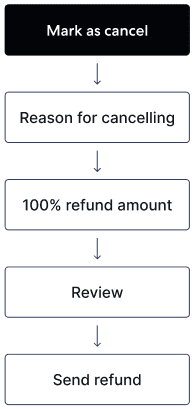
cancelReservationmutation. Cancellation must occur before 23:59 on the check-in date (local property time), and a penalty cannot be charged. The following use cases are supported:When requested by the guest
A lodging partner can request to cancel a reservation and agree to waive (or refund, if applicable) any cancellation fees and other amounts associated with the reservation. Expedia Group will not charge any compensation for these waived amounts.
If the method of payment is invalid (Hotel Collect only)
If the credit card provided by the traveler is invalid, the partner can request to cancel the reservation and agree to waive (or refund, if applicable) any cancellation fees and other amounts associated with the reservation. Expedia Group will not charge any compensation for these waived amounts.
Cancel a reservation after a reservation’s check-in date using the
cancelReservationReconciliationmutation. After arrival, reservations can be cancelled with or without penalty. These use cases are supported:If the guest does not show up
A no-show is a guest who fails to arrive on the check-in date without cancelling. Partners can mark the reservation as cancelled and reconcile the reservation with our system to specify the penalty amount that the guest was charged. This way, partners can ensure that Expedia Group will charge a commission on the penalty amount that the guest was charged instead of the original amount.
If requested by the guest
Partners can let Expedia Group know whether the guest was charged a cancellation fee after receiving notification that a guest cancelled a reservation. This way, partners can ensure that Expedia Group will charge a commission on the penalty amount that the guest was charged instead of the original amount.
Before guest arrival: |
|
After guest arrival: |
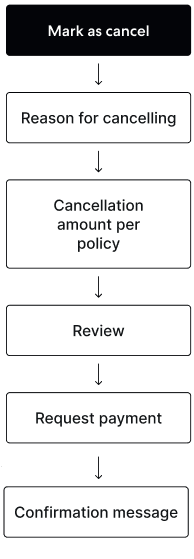
Implementation detail and limitations:
For Expedia Collect (EC) reservations, penalty amounts cannot be greater than the default penalty applied to a reservation at the time of booking. You can validate the business model and cancellation penalties applied to a reservation using the
reservationsquery before attempting to cancel the reservation.For Hotel Collect (HC) reservations:
You can specify any penalty amount (between 0 and the total booking amount). You can validate the business model and cancellation penalties applied to a reservation using the
reservationsquery before attempting to cancel the reservation.HC reservations can be reconciled only once when cancelling a reservation (using the
cancelReservationReconciliationmutation). (Partners must use Expedia Partner Central to reset a cancellation, if needed.)
Updates and reconciliation
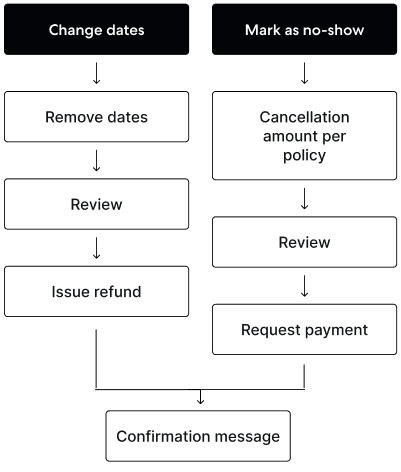
Using the changeReservationReconciliation mutation, partners to update a reservation after the check-in date if the travel dates or daily rates applied to the reservation were modified. For Expedia Collect reservations, you can only remove nights. For Hotel Collect reservations, you can add and remove nights to the beginning or end of the reservation's original dates.
If a lodging partner needs to charge a guest more or less than the amount that was charged when a reservation was booked, such as if a guest’s length of stay changed, the partner can communicate rates to Expedia Group so that we charge commission on the amount that was charged to the guest.
After guest arrival: |
Refunds
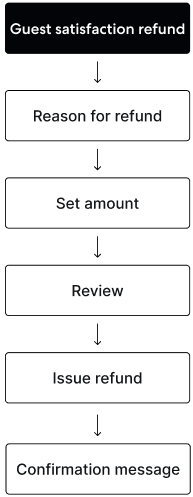
The capability enables partners to refund a reservation's rate on or after a reservation’s check-in date if issues arose during the guest's stay. Implementing the refundReservation mutation allows for goodwill refunds in the case of quality issues or discounts or loyalty perks not being fulfilled. This is supported for Expedia Collect reservations only.
After guest arrival: |
Credit card validation and recapture
Historically, properties have manually recaptured valid payment methods from travelers using Expedia Partner Central. Now, the reservation management capability can facilitate credit card validation and payment recapture. Here is the workflow:
Credit card validation details are available to a property's connected system via the
reservationsquery. ThepaymentInstrumentDetailsobject provides this information.Property can report a card as invalid from their connected system via the
markGuestCreditCardAsInvalidmutation.Expedia sends an automated email to the traveler, prompting them to update card details through the Virtual Agent. The reservation cannot be cancelled by the property during this recapture window.
If the traveler updates their payment method within the recapture window, a webhook notification is sent to the partner indicating that the reservation has been modified, and the payment instrument status is updated in all systems.
If the recapture window expires before the traveler updates their payment method, the reservation becomes eligible for cancellation, or the property can provide more time to the traveler so that they can submit a new credit card.
The recapture window for travelers to update their payment method before a reservation becomes eligible for cancellation depends on the proximity to the check-in date and the length of stay:
| Time before check-in | Length of stay | Recapture window |
|---|---|---|
| More than 14 days | Any | 24 hours |
| Within 14 days | Any | 24 hours |
| Less than 48 hours | 10 nights or less | 12 hours |
| Less than 48 hours | More than 10 nights | 2 hours |
Note that the recapture window begins when the traveler is notified to update their payment method.
The following flowchart illustrates how to determine if a reservation is eligible for cancellation:
─ Has the credit card been marked as INVALID?
│     │
│     ├─► NO
│     │    └─► Reservation should NOT be cancelled due to invalid payment method.
│     │
│     └─► YES
│           │
│           ├─► Is the recapture window still open?
│               │      │
│               │      └─► YES
│               │            ├─► Traveler has guaranteed time to update payment method.
│               │            └─► Property CANNOT cancel reservation.
│               │
│               └─► NO (Recapture window expired)
│                    │
│                    └─► Is the reservation sourced from an affiliate partner?
│                        │      │
│                        │      └─► YES
│                        │            ├─► Was recapture initiated?
│                        │            ├─► Did recapture window expire?
│                        │            ├─► Is cancellation reason INVALID_PAYMENT_METHOD?
│                        │            └─► YES to all → Cancellation is eligible.
│                        │            └─► NO to any → Cancellation NOT eligible.
│                        │
│                        └─► NO
│                             │
|                             └─► Reservation is eligible for cancellation.
│                             └─► Is today the check-in date?
│                                 │
│                                 ├─► YES
│                                 │     ├─► Did recapture window expire BEFORE partner's cancellation cutoff?
│                                 │           └─► YES → Can cancel today.
│                                 │           └─► NO → Can cancel starting 5am next day.
│                                 │
│                                 └─► NO → Can cancel immediately.
If you have adopted reservation delivery, the ReservationNotificationEvent webhook notification is sent after a payment method is updated ("action_type": "MODIFIED"). Because the notification does not specify what changed, we recommend that you query for all reservation details after receiving this notification and replace the original reservation details with all latest details. If you have not adopted reservation delivery, a soft modification notification will be sent through your primary booking API to include the payment instrument that was updated.
Implementation detail and limitations:
Reservations sourced from Expedia's affiliate partners are only eligible to be cancelled if they meet all three criteria:
- The credit card recapture process has been initiated
- The recapture window has expired
- The cancellation reason provided is INVALID_PAYMENT_METHOD
If the recapture window expires on the day of check-in, cancellation eligibility for the reservation is dependent on the partner's cancellation cutoff settings:
- If the recapture window expires before the partner’s defined cancellation cutoff, the reservation can be cancelled on the day of check-in
- If the recapture window expires after the partner's defined cancellation cutoff, the reservation can be cancelled starting at 5am the day after check-in through the reconciliation process
The credit card associated with a reservation can only be marked as invalid once. Multiple recapture attempts are currently not supported.
If the original credit card was marked as invalid by Expedia, the reservation's payment method cannot be marked as invalid by the lodging partner using the
markGuestCreditCardAsInvalidmutation.
Minimum certification requirements
To adopt the reservation update feature, you must successfully complete end-to-end certification with Expedia Group teams. You are expected to confirm reservation update eligibility by retrieving reservations using the reservation retrieval feature (by reservation ID, checkout date, or last updated date and time) and the reconciliationEligibility object.
| Feature | Functionality support | Description |
|---|---|---|
| Reconcile a reservation after check-in |
| Cancel and Update EC and HC reservations on or after a reservation’s check-in date |
| Cancel a reservation before check-in |
| Cancel EC and HC reservations on or before a reservation’s check-in date |
| Display errors | Error display on system UI | Partner must display error messages in the user interface (UI) |
| Implement validation rules | Include recommended validation rules | Partner must support the given list of validation rules |