Lodging API launch requirements
Get started right with the Rapid Lodging API
The launch requirements for the Rapid Lodging API include those that apply to any implementation, regardless of audience, and specific requirements for business-to-business (B2B) or business-to-consumer (B2C) usage. Please read through these requirements carefully as these may differ from any other rate types/booking flows you have integrated previously.
Note: Each requirement listed below includes a reference code to help our customer service team assist you.
Requirements
The following requirements apply to any Lodging API implementation.
General requirements
Use Expedia information correctly
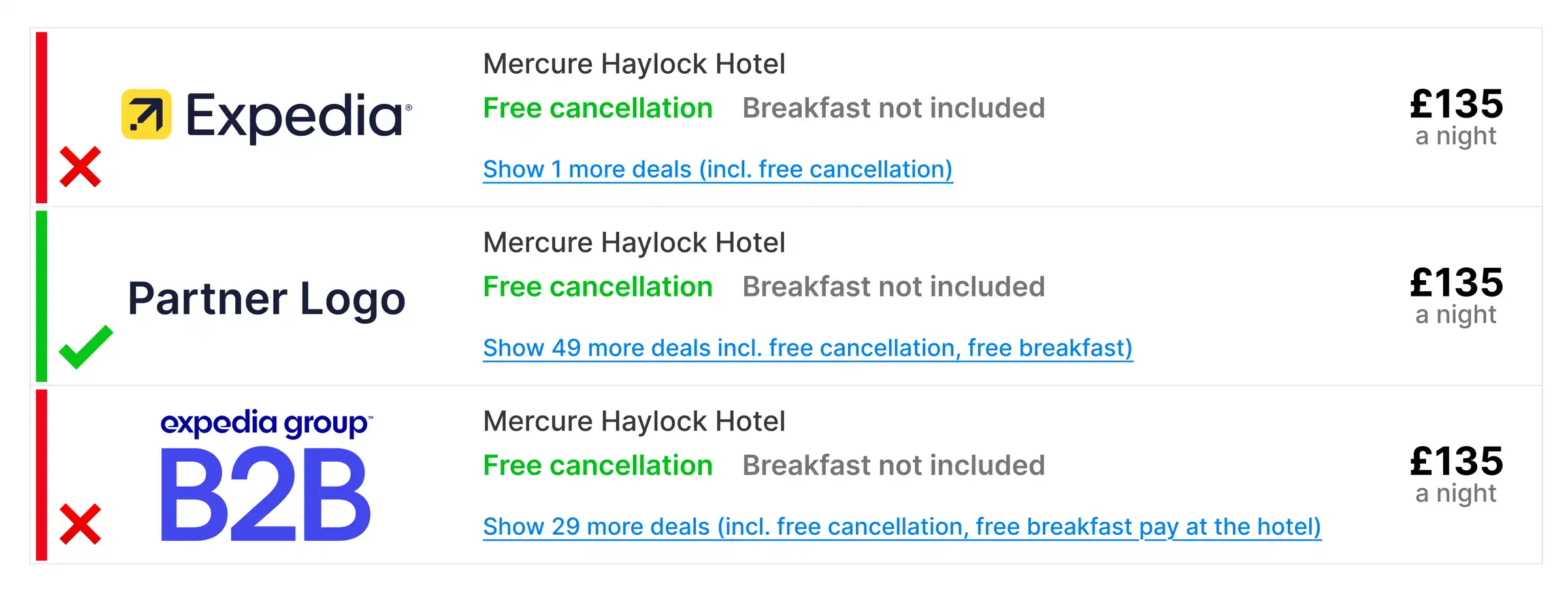
GR1: Use of our names and logos
Use of our names and logos may only be used on traveler-facing or agent-facing sites with our explicit written approval in advance as an exception.
Example user interface
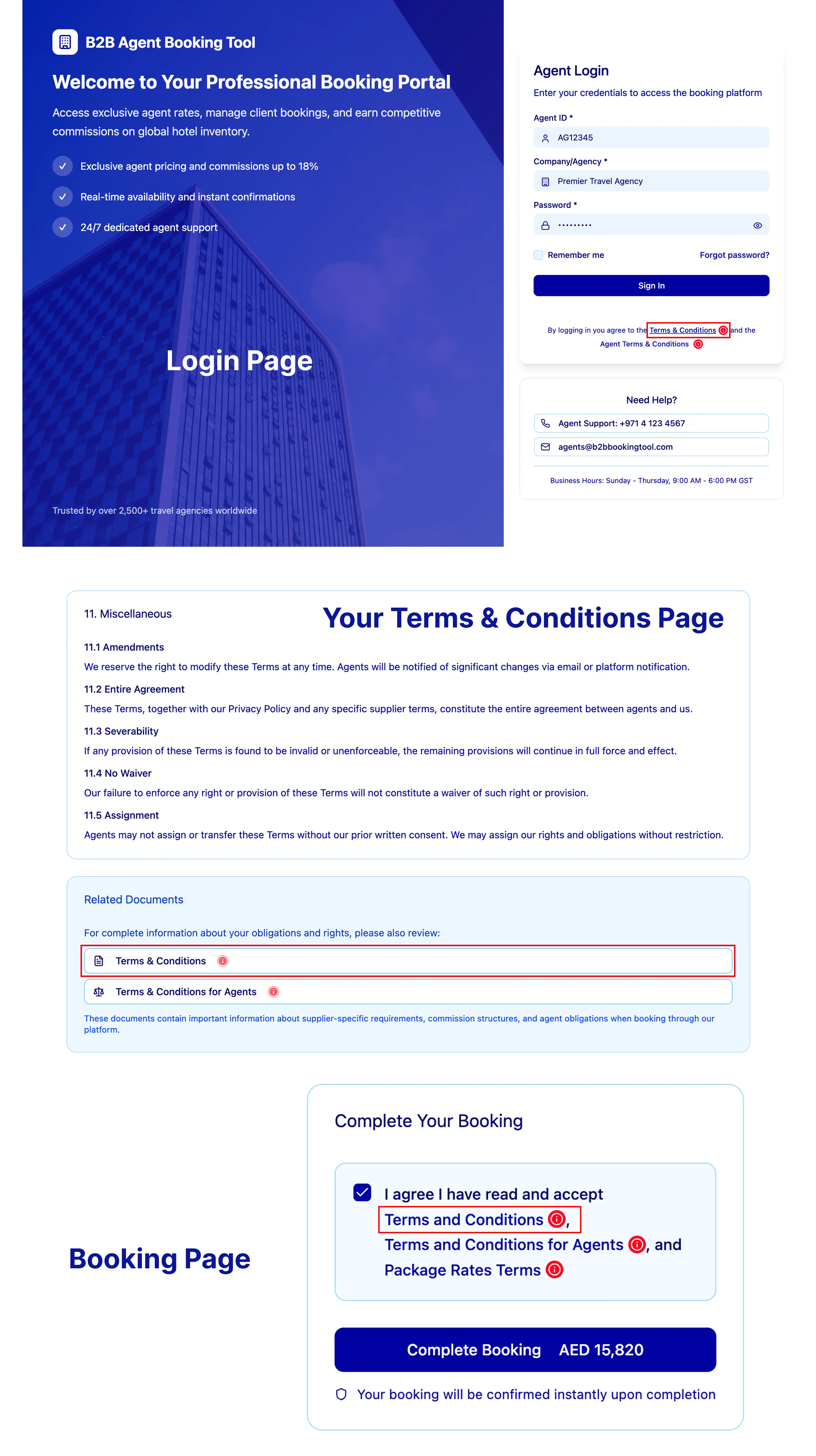
GR2: Links to the our terms and conditions URL to be displayed
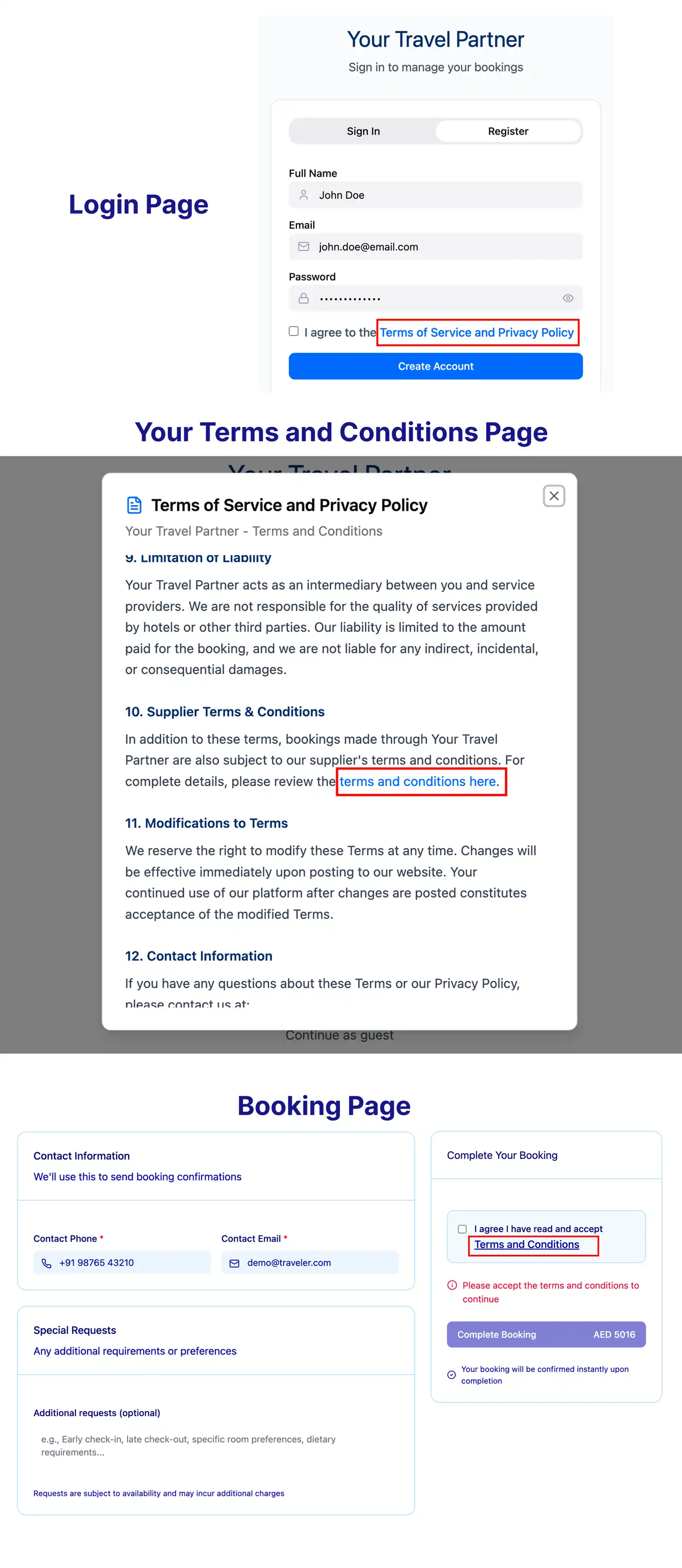
Provide a link to our terms and conditions within your site's own terms and conditions text or directly link to the terms from your booking page. These terms detail the policies that govern the booking. Place the following link in an easy-to-find location, using the link wording "Supplier Terms & Conditions".
Versions of the terms and conditions in every language we support are available from this Rapid API terms and conditions page.
Example user interface - B2B

Example user interface - B2C
GR4: Proper use and display of credit card regulations when Expedia Group is the Merchant of Record (MOR)
Where you obtain, use, transmit, store or process traveler's cardholder data, you must comply with the Payment Card Industry (PCI) Data Security Standard as issued by the PCI Security Standards Council. A complete reference for these regulations is available at the official PCI Security Standards Council website.
GR5: Supply evidence of PCI compliance when using property collect or when Expedia Group is the MOR (applicable partners only)
Whether Expedia Group is the MOR or the property is the MOR, an Attestation of Compliance (AOC) must be supplied as evidence of PCI compliance.
You can find advice regarding PCI compliance on the official PCI Security Standards Council website.
Search page
Set accurate search parameters
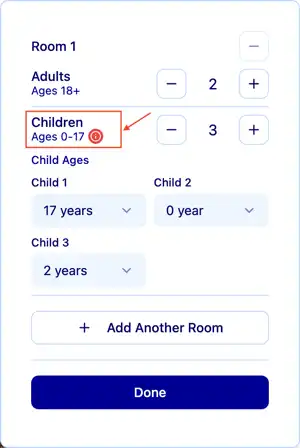
SP1: Proper messaging and input of child ages where affiliate allows children to be included in bookings
If your integration permits child travelers, you must offer the ability to specify the age of each child traveler at the time of check in. This information is provided via the occupancy object (see example below).
When travelers specify child travelers, the API response may contain age restrictions and/or extra occupancy or crib charges that may affect the cost or eligibility of the booking.
Each hotel configures what age range they classify as a child. Typically individuals aged 17 or younger are considered children. Some properties do not allow guests under age 18.
Example API request
https://api.ean.com/2.4/properties/availability?checkin=2020-09-11
&checkout=2020-09-14
¤cy=USD&language=en-US& occupancy=2-9,4 &property_id=XXXX
&country_code=XX&sales_channel=XXXX
&sales_environment=XXXX&filter=XXXX&rate_plan_count=XXXX
&rate_option=XXXX&billing_terms=XXXX&payment_terms=XXXX
&partner_point_of_sale=XXXX&platform_name=XXXXExample API response
"occupancies": {
"2-9,4" : {
"nightly": [
[Example user interface: 1 Room with 2 adults and 3 children aged 17, 2, and under 1.

Property or room availability
Display information about the room or property
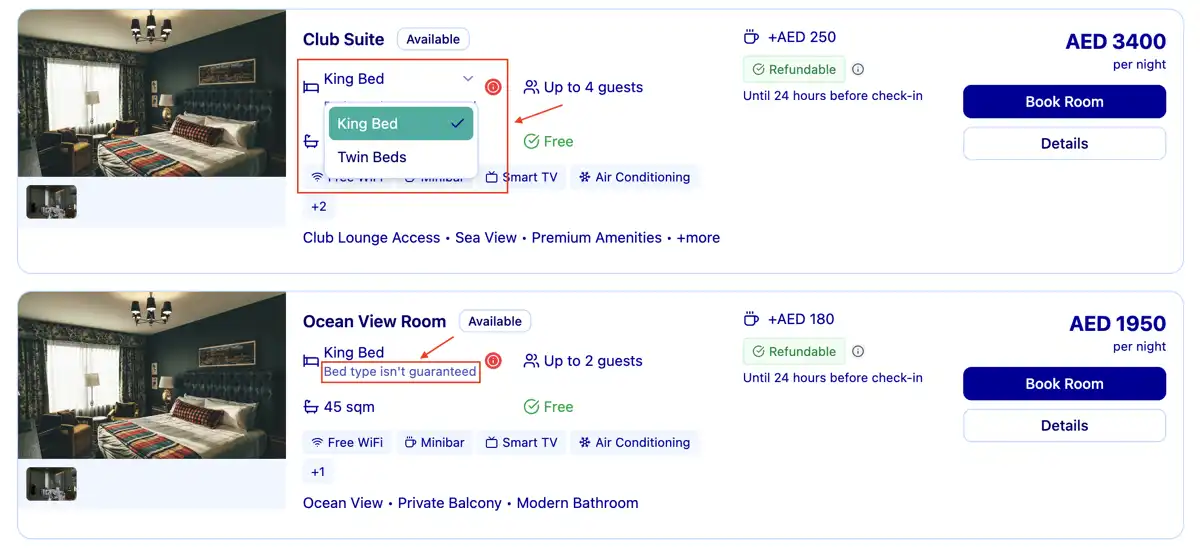
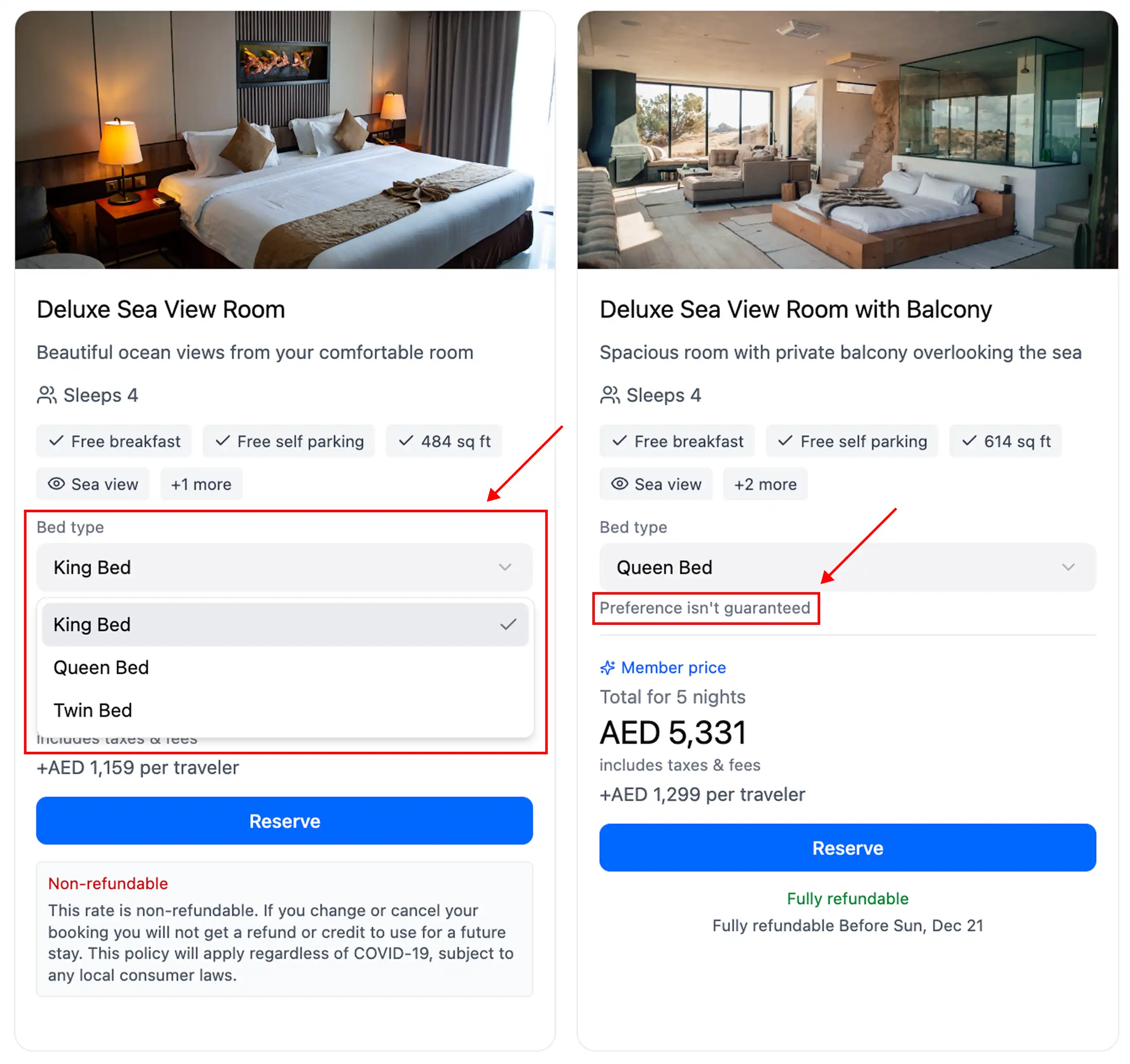
AP1: Bed type descriptions present for each room
Shopping responses may return the bed_groups array with a single value or multiple options. Display the values contained in the configuration array to describe the travelers's bed choice(s).
When the bed_groups array returns multiple options, display the price_check links provided by the Shopping response for each bed type to allow selection by the traveler.
Messaging must be displayed to the traveler that choices between multiple bed types for the same room are requests only and may not be honored at the hotel if availability does not permit.
Room names are returned within the Shopping response's rooms array as room_name.
Example API response
"property_id": "11775754",
"rooms": [
{
"id": "230434524",
"room_name": "Superior double room" ,
"rates": [
{
...
"bed_groups": {
"133243": {
"id": "133243",
"description": "Double bed" ,
"links": {...},
"configuration": [...]
},
"133242": {
"id": "133242",
"description": "2 single beds" ,
"links": {...},
"configuration": [...]
}
},Example user interface - B2B

Example user interface - B2C
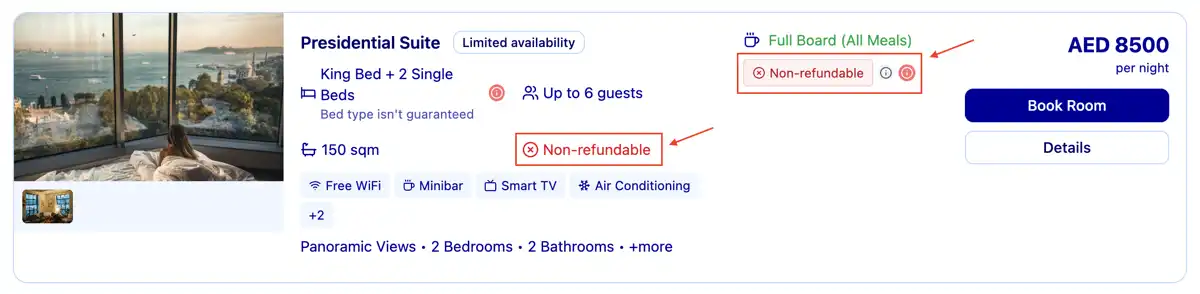
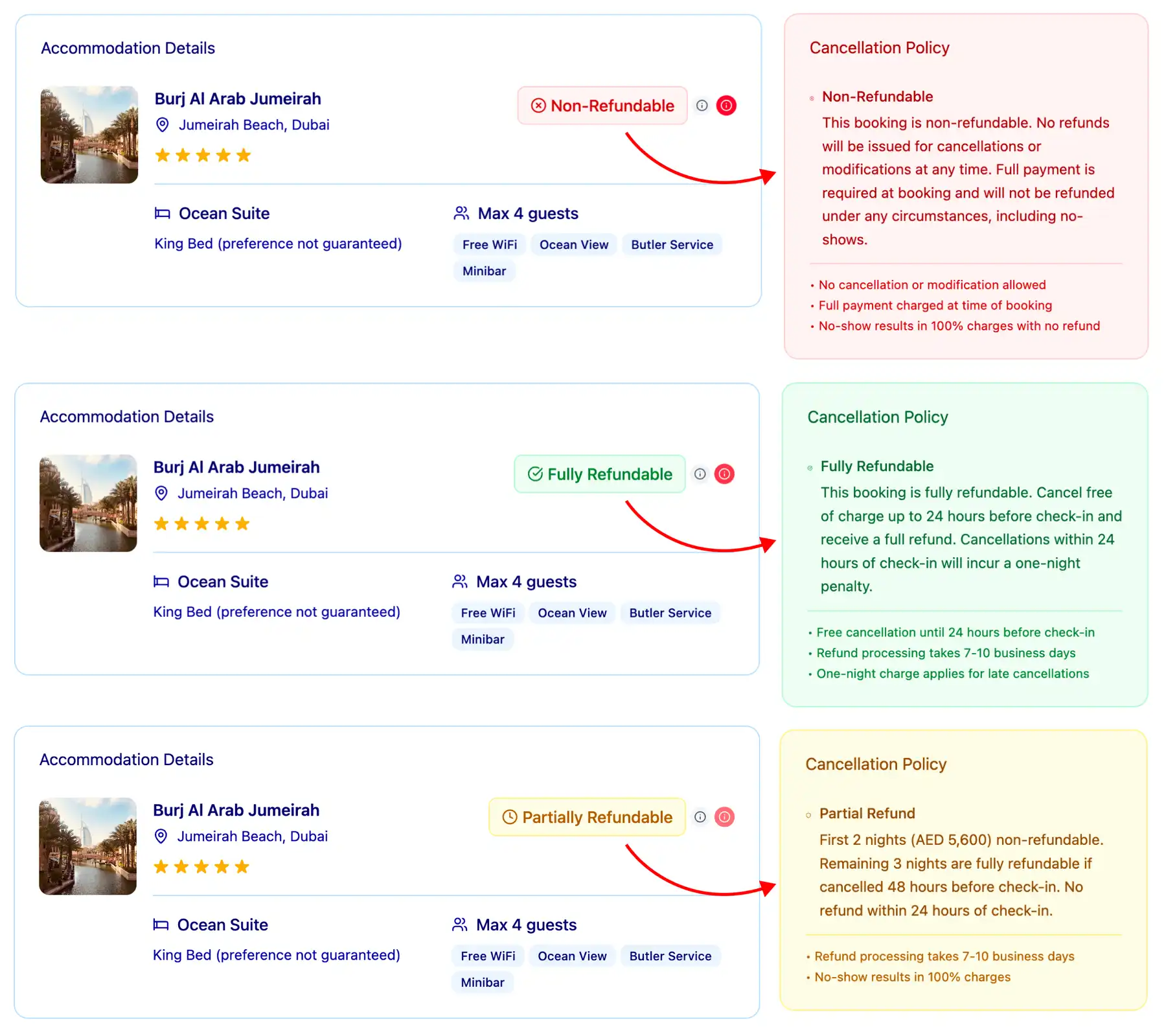
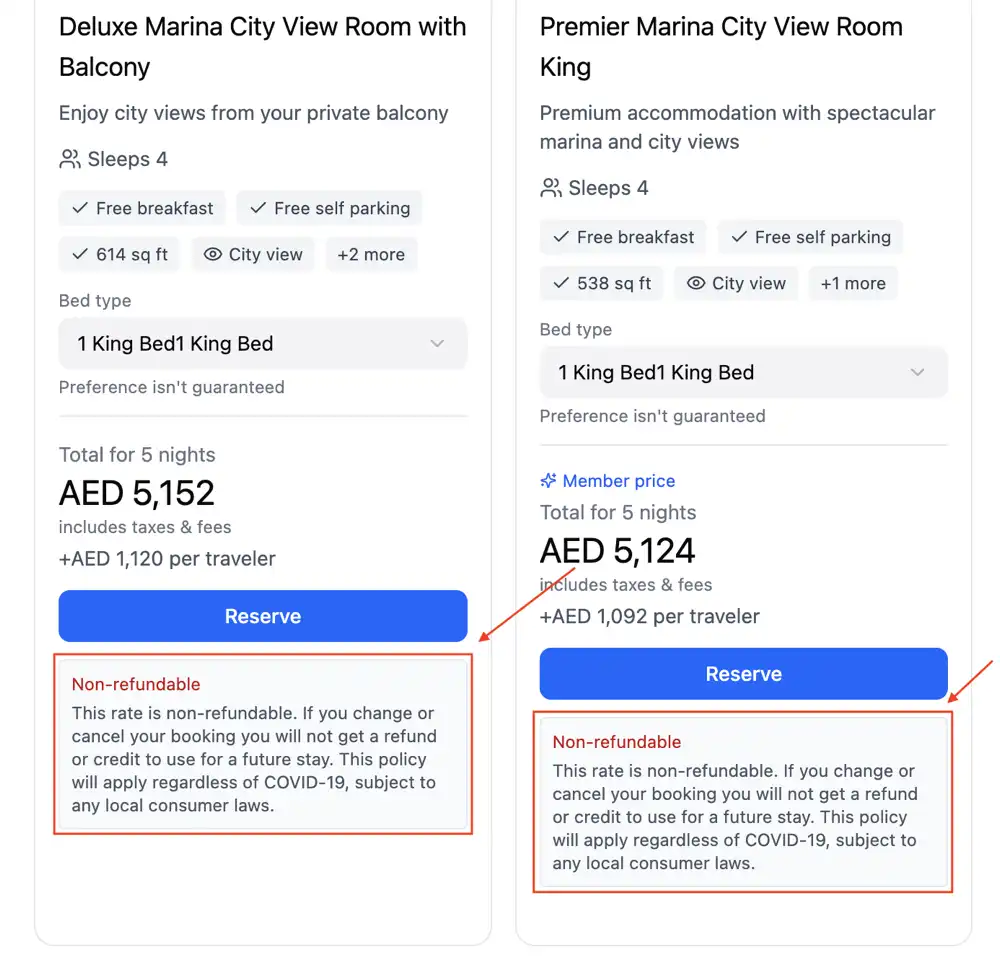
AP2: Non-refundable flag clearly visible
Non-refundable availabilities are indicated by refundable=false in the Shopping API availability response. When refundable=false is returned in an availability response, clearly label the applicable rooms. This value always takes precedence over any differing policy data. These reservations are not refunded by the property under any circumstances.
Example API response
"property_id": "XXXX",
"rooms":
"id": "XXXX",
"room_name": "Fairmont King",
"rates":
"id": "XXXX",
"status": "available",
"available_rooms": 4999,
"refundable": false ,
"deposit_required": false,
"merchant_of_record": "expedia",Example user interface - B2B

Example user interface - B2C
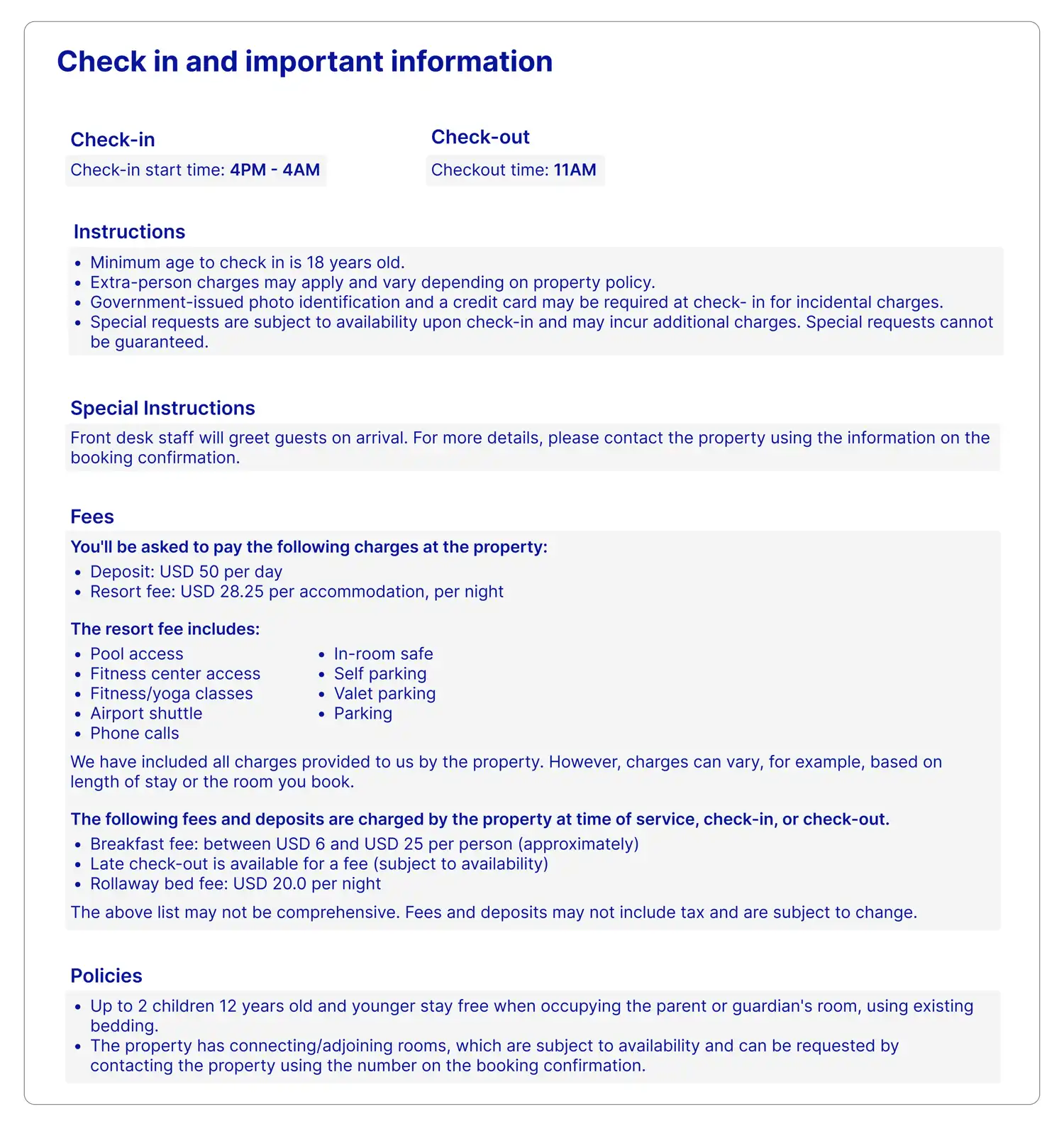
AP3: Check-in and special instructions displayed
The contents of the checkin, checkout, fees, and policies objects must be displayed for each room as returned in the Content API property definition. This information must be displayed on your availability page to ensure the traveler is aware of any potential fees at checkin or special access instructions.
The special check-in field may include information critical for check-in that is not included in the checkin object's instructions field, such as a requirement to notify the property of expected arrival time, check-in at a different location from the guest building, or an alert to expect special check-in instructions from the property via email.
Make sure to display both the instructions and special_instructions to the traveler within the same area.
Example API response
"11775754": {
"property_id": "11775754",
"checkin": {
"begin_time": "16:00 PM",
"end_time": "4:00 AM",
"instructions": "Minimum age to check in is 18 years old.
<br />Extra-person charges may apply and vary depending on property policy.
<br />Government-issued photo identification and a credit card may be required at
check- in for incidental charges.
<br />Special requests are subject to availability upon check-in and
may incur additional charges. Special requests cannot be guaranteed. <ul>. ",
"special_instructions": "Front desk staff will greet guests on arrival. For more details,
please contact the property using the information on the booking confirmation.",
"min_age": 18
"checkout": {
"time": "11:00 AM"
"fees": {
"mandatory": "<p>You'll be asked to pay the following charges at the property:</p>
<ul><li>Deposit: USD 50 per day</li>
<li>Resort fee: USD 28.25 per accommodation,
per night</li></ul> The resort fee includes:<ul
><li>Pool access</li><li>Fitness center access</li><li>Fitness/yoga classes</li>
<li>Airport shuttle</li><li>Phone calls</li><li>In-room safe</li><li>Self parking</li>
<li>Valet parking</li><li>Parking</li></ul> <p>We have included all charges provided to us by the property.
However, charges can vary, for example, based on length of stay or the room you book. </p>",
"optional": "<p>The following fees and deposits are charged by the property at time of service,
check-in, or check-out. </p> <ul> <li>Breakfast fee: between USD 6 and USD 25 per person
(approximately)</li> <li>Late check-out is available for a fee (subject to availability)</li>
<li>Rollaway bed fee: USD 20.0 per night</li>
</ul> <p>The above list may not be comprehensive. Fees and deposits may not include tax
and are subject to change. </p>"
"policies": {
"know_before_you_go": "<ul> <li>Up to 2 children 12 years old and younger stay free when
occupying the parent or guardian's room, using existing bedding. </li>
<li>The property has connecting/adjoining rooms, which are subject to availability
and can be requested by contacting the property using the number on the booking
confirmation. </li> </ul>"Example user interface

Booking page
Provide essential checkout details
BP1: SSL encryption present for personal data
When sending or transmitting personal data, you must use SSL encryption to secure connections between client browsers/applications and your site, as well as the network communications with dependent systems. Personal data includes guest names, phone numbers or emails, payment card details, and booking/itinerary receipts and confirmation pages. Stop or redirect the connection when it is not secured.
BP2: Check-in and special instructions displayed
The contents of the checkin, checkout, fees, and policies objects must be displayed for each room as returned in the Content property definition. This information must be displayed to ensure the traveler is aware of any potential fees at check-in or special access instructions before they finalize their booking.
The special check-in field may include information critical for check-in that is not included in the checkin object's instructions field, such as a requirement to notify the property of expected arrival time, check-in at a different location from the guest building, or an alert to expect special check-in instructions from the property via email.
Make sure to display both the instructions and special_instructions to the traveler within the same area.
BP3: Cancellation policy and non-refundable tag clearly displayed
Before allowing travelers to confirm their purchase on your final booking page, you must provide the cancellation policy or non-refundable tag for the selected room or rooms. The cancellation policy for each rate is provided within the cancel_penalties object in the Rapid Shopping Availability API.
For refundable rates, the response includes an array of cancellation policy details. The details include the start date and end date of the specified penalty as well as the penalty type and value, and any exception booking dates that apply. The penalty types include a fixed amount, number of nights, and percentage of total cost.
| Response | Meaning |
|---|---|
refundable=true | This rate is fully refundable. |
refundable=true + cancel_penalties | • This rate is refundable during the cancellation timeframe. • The earliest cancel_penalties.[].start is the free cancellation deadline, if it is a future timeline.• The rate is 100% non-refundable after the latest cancel_penalties.[].end |
refundable=false | • This rate is non-refundable. • No cancel penalty window is returned. |
refundable=false + cancel_penalties | • The rate can be partially refundable. • cancel_penalties should be shown in conjunction with nonrefundable_date_ranges which will show the stay dates of this range are non-refundable once the booking is created. |
Read more about how to construct cancellation policies.
Reference:
refundable=false
- A non-refundable amount will incur immediately once the booking is created.
cancel_penaltiesandnonrefundable_date_rangeswill provide more details.
nonrefundable_date_ranges
- The stay dates of this range are non-refundable once the booking is created.
cancel_penalties
- Applicable to the stay dates that are not involved in
nonrefundable_date_ranges. - The rate is 100% non-refundable when
cancel_penaltiesis empty or not returned. - A penalty will incur when canceling during the time frame of
cancel_penalties. - The earliest
cancel_penalties.[].startis the free cancellation deadline, if it is a future timeline. - The rate is 100% non-refundable after the latest
cancel_penalties.[].end.
Example API Response: Cancellation policy and non-refundable flag
"property_id": "11775754",
"rooms": [
{
"id": "230434524",
"room_name": "Traditional Room (Partner:Connect Test)",
"rates":
"id": "276321199",
"status": "available",
"available_rooms": 4999,
"refundable": true,
"cancel_penalties": [
{
"start": "2020-09-10T18:00:00.000-07:00",
"end": "2020-09-11T18:00:00.000-07:00",
"amount": "76.00",
"currency": "USD"Example user interface

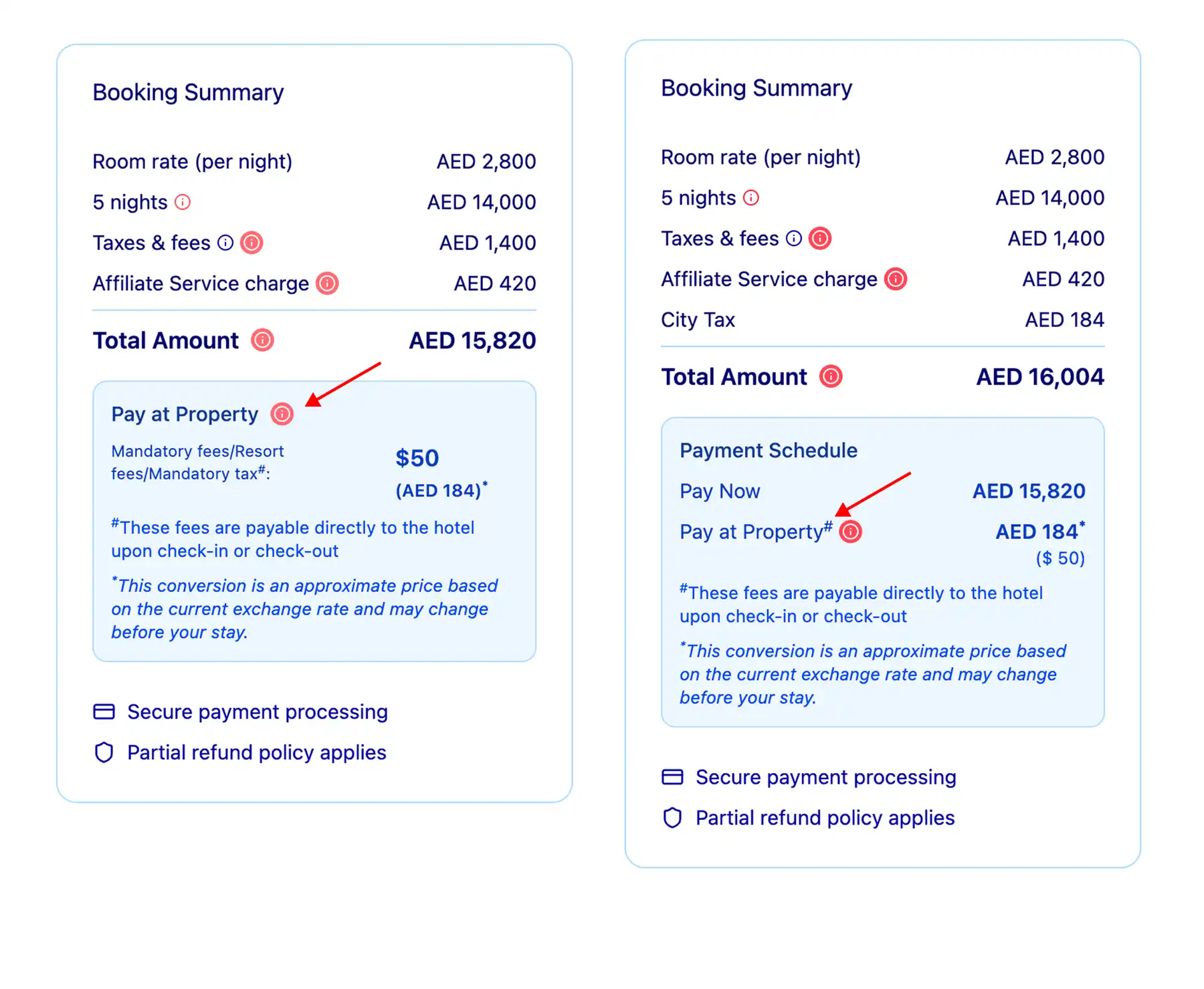
BP4: Charges due separately at the property displayed within the price breakdown
When charges are returned in the fees array, display each value separately as a charge due at the property (check-in or check-out). Present the traveler the local currency and request currency. These charges are collected directly by the property (not by us or local government) and are not part of standard tax recovery charges, taxes, or fees included in the taxes and fees line.
Example API response: Fees array
"fees" : {
"resort_fee": {
"request_currency": {
"value": "74.97",
"currency": "USD"
},
"billable_currency": {
"value": "74.97",
"currency": "USD"
},
"scope": "per_accommodation",
"frequency": "per_night"
}
},Example user interface

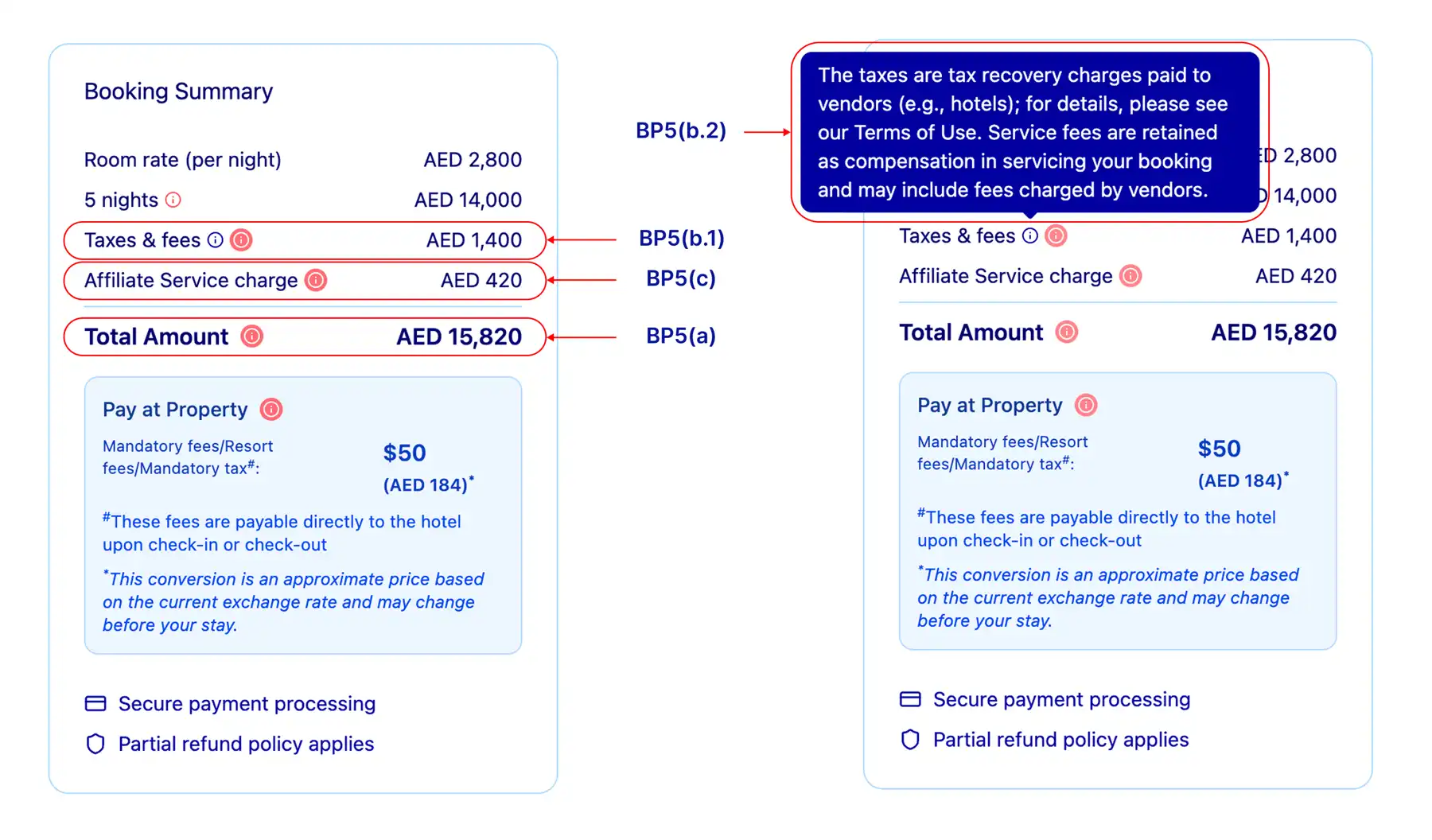
BP5: Price display must include the total price and a breakdown of the taxes and fees
A) Total price
The total price for the booking must be displayed to the traveler on the checkout page. The total price should match the API response, with no rounding or currency conversion permitted. The final breakdown must include room rates (total or per night), any additional nightly fees (except those in the property_fee field described below), all stay amounts and taxes, a chargeable total, and set out what is paid now and what is to be paid later at the property.
Note: Additional price display requirements apply for B2B or B2C package rates and exposed package rates implementations.
B) Tax breakdown
Price display must include the sum of tax_and_service_fee and property_fee as one line titled "Taxes and fees". The exact text below is legally required to be displayed when referring to any taxes and fees totals within the price breakdown. This can be displayed as a pop-up, plain text, modal, or other implementation. Property fee should not be displayed separately on the checkout page.
"The taxes are tax recovery charges paid to vendors (e.g. hotels); for details, please see our Terms of Use. Service fees are retained as compensation in servicing your booking and may include fees charged by vendors.” Translations can be found on Expedia Partner Solutions.
The value returned for tax_and_service_fee only includes taxes and fees mandated by a tax jurisdiction.
C) Partner service and booking charges
To the extent that Expedia Group grants a waiver to permit additional service or booking charges, they must be clearly separated. If your organization imposes a service charge that is added to the booking, it must be clear to the traveler that the charge is levied by you, and not by Expedia Group for a separate service (that is, not a further charge for the provision of accommodation). Charges may not be included inside of existing taxes and fees line items. Do not use the word "fee" to describe any charge imposed by your property. Instead, you may use "affiliate booking charge" or "affiliate service charge."
Note: Additional requirements apply for B2B or B2C property collect and exposed package rates implementations.
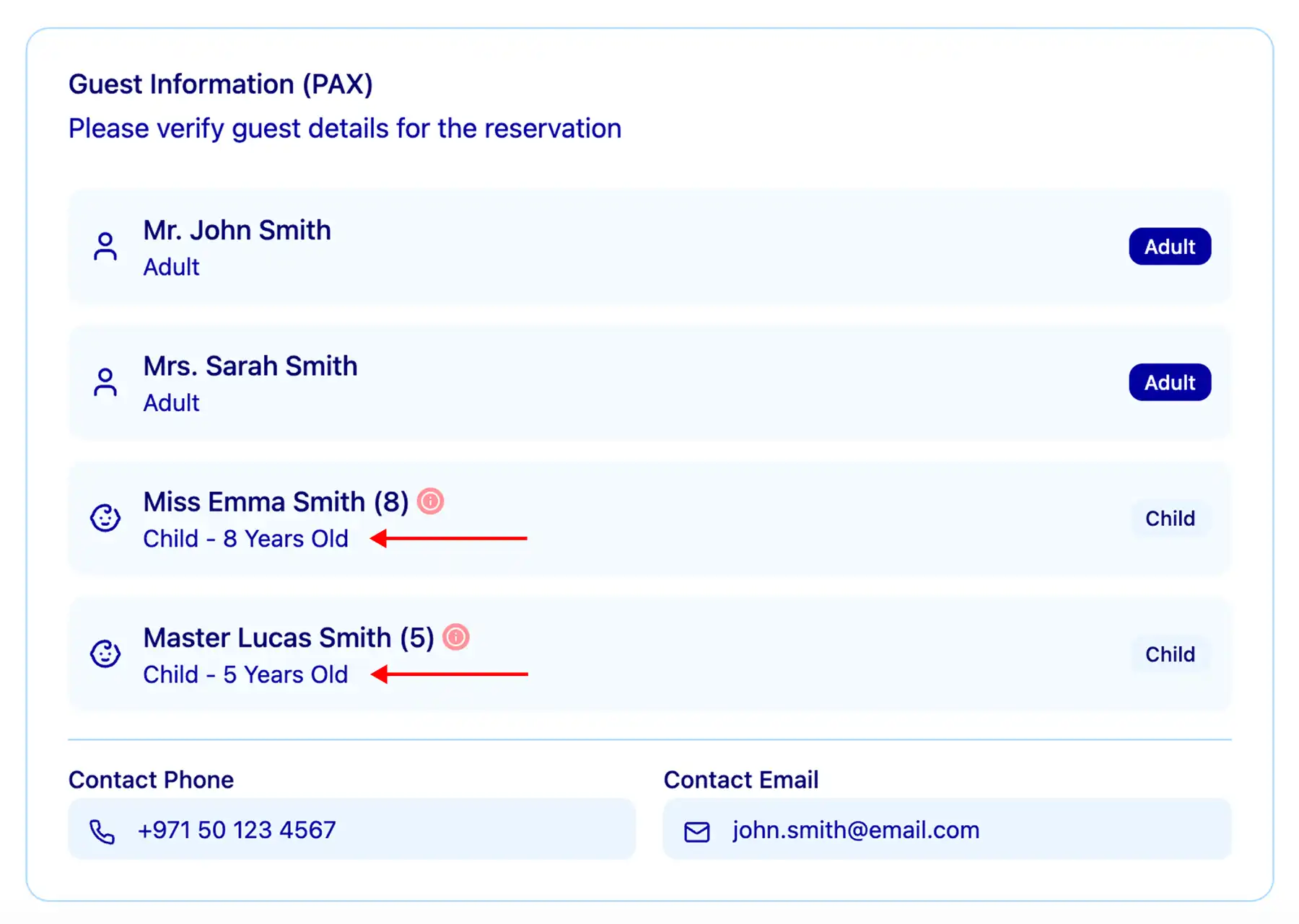
BP7: Child ages are reiterated (if applicable)
If your integration permits child travelers and the traveler specified child travelers for their room selection, you must clearly confirm the number of child travelers and their ages on your booking pages. This information is provided via the child_ages object.
Example user interface
BP8: Statement of when payment will be taken from the end traveler (for property collect or when Expedia Group is the MOR)
If Expeda Group is the MOR, state that the credit card provided will be charged immediately for the full amount of the reservation.
If Property Collect, state that the credit card provided will be charged by the property at check-in or check-out. If the property is serving a non-refundable post-pay rate, instead indicate that the traveler could be charged by the property shortly after completing the booking.
BP9: Compliant with SCA regulation
Regulatory agencies and card networks are introducing new requirements to strengthen security for online payments and protect consumers from fraud. Many of these regulations have included the requirement to use strong customer authentication (SCA) for online payments.
Learn more about strong customer authentication (SCA)
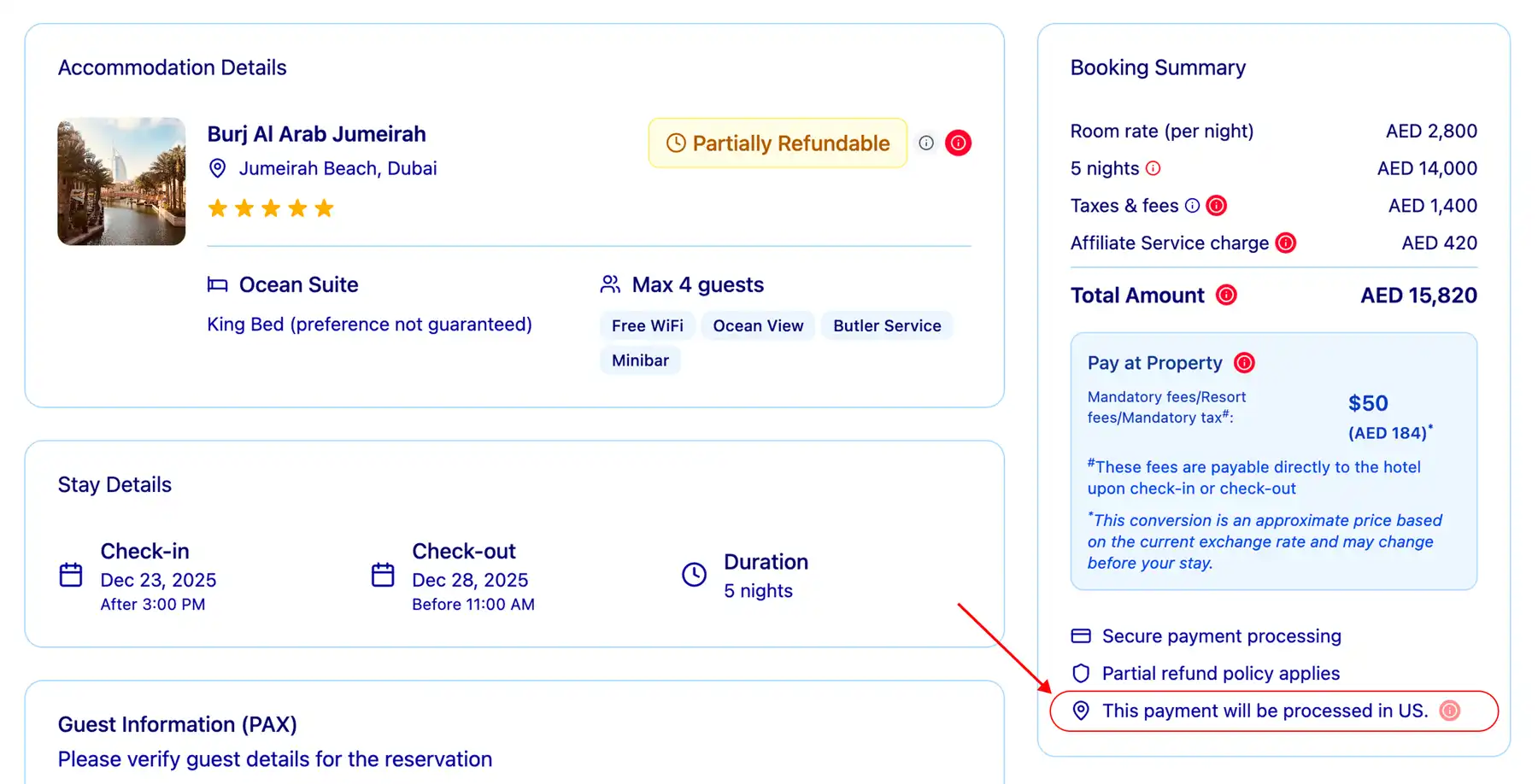
BP10: Payment processing location displayed on check-out pages when Expedia Group is MOR
Where Expedia Group is the MOR, the country where the payment will be processed must be displayed in a prominent place on the check-out page. The phrase “This payment will be processed in” must be inserted before the country name.
Use the payment options function of the Shopping API to retrieve this information.
Example API request for payment options
https://api.ean.com/<payment-options link from previous availability request>
Example API response
"credit_card": {
"name": "Credit Card",
"card_options": [
"name": "MasterCard",
"processing_country": "US"
"name": "Visa",
"processing_country": "US"Example user interface

Confirmation page
Share the important information about the booking
CP1: Price display must include the total price as well as taxes and fees if a breakdown is provided
A) Total price
The total price for the booking must be displayed to the traveler on the confirmation page. The total price should match the API response, with no rounding or currency conversion permitted. The final breakdown must include room rates (total or per night), any additional nightly fees (except those in the property_fee field described below), all stay amounts and taxes, a chargeable total, and set out what is paid now and what is paid later at the property.
Note: Additional price display requirements apply for B2B or B2C package rates implementations.
B) Tax breakdown
Price display must include the sum of tax_and_service_fee and property_fee as one line titled "Taxes and fees". The exact text below is legally required to be displayed when referring to any taxes and fees totals within a price breakdown. This can be displayed as a pop-up, plain text, modal, or other implementation. Property fee should not be displayed separately on the checkout page.
“The taxes are tax recovery charges paid to vendors (e.g. hotels); for details, please see our Terms of Use . Service fees are retained as compensation in servicing your booking and may include fees charged by vendors.” Translations can be found on Expedia Partner Solutions.
The value returned for tax_and_service_fee only includes taxes and fees mandated by a tax jurisdiction.
C) Partner service and booking charges
To the extent that Expedia Group grants a waiver to permit additional service or booking charges, they must be clearly separated. If your organization imposes a service charge that is added to the booking, it must be clear to the traveler that the charge is levied by you, and not by Expedia Group for a separate service (that is, not a further charge for the provision of accommodation). Charges may not be included inside of existing taxes and fees line items. Do not use the word "fee" to describe any charge imposed by your property. Instead, you may use "affiliate booking charge" or "affiliate service charge."
Note: Additional price display requirements apply for B2B or B2C property collect implementations.
Confirmation email or voucher
Provide the traveler booking information for reference
If you will provide a hosted voucher within a mobile application, you must follow the requirements below.
ER1: Itinerary IDs displayed properly
Customer Direct Support (CDS) only
If your integration will provide our itinerary_id directly to the traveler, you must clearly display this number on your confirmation email.
If applicable, you must provide evidence that your agents have access to the our original itinerary IDs should they require assistance from our customer support.
Agent to Agent (A2A) support
Your agents should have access to their original itinerary IDs should they require assistance from our customer support.
ER2: Customer support clearly displayed, including links to online customer service tools
Clearly display your customer support channels within the booking flow or within the confirmation email e.g. telephone number or live chat. If our agents will be providing direct support to your travelers, display the our support number in your booking flow.
ER3: Bed type descriptions present on each room
Confirm the traveler-requested bed type in your confirmation email/voucher and display messaging to the traveler that choices between multiple bed types for the same room are requests only and may not be honored at the hotel if availability does not permit.
Display the values contained in the configuration array to describe the traveler's bed choice(s).
ER4: Check-in and special instructions displayed
The contents of the checkin, checkout, fees, and policies objects must be displayed for each room as returned in the property content definition. This information must be displayed on your availability page to ensure the traveler is aware of any potential fees at check-in or special access instructions.
The special check-in field may include information critical for check-in that is not included in the checkin object's instructions field, such as a requirement to notify the property of expected arrival time, check-in at a different location from the guest building, or an alert to expect special check-in instructions from the property via email.
Make sure to display both the instructions and special_instructions to the traveler within the same area.
ER5: Charges due separately at the property displayed within the price breakdown
When charges are returned in the fees array, display each value separately as a charge due at the property (check-in or check-out). These charges are collected directly by the property (not us or local government) and are not part of standard tax recovery charges.
ER6: Price display must include the total price and breakdown of the taxes and fees
A) Total price
The total price for the booking must be displayed to the traveler on the email receipt. The total price should match the API response, with no rounding or currency conversion permitted. The final breakdown must include room rates (total or per night), any additional nightly fees (except those in the property_fee field described below), all stay amounts and taxes, a chargeable total, and set out what is paid now and what is paid later at the property.
Note: Additional price display requirements apply for B2B or B2C package rates and exposed package rates implementations.
B) Tax breakdown
Price display must include the sum of tax_and_service_fee and property_fee as one line titled "Taxes and fees". The exact text below is legally required to be displayed when referring to any taxes and fees totals within a price breakdown. This can be displayed as a pop-up, plain text, modal, or other implementation. Property fee should not be displayed separately on the checkout page.
“The taxes are tax recovery charges paid to vendors (e.g. hotels); for details, please see our Terms of Use. Service fees are retained as compensation in servicing your booking and may include fees charged by vendors.” Translations can be found on Expedia Partner Solutions.
The value returned for tax_and_service_fee only includes taxes and fees mandated by a tax jurisdiction.
C) Partner service and booking charges
To the extent that Expedia Group grants a waiver to permit additional service or booking charges, they must be clearly separated. If your organization imposes a service charge that is added to the booking, it must be clear to the traveler that the charge is levied by you, and not by Expedia Group for a separate service (that is, not a further charge for the provision of accommodation). Charges may not be included inside of existing taxes and fees line items. Do not use the word "fee" to describe any charge imposed by your property. Instead, you may use "affiliate booking charge" or "affiliate service charge."
Note: Additional price display requirements apply for B2B or B2C property collect implementations.
Technical requirements
Behind-the-scenes requirements
TR1: Provide unique affiliate reference ID with each booking request
For every booking request you must use the affiliate_reference_id element with the intent of:
- Your own tracking.
- Preventing duplicate bookings/duplicate charges from multiple form submissions.
- Checking our systems for an itinerary if the reservation timed out or returned an empty result due to upstream timeouts.
Example
{
"affiliate_reference_id": "Launch_Requirement_TR1" ,
"hold": false,
"email": "TR4@Launch.Requirement",
"phone": {
"country_code": "Launch_Requirement_TR5b",
"number": "Launch_Requirement_TR5b",
"area_code": "Launch_Requirement_TR5b"
},
"rooms": [
{
"given_name": "John_Launch_Requirement_TR5a",
"family_name": "Doe_Launch_Requirement_TR5a,
"smoking": false,
},
{
"given_name": "David_Launch_Requirement_TR5a",
"family_name": "Smith_Launch_Requirement_TR5a",
"smoking": false,
}
],TR2: Provide the traveler's country code with each request
- The traveler's
country_codemust be passed in API requests for Shopping and Recommendations. The country code must match the point of sale being accessed by the traveler. - This requirement ensures our systems provide travelers with relevant content and the most suitable rates based on the sales market.
Example API request
https://api.ean.com/2.4/properties/availability?checkin=2020-09-11
&checkout=2020-09-14
¤cy=USD&language=en-US&occupancy=2-3,4&property_id=XXXX
&country_code=XX&sales_channel=XXXX
&sales_environment=XXXX&filter=XXXX&rate_plan_count=XXXX
&rate_option=XXXX&billing_terms=XXXX&payment_terms=XXXX
&partner_point_of_sale=XXXX&platform_name=XXXXTR3: Provide billing information with each request
A) Payor name
For traveler, corporate, and virtual card:
- You must send the name of the cardholder whose card is being charged by us.
For Expedia Affiliate Collect (EAC) Partners:
- Wherever possible, Expedia Group strongly recommends that you send the name of the actual end payor for the booking.
- This information is required for regulatory/sanctions screening purposes.
- If it's not possible to provide the name of the actual end payor, provide the name of the company or legal entity that is paying us.
Note: If the POS is Russia, Ukraine, or Venezuela then true payor information is always required.
B) Billing country
- Must represent the individual name passed in the billing contact/payor name field.
C) Billing ZIP code
- Must represent the individual name passed in the billing contact/payor name field.
Note: For countries that do not maintain a ZIP code, this information does not need to be provided.
Example
"payments": [
{
"type": "customer_card",
"billing_contact": {
"given_name": "Launch_Requirement_TR3a",
"family_name": "Launch_Requirement_TR3a",
"address": {
"line_1": "555 1st St",
"line_2": "10th Floor",
"line_3": "Unit 12",
"city": "Seattle",
"state_province_code": "WA",
"postal_code": "Launch_Requirement_TR3c",
"country_code": "Launch_Requirement_TR3b"
}
},TR4: Provide the traveler email address or monitored email mailbox
The email element of each itinerary must contain the traveler email address or the mailbox your integration monitors for confirmation email handling. This is required for cases of booking disputes or troubleshooting.
TR5: Provide accurate traveler information
A) Traveler name
Bookings must always be submitted with the name of the actual travelers staying in each booked room. This means that in your booking request body the values for given_name and family_name within the rooms object must match the first and last name of the main guest checking in for each room.
B) Traveler phone number
The booking must include a viable contact number for the traveler. Include this number in your booking request's phone field of each itinerary. Expedia Group will not contact the traveler if the your agents provide direct support to your travelers.
TR6: Provide multi-room booking information
If multi-room bookings are supported, provide the API request and response logs for a test booking which shows each room has been booked and cancelled.
Each room that is booked will create a separate Confirmation ID, which allows the rooms to be cancelled separately. To cancel all rooms, complete a cancellation call for every confirmation ID within the itinerary.
Expedia Group do not directly offer group bookings of more than 8 rooms through our API or template. Your account manager can advise you if you need to book more than 8 rooms.
TR7: Review error handling recommendations
Please confirm you have reviewed our error handling recommendations and implemented logic to handle them.
B2B implementation specifics
You can find a checklist to help support your development or to provide feedback on the requirements. If you provide screenshots for your site review, you should also add them and the corresponding logs in the checklist to help us complete your review.
General requirements
Use Expedia information correctly
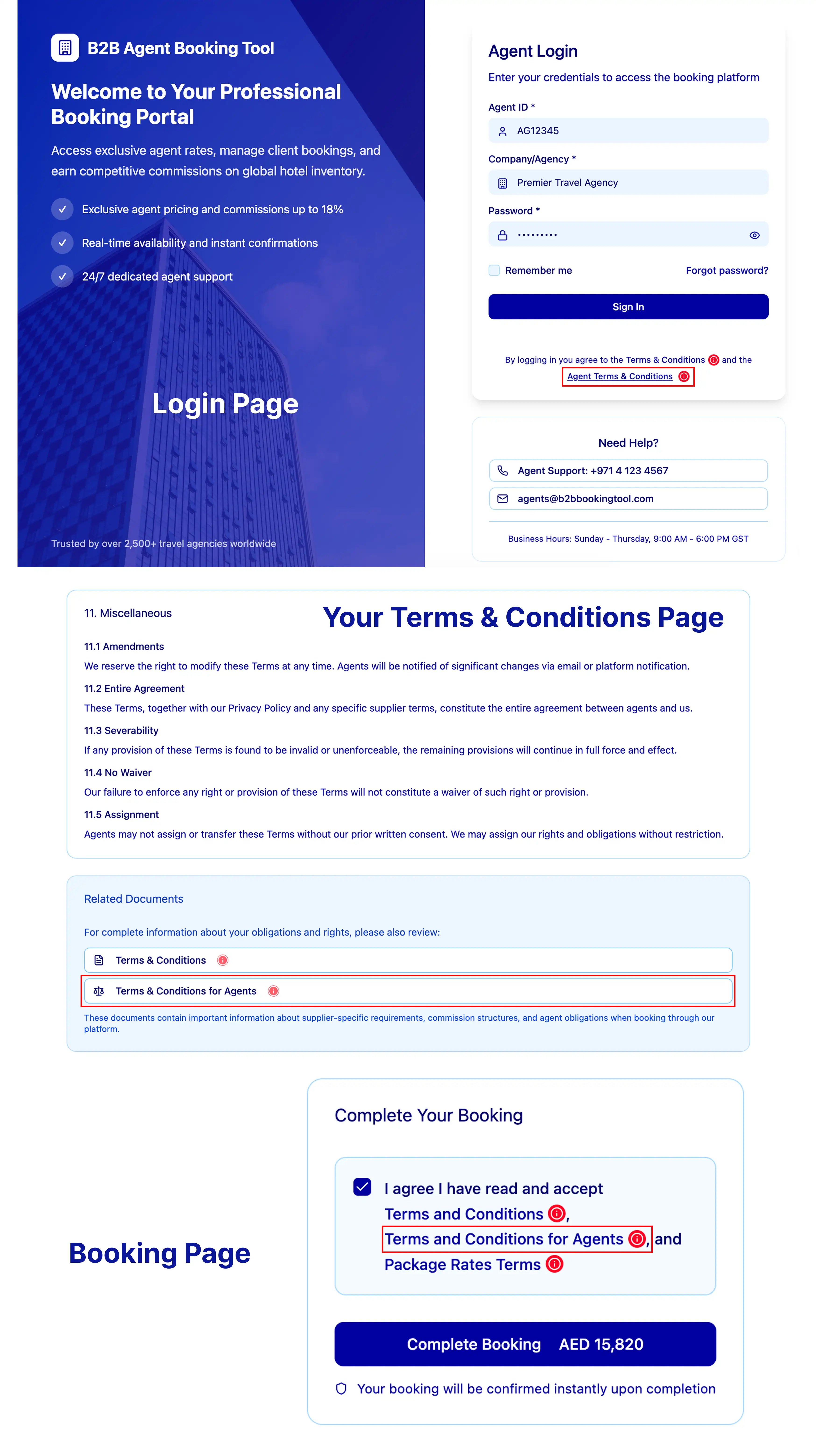
GR3: Downstream agents must agree to our Agent Terms and Conditions for accessing our inventory
Agents making a booking on behalf of a traveler must agree to our downstream agent agreement. A link to the downstream agent agreement should be provided for agents to review and accept prior to making a booking. Other versions are available on Expedia Partner Solutions.
Example user interface

Additional package rates requirements
In addition to the common requirements listed above, if you are including a package rates element to your implementation, you must also meet these requirements.
Property or room availability
Display standard information about the booking
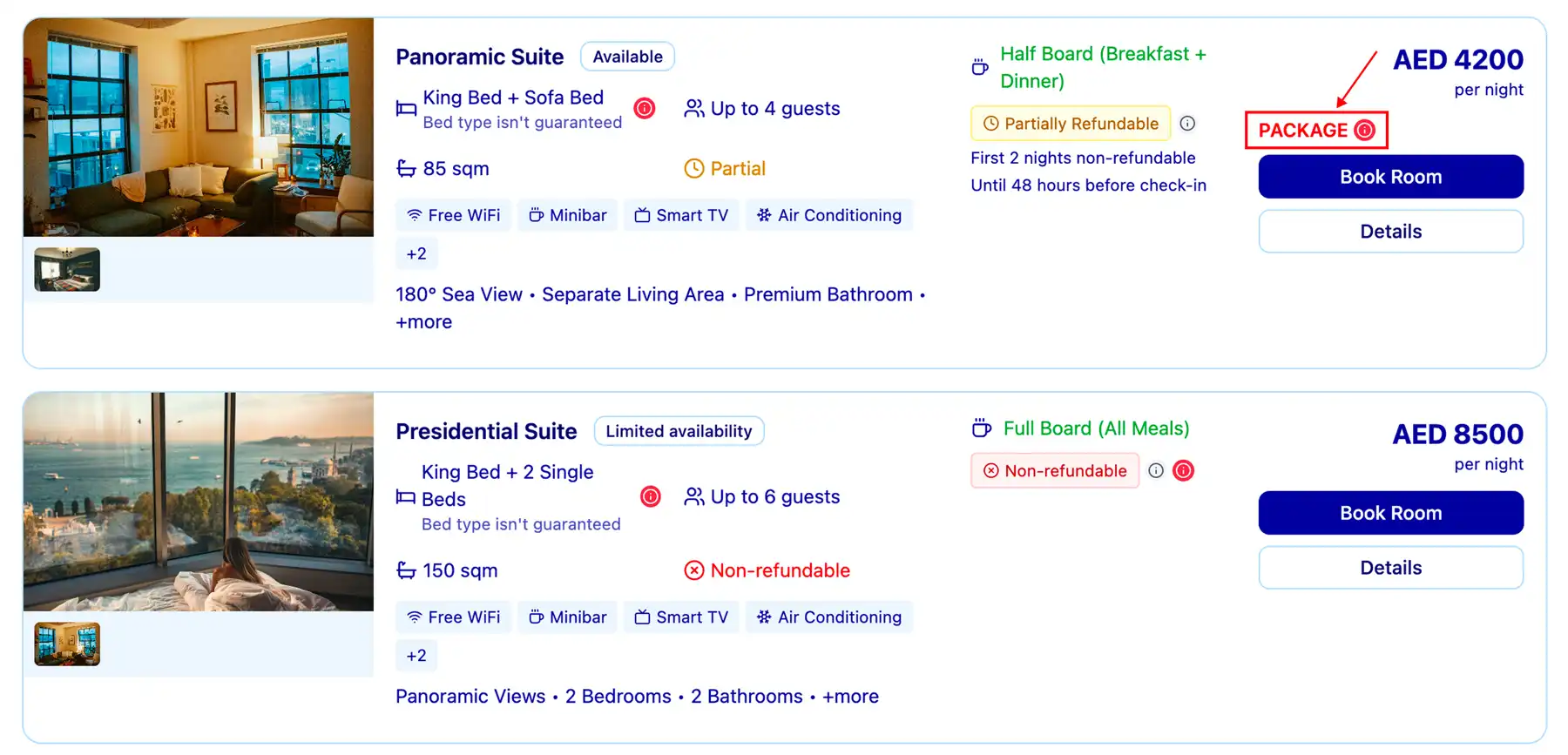
AP4: Display package rates with a unique label or identifier
You must clearly identify that the Expedia Group Package Rate as a package rate (not separate items) at the room level.
Example user interface
Booking page
Provide essential checkout details
BP5: Price display must include the total price and a breakdown of the taxes and fees
The total price requirement for package rates is different from the common requirements listed above.
A) Total price
Package pricing must be combined with the price of the transport component to display one total package price. This is typically achieved by displaying a per-person cost for the property plus transport.
The total price for the booking must be displayed to the traveler on the checkout page. The total price should match the API response, with no rounding or currency conversion permitted.
Example user interface

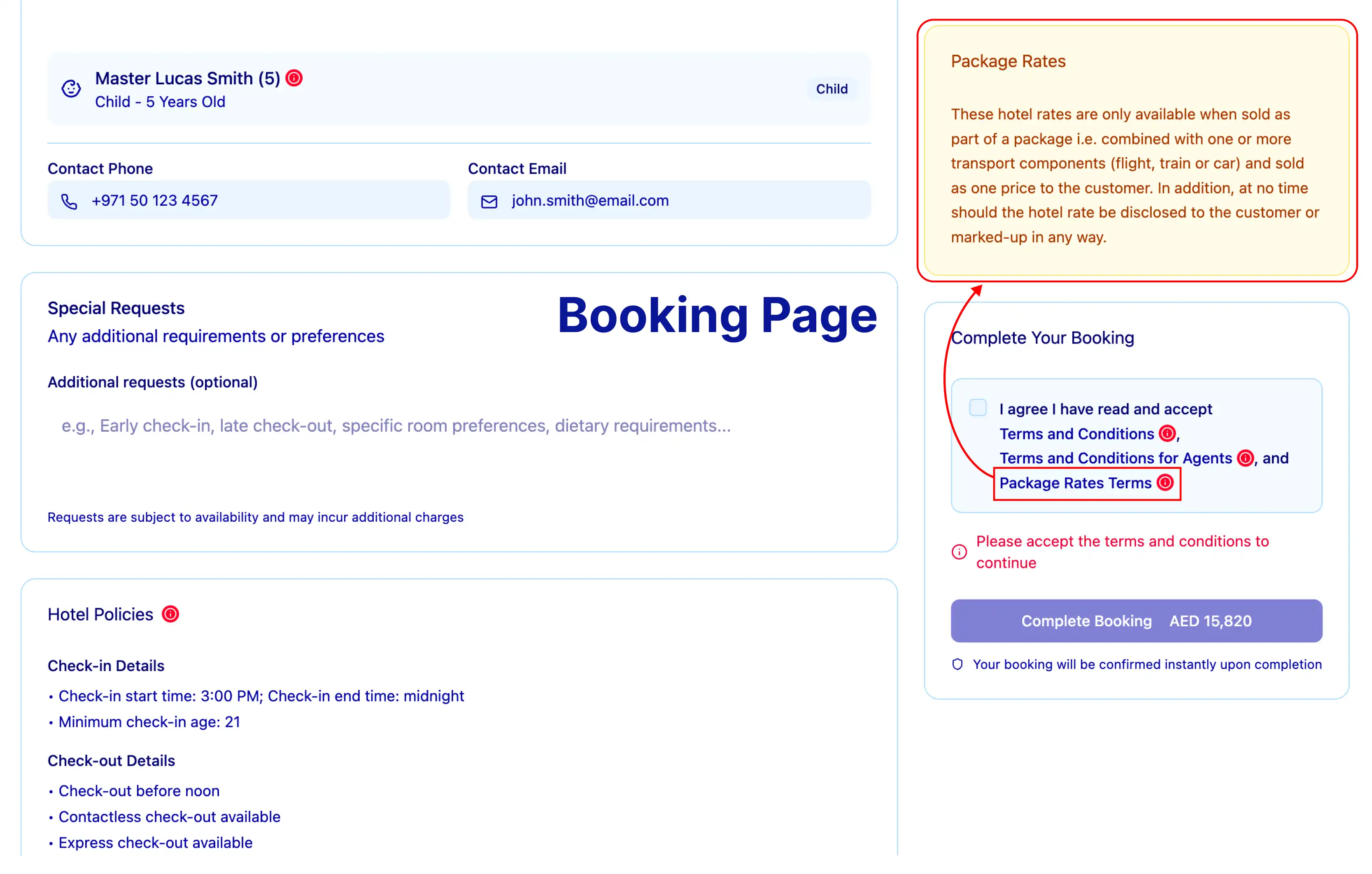
BP11: Require agents to accept package rate rules
Include a checkbox on your checkout page where the agent acknowledges they are selling this rate together with an approved transport component.
Example user interface
Confirmation page
Share the important information about the booking
CP1: Price display must include the total price and a breakdown of the taxes and fees
The total price requirement for package rates is different from the common requirements listed above.
A) Total price
Package pricing must be combined with the price of the transport component to display one total package price. This is typically achieved by displaying a per-person cost for the property plus transport.
The total price for the booking must be displayed to the traveler on the confirmation page. The total price should match the API response, with no rounding or currency conversion permitted.
Confirmation email or voucher
Provide the customer booking information for reference
ER6: Price display must include the total package price as well as taxes and fees if a breakdown is provided
The total price requirement for package rates is different from the common requirements listed above.
A) Total price
Package pricing must be combined with the price of the transport component to display one total package price. This is typically achieved by displaying a per-person cost for the property plus transport.
The total price for the booking must be displayed to the traveler on the email receipt. The total price should match the API response, with no rounding or currency conversion permitted.
Additional property collect requirements
In addition to the common requirements listed above, if you are including property collect to your implementation, you must also meet these requirements.
General requirements
Use Expedia information correctly
GR6: Agents must support the property's cancellation process
With a property collect (or pay later) booking, the property acts as MOR. They will verify the payment card provided at the time of booking. If the payment fails or they are unable to confirm that the card is valid, the property will attempt to reach out to the agent for a valid payment method. If the property does not receive any response they can cancel the booking up to 14 days before check-in.
Once a booking is cancelled, a supplier cancellation notification will be sent to the booking contact method. The message needs to be shared with the traveler so that they can rebook.
Agents should provide a specific, monitored contact method for these communications to be sure the notifications are received in a timely manner. A lack of response from a generic or unmonitored contact method can increase the traveler's risk.
Booking page
Provide essential checkout details
BP5: Price display must include the total price and a breakdown of the taxes and fees
In addition to the common requirements listed above, a property collect implementation must display information about the deposit policy.
D) Deposits
When collecting a deposit on a property collect booking, you must display the deposit policy and payment schedule to the traveler.
Confirmation page
Share the important information about the booking
CP1: Price display must include the total price as well as taxes and fees if a breakdown is provided
In addition to the common requirements listed above, a property collect implementation must display information about sales tax and the deposit policy.
C) Sales tax
When sales_tax for your B2B property collect implementation is returned by the nightly array, display it separately within the charge breakdown. This item details taxes collected by local municipalities or states and must be displayed per local laws.
E) Deposits
When collecting a deposit on a property collect booking, you must display the deposit policy and payment schedule to the traveler.
Confirmation email or voucher
Provide the traveler booking information for reference
ER6: Price display must include the total price and breakdown of the taxes and fees
In addition to the common requirements listed above, a property collect implementation must display information about sales tax and the deposit policy.
C) Sales tax
When sales_tax for your B2B property collect implementation is returned by the nightly array, display it separately within the charge breakdown. This item details taxes collected by local municipalities or states and must be displayed per local laws.
E) Deposits
If your B2B implementation will use our property collect deposits, you must display the deposit policy and payment schedule to the traveler.
ER8: Confirmation emails should state that payment will be taken by the property
The traveler's email confirmation must state that their reservation is secured and that the property will collect payment at check-in. If the booking is for a nonrefundable property collect rate, the email should indicate that the traveler could be charged by the property shortly after completing the booking.
B2C implementation specifics
We've created a checklist to help support your development or to provide feedback on the requirements. If you provide screenshots for your site review, you should also add them and the corresponding logs in the checklist to help us complete your review.
General requirements
Use Expedia information correctly
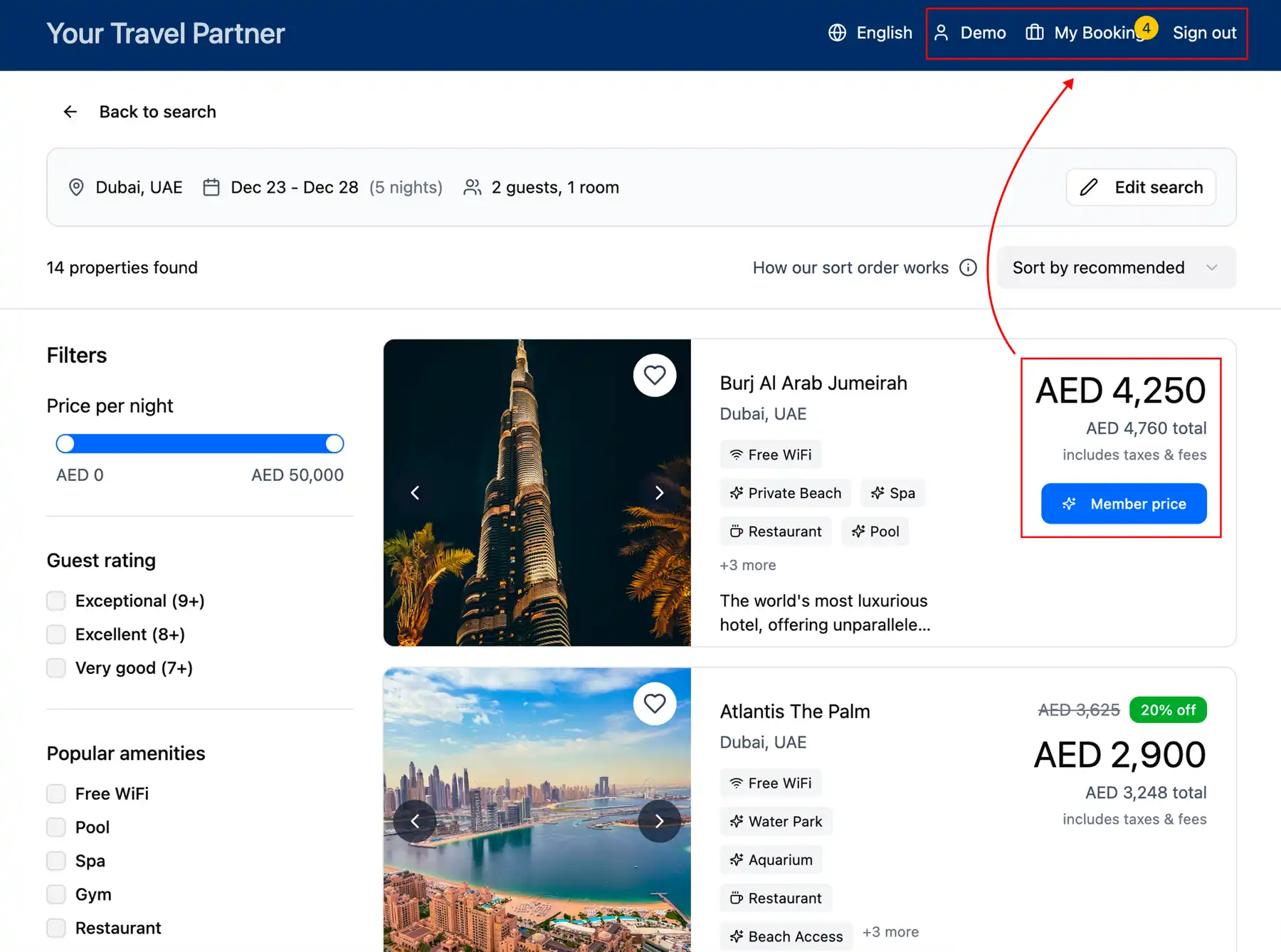
GR10: Provide appropriate access to member-only deals
Member-only deals are to be sold exclusively in a closed-user environment (for example, via login to a site, mobile app, or agent tool).
Example user interface
Additional package rate requirements
In addition to the common requirements listed above, if you are including a package rate element to your implementation, you must also meet these requirements.
Booking page
Provide essential checkout details
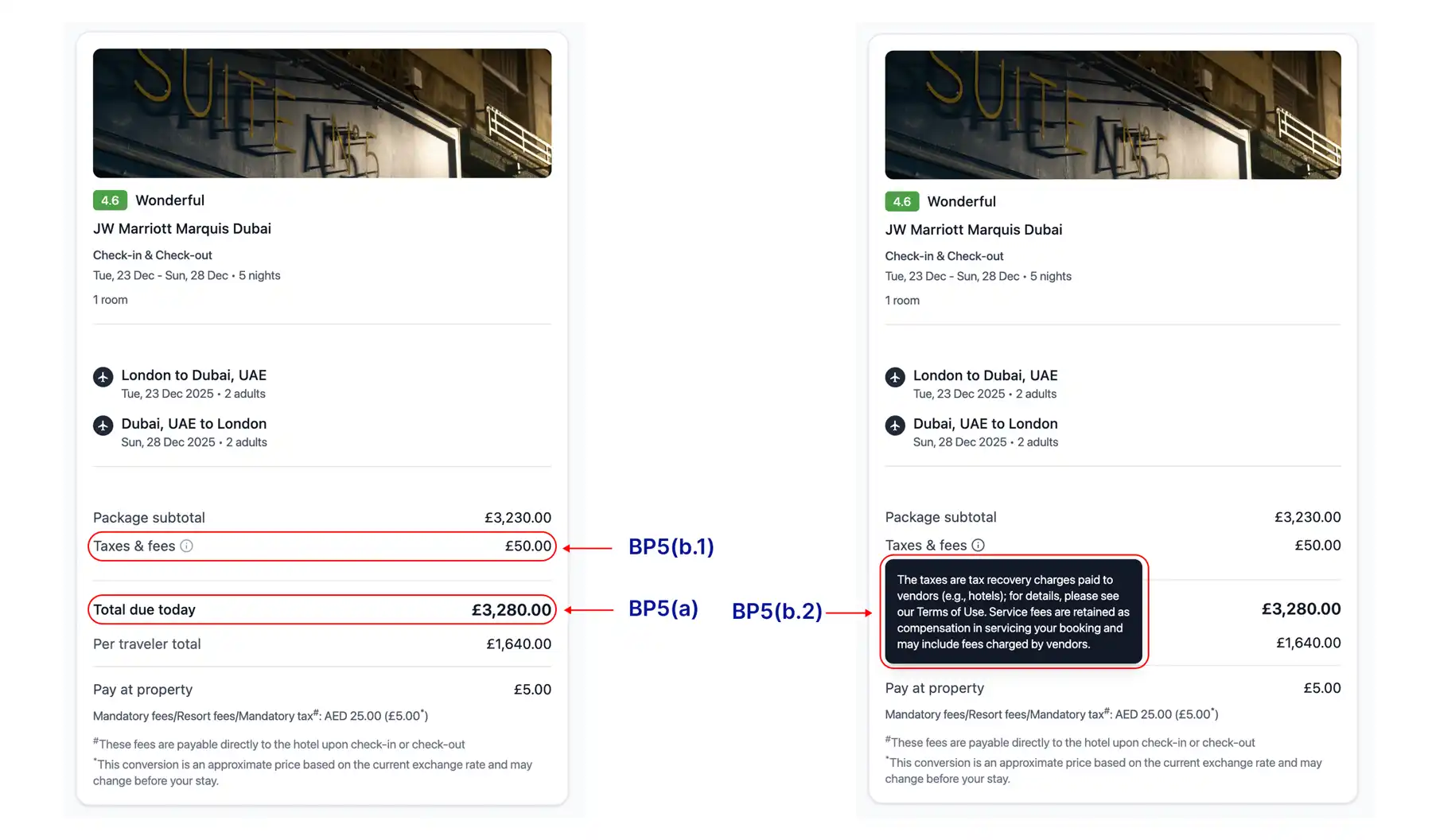
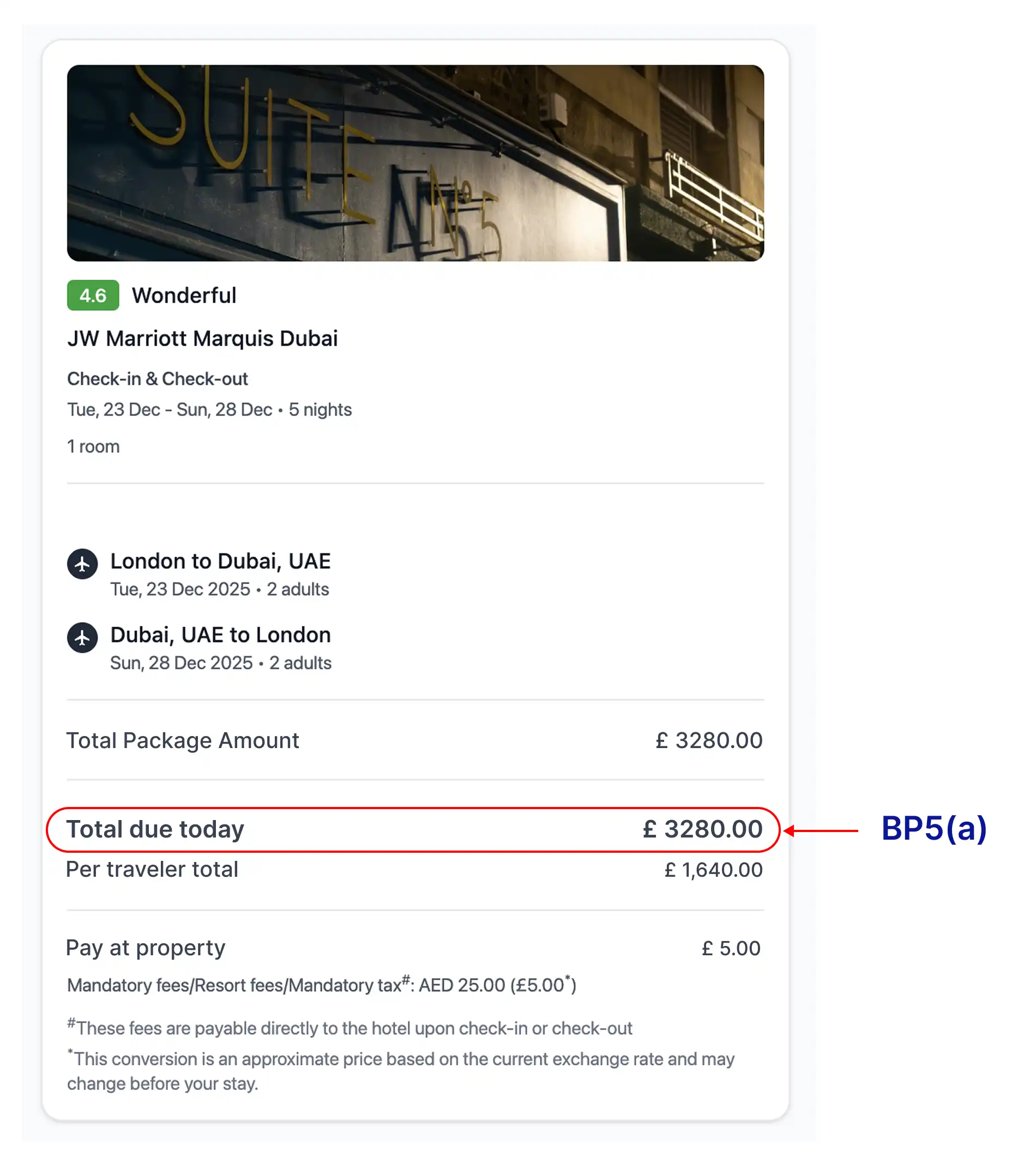
BP5: Package price display must include the total price and a breakdown of the taxes and fees
The total price requirement for package rates is different from the common requirements listed above.
A) Total price
Package pricing must be combined with the price of the transport component to display one total package price. This is typically achieved by displaying a per-person cost for the property plus transport.
The total price for the booking must be displayed to the traveler on the checkout page. The total price should match the API response, with no rounding or currency conversion permitted.
Example user interface
Confirmation page
Share the important information about the booking
CP1: Price display must include the total price as well as taxes and fees if a breakdown is provided
The total price requirement for package rates is different from the common requirements listed above.
A) Total price
Package pricing must be combined with the price of the transport component to display one total package price. This is typically achieved by displaying a per-person cost for the property plus transport.
The total price for the booking must be displayed to the traveler on the confirmation page. The total price should match the API response, with no rounding or currency conversion permitted.
Confirmation email or voucher
Provide the customer booking information for reference
ER6: Price display must include the total package price as well as taxes and fees if a breakdown is provided
The total price requirement for package rates is different from the common requirements listed above.
A) Total price
Package pricing must be combined with the price of the transport component to display one total package price. This is typically achieved by displaying a per-person cost for the property plus transport.
The total price for the booking must be displayed to the traveler on the confirmation page. The total price should match the API response, with no rounding or currency conversion permitted.
Additional exposed package rates requirements
In addition to the common requirements listed above, if you are including an exposed package rate element to your implementation, you must also meet these requirements.
Booking conditions
Eligibility for exposed package rates
EXP1: Scenarios where exposed package rates can be shown
Travelers can be shown package rates that are:
- Available for 20 days after a qualifying component has been booked if their departure is more than 30 days away.
- Available for 10 days after a qualifying component has been booked if their departure is within 30 days of a transport booking.
EXP2: Round trip
Hotel stay must occur within three days on either end of a booking.
EXP3: One way
Hotel stay must occur within 1 week before or after the flight date.
EXP4: Purchase of qualifying components
An exposed rate can be offered to a traveler for:
- Air travel
- Rail travel that constitutes a substantial portion of the package
- Car rental for at least the full duration of the hotel stay period of the booking
- An overnight cruise
- An event or activity that is at least 35% of the total price (minimum cart value of $100)
EXP5: Offer exposed rates only to the traveler who made the component booking
The traveler must log into the affiliate site to access email rate offers or a unique link to a booked itinerary.
The maximum room count cannot be higher than the number of component tickets in the booking.
You should include appropriate messages on the cross-sell path about why travelers are able to see special discounts.
EXP6: Destination restrictions
The destination of the package components must be within 200 miles of the booked hotel.
EXP7: Include rate_option parameter
When integrating on exposed package rates, you must always send in the rate_option value cross_sell.
Booking page
Provide essential checkout details
BP6: Price display must include the total price and a breakdown of the taxes and fees
Note: The price display requirements for exposed package rates implementations are different from the common requirements listed above.
A) Total price
The total price for the booking must be displayed to the traveler on the checkout page. The total price should match the API response, with no rounding or currency conversion permitted.
The final breakdown must include room rates (total or per night), any additional nightly fees (except those in the property_fee field described below), all stay amounts and taxes, and a chargeable total, and it must set out what is paid now and what is paid later at the property.
B) Tax breakdown
Price display must include the sum of tax_and_service_fee and property_fee as one line titled "Taxes and fees". The exact text below is legally required to be displayed when referring to any taxes and fees totals within the price breakdown. This can be displayed as a pop-up, plain text, modal, or other implementation. Property fee should not be displayed separately on the checkout page.
"The taxes are tax recovery charges paid to vendors (e.g. hotels); for details, please see our Terms of Use. Service fees are retained as compensation in servicing your booking and may include fees charged by vendors.” Translations can be found on Expedia Partner Solutions.
The value returned for tax_and_service_fee only includes taxes and fees mandated by a tax jurisdiction.
C) Partner service and booking charges
To the extent that Expedia Group grants a waiver to permit additional service or booking charges, they must be clearly separated. If your organization imposes a service charge that is added to the booking, it must be clear to the traveler that the charge is levied by you, and not by Expedia Group for a separate service (that is, not a further charge for the provision of accommodation). Charges may not be included inside of existing taxes and fees line items. Do not use the word "fee" to describe any charge imposed by your property. Instead, you may use "affiliate booking charge" or "affiliate service charge."
Confirmation email or voucher
Provide the customer booking information for reference
ER6: Price display must include the total package price as well as taxes and fees if a breakdown is provided
The total price requirement for exposed package rates is different from the common requirements listed above.
A) Total price
Package pricing must be combined with the price of the transport component to display one total package price. This is typically achieved by displaying a per-person cost for the property plus transport.
The total price for the booking must be displayed to the traveler on the email receipt. The total price should match the API response, with no rounding or currency conversion permitted.
Additional property collect requirements
In addition to the common requirements listed above, if you are including an exposed package rate element to your implementation, you must also meet these requirements.
General requirements
Use Expedia information correctly
GR6: Agents must support the property's cancellation process
With a property collect (or pay later) booking, the property acts as MOR. They will verify the payment card provided at the time of booking. If the payment fails or they are unable to confirm that the card is valid, the property will attempt to reach out to the agent for a valid payment method. If the property does not receive any response they can cancel the booking up to 14 days before check-in.
Once a booking is cancelled, a supplier cancellation notification will be sent to the booking contact method. The message needs to be shared with the traveler so that they can rebook.
Agents should provide a specific, monitored contact method for these communications to be sure the notifications are received in a timely manner. A lack of response from a generic or unmonitored contact method can increase the traveler's risk.
Booking page
Provide essential checkout details
BP5: Package price display must include the total price and a breakdown of the taxes and fees
In addition to the common requirements listed above, a property collect implementation must display information about the deposit policy.
D) Deposits
When collecting a deposit on a property collect booking, you must display the deposit policy and payment schedule to the traveler.
Confirmation page
Share the important information about the booking
CP1: Price display must include the total price as well as taxes and fees if a breakdown is provided
In addition to the common requirements listed above, a property collect implementation must display information about the deposit policy.
D) Deposits
When collecting a deposit on a property collect booking, you must display the deposit policy and payment schedule to the traveler.
Confirmation email or voucher
Provide the customer booking information for reference
ER6: Price display must include the total price and breakdown of the taxes and fees
In addition to the common requirements listed above, a property collect implementation must display information about the deposit policy.
D) Deposits
If your B2B implementation will use our property collect deposits, you must display the deposit policy and payment schedule to the traveler.
ER8: Confirmation emails should state that payment will be taken by the property
The traveler's email confirmation must state that their reservation is secured and that the property will collect payment at check-in. If the booking is for a nonrefundable property collect rate, the email should indicate that the traveler could be charged by the property shortly after completing the booking.