Rapid Car API: Launch requirements
Requirements for integration of the Rapid Car API
For the integrity of your business-to-business (B2B) or business-to-consumer (B2C) implementation, the Rapid Car API requires that some pages include specific information. Only the pages with specific requirements are listed here.
Checklist
We've created a checklist to help support your development or to provide feedback on the requirements. If you provide screenshots for your site review, be sure to add them and any corresponding logs in the checklist to help us complete your review.
>> Download the checklist (DOCX)
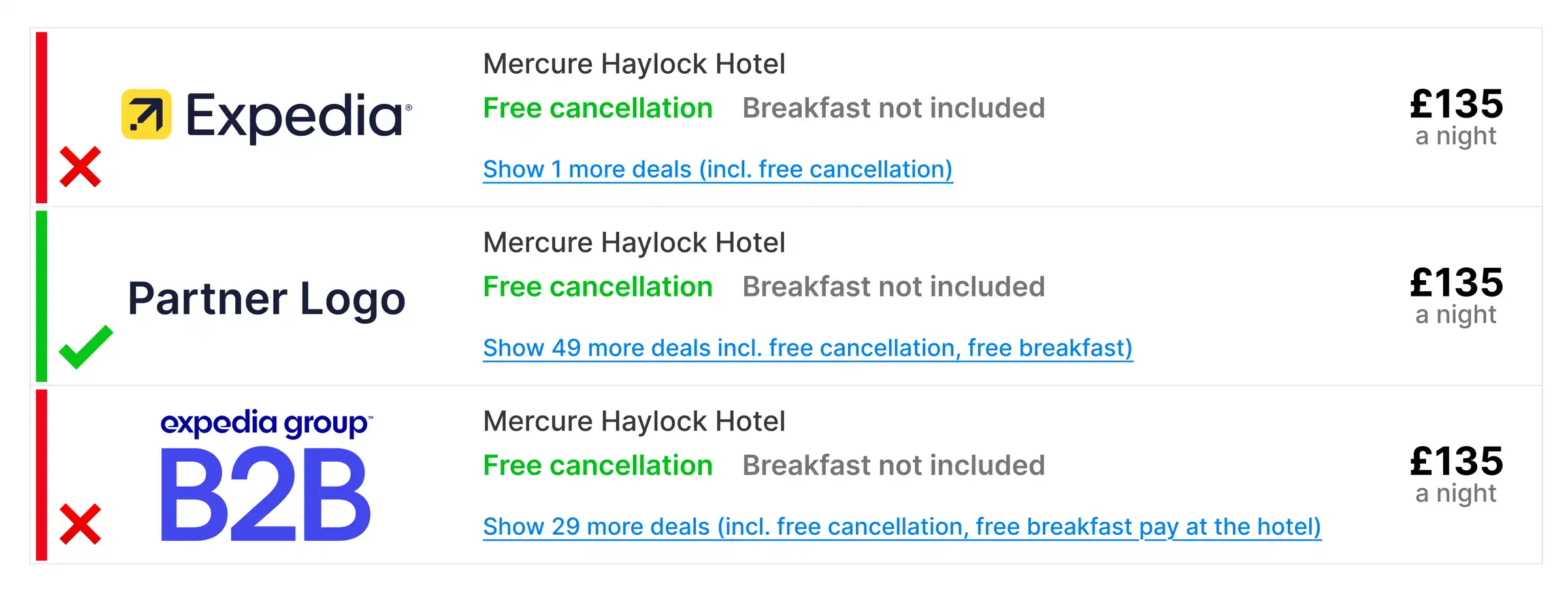
GR1: Use of our names and logos
Use of our names and logos may only be used on traveler-facing or agent-facing sites with our explicit written approval in advance as an exception.
Example user interface
GR2: Link to the Expedia Group terms and conditions
For both traveler-facing and agent-facing sites, you must include a link to the Expedia Group terms and conditions in the general terms of service and privacy policy.
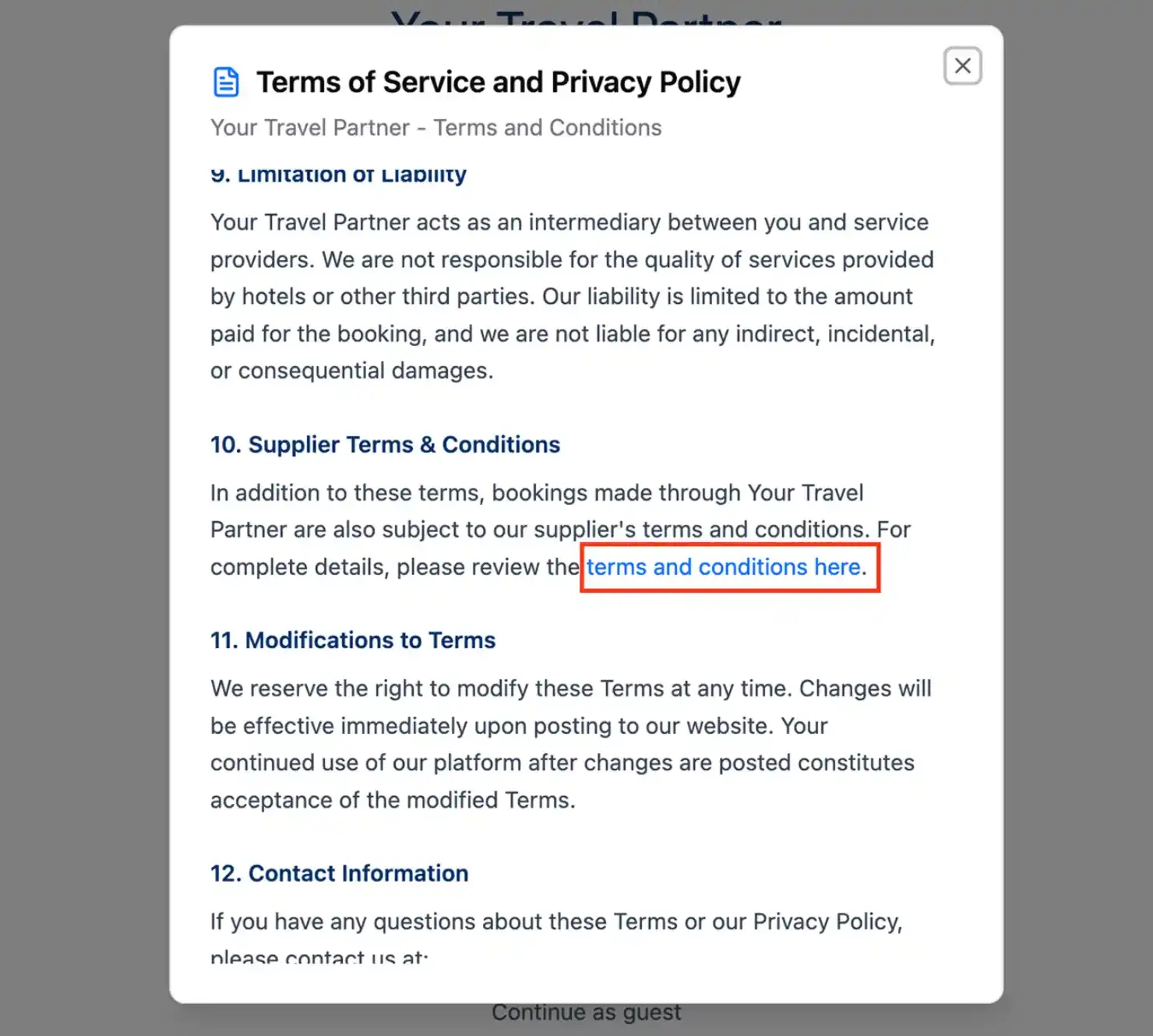
Use our list of localized terms and conditions links to include the point of sale and language that best fits your implementation.
SPC1: Set accurate search parameters
Add fields that capture pick-up and drop-off locations and the rental date and time, then send in the availability request. Your parameters can allow search by area (radius and coordinates), airport (with the airport region ID), or a combination of the two.

Sample searches
By radius and coordinates
/v2/cars/availability?pickup_time=2026-02-12T10:00:00&dropoff_time=2026-02-14T18:00:00&pickup_area=10,33.9422,-118.4036&dropoff_area=10,33.9422,-118.4036&driver_age=30&country_code=US¤cy=USD&language=en-US&limit=200&sort=total_price&sales_channel=website&sales_environment=car_only&filter=refundable&filter=vendor_collectBy airport region ID
/v2/cars/availability?pickup_time=2026-02-12T10:00:00&dropoff_time=2026-02-14T18:00:00&pickup_airport=5783884&dropoff_airport=5783884&driver_age=30&country_code=US¤cy=USD&language=en-US&limit=200&sort=recommended&sales_channel=website&sales_environment=car_only&filter=refundable&filter=expedia_collectWith both parameters
/v2/cars/availability?pickup_time=2026-02-12T10:00:00&dropoff_time=2026-02-14T18:00:00&pickup_area=10,33.9422,-118.4036&dropoff_airport=5456204&driver_age=30&country_code=US¤cy=USD&language=en-US&limit=200&sort=total_price&sales_channel=website&sales_environment=car_only&filter=refundable&filter=vendor_collectSPC2: Capture the driver's age
Drivers who are younger than 30 or older than 70 may incur additional mandatory fees. If the driver is under 30 or over 70, capture and send their actual age so the API can calculate any required extra fees correctly. If the driver is 30 to 70 years old, send 40 as the default value for the driver_age parameter.

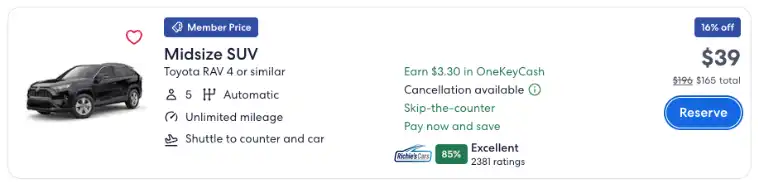
The listing page is a collection of options, also known as a search results page. It should display the following elements.
LPC1: Provide accurate rental information
The listing page, also known as a search results page, should display all material rental information that returns from the API, such as:
- Class, make, and model of each car
- Maximum capacity
- Transmission type
- Permitted mileage
- Pick-up point and drop-off point
- Rental company name or logo
- *Fuel source: gas, hybrid, electric, etc. (Required for i) transactions initiated by California customers with worldwide pick up location and ii) Pick up location in California)
Note: Expedia suggests including all the listed information (except where indicated with a *). However, you should determine which attributes are most relevant for your travelers.
Many attributes of the car rental are provided as part of the acriss_code parameter, which can be decoded using the values in the ACRISS table.
In this example, the value JFBC represents an intermediate elite (category J), SUV (type F) with an auto 4-wheel-drive (transmission B) and electric power (fuel/air cond. C).
"description": "Skoda Enyaq Electric car or similar",
        "number_of_passengers": 5,
        "number_of_doors": {
            "min": 5,
            "max": 5
        },
        "luggage_count": {
            "small": 3,
            "large": 3
        },
        "acriss_code": "JFBC",
LPC2: Total price and when payment is due
Include the total price for the selected rental period and whether the rental must be paid in advance (pay now, or Expedia collect) or at the counter (pay later, or vendor collect).
Note: Bookings with a different pick-up and drop-off location (also known as one-way rentals) often incur additional transfer fees.

Pay now / Expedia collect example
[
 {
   ...
   "rate": {
     "merchant_of_record": "expedia",
     "sale_scenario": {
       "package": false,
       "member": false,
       "mobile_promotion": false
     },
     "pricing": {
       "daily_rate_strikethrough": {...},
       "daily_rate": {...},
       "totals": {
         "inclusive_strikethrough": {...},
         "inclusive": {...},
         "exclusive": {...},
         "fees": {...}
       }
     }
   },
   ...
 }
]
Pay later / vendor collect example
[
 {
   ...
   "rate": {
     "merchant_of_record": "vendor",
     "sale_scenario": {
       "package": false,
       "member": false,
       "mobile_promotion": false
     },
     "pricing": {
       "daily_rate": {...},
       "totals": {
         "inclusive": {...},
         "exclusive": {...},
         "fees": {...}
       }
     }
   },
   ...
 }
]
LPC3: Cancellation policy
Inform the customer of the cancellation policy. For example: non-refundable, free cancellation until, free cancellation, etc.
Note: If no cancel_penalties value is present in the response, it indicates free cancellation.
[
  ...
  {
    "cancel_penalties": [
      {
        "start": "2026-02-11T10:00:00",
        "end": "2026-02-12T10:00:00",
        "currency": "USD",
        "amount": "50.00"
      },
      {
        "start": "2026-02-12T10:00:00",
        "currency": "USD",
        "amount": "50.00"
      }
    ],
  }
  ...
]
LPC4: Standard insurance information
Include information about Basic Collision Damage Protection along with any additional insurance options.
{
  ...
  "policies": [
    ...
    {
      "name": "Basic Collision Damage Protection",
      "descriptions": [],
      "policy_statements": [
        {
          "statement": "Basic Collision Damage Protection",
          "statement_condition": "included"
        }
      ],
      "policy_type": "PRODUCT_USE_POLICY"
    },
    ...
  ],
  ...
}PDPC1: Provide accurate rental information
The product detail page with product descriptions should display all material rental information that returns from the API, such as:
- Class, make, and model of each car
- Maximum capacity
- Number of doors
- Luggage capacity
- Transmission type
- Permitted mileage
- Fuel refill policy (full to full)
- Pick-up point and drop-off point
- Car rental company name or logo
- *Fuel source: gas, hybrid, electric, etc. (Required for i) transactions initiated by California customers with worldwide pick up location and ii) Pick up location in California)
Note: Expedia suggests including all the listed information (except where indicated with a *). However, you should determine which attributes are most relevant for your travelers.
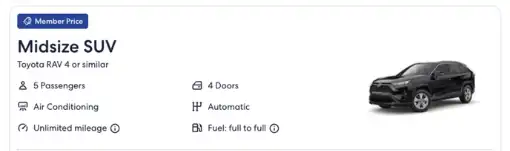
Many attributes of the car rental are provided as part of the acriss_code parameter, which can be decoded using the values in the ACRISS table.
In this example, the value of JFBC represents an intermediate elite (category J), SUV (type F) with an auto 4-wheel-drive (transmission B) and electric power (fuel/air cond. C).
"description": "Skoda Enyaq Electric car or similar",
        "number_of_passengers": 5,
        "number_of_doors": {
            "min": 5,
            "max": 5
        },
        "luggage_count": {
            "small": 3,
            "large": 3
        },
        "acriss_code": "JFBC",
PDPC2: Show full rental policies
Rental policies, including any rules and restrictions, should be disclosed in full before a traveler finalizes their car rental. This includes any refundable security deposits that are due at the time of pick-up.
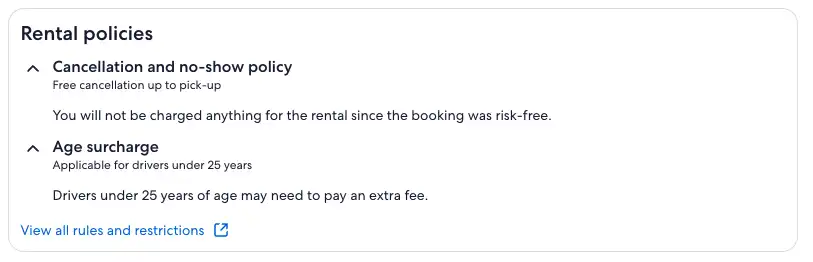
Rental policies example
"policies": [
        {
            "name": "Fuel: full to full",
            "descriptions": [],
            "policy_statements": [
                {
                    "statement": "Fuel: full to full",
                    "statement_condition": "Vehicle to be returned with the same amount of fuel as start of the trip to avoid refuelling charges."
                }
            ],
            "policy_type": "PRODUCT_USE_POLICY"
        },
        {
            "name": "Unlimited mileage",
            "descriptions": [],
            "policy_statements": [
                {
                    "statement": "Unlimited mileage",
                    "statement_condition": "Drive unlimited distance with this car at no extra cost."
                }
            ],
            "policy_type": "PRODUCT_USE_POLICY"
        },
        {
            "name": "Cancellation available",
            "descriptions": [],
            "policy_statements": [
                {
                    "statement": "Cancellation available",
                    "statement_condition": "Before Fri, Sep 19, 10:30am"
                }
            ],
            "policy_type": "CANCELLATION_POLICY"
        },
        {
            "name": "",
            "descriptions": [],
            "policy_statements": [],
            "policy_type": "PRODUCT_USE_POLICY"
        },
        {
            "name": "Online check-in",
            "descriptions": [],
            "policy_statements": [
                {
                    "statement": "",
                    "statement_condition": "Check in online on the Sixt website by uploading required documents, like driver’s license, up to the time of pick-up."
                }
            ],
            "policy_type": "CHECKIN_POLICY"
        },
        {
            "name": "Pay now and save",
            "descriptions": [],
            "policy_statements": [],
            "policy_type": "PAYMENT_POLICY"
        }
    ],
Rules and restrictions example
{
  "rules_and_restrictions": [
    {
      "title": "Rental policies overview",
      "statements": "<p>The following rules and restrictions are provided by the car rental company.</p>"
    },
Additional country-specific requirements
In the EU and UK regions, you must display a disclaimer that the right of withdrawal does not apply.
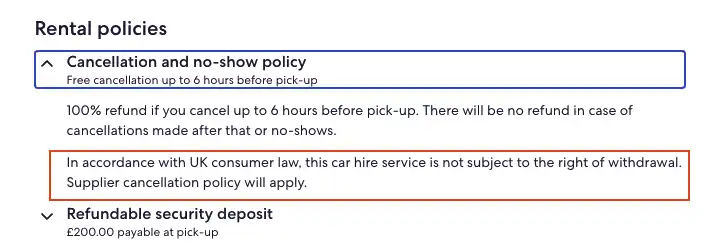
PDPC3: Display the cancellation policy
If a rental needs to be cancelled, the traveler will need to understand the parameters of the vendor’s cancellation policy.
Free cancellation
Some vendors offer free cancellation of a reservation regardless of timing.

{...
        {
            "name": "Free cancellation",
            "descriptions": [],
            "policy_statements": [],
            "policy_type": "CANCELLATION_POLICY"
        },
        {
            "name": "Free cancellation",
            "descriptions": [],
            "policy_statements": [
                {
                    "statement": "Lock in this price today, cancel free of charge anytime. Reserve now and pay at pick-up.",
                    "statement_condition": ""
                }
            ],
            "policy_type": "PRODUCT_USE_POLICY"
        },
}
Free cancel until
Depending on the situation, some vendors may allow free cancellation of a reservation until a certain point, such as 24 hours prior to the date of pick-up.

{
        {
            "name": "Free cancellation",
            "descriptions": [],
            "policy_statements": [
                {
                    "statement": "Free cancellation",
                    "statement_condition": "Before Wed, Oct 1, 10:30am"
                }
            ],
            "policy_type": "CANCELLATION_POLICY"
        },
        {
            "name": "Free cancellation",
            "descriptions": [
                "Free cancellation up to 24 hours before pick-up",
                "Cancellations made after that or no-shows are subject to a fee of $50 or total reservation amount, whichever is lesser which will be charged on the card details shared by you.",
                "Get 100% refund of Collision Damage Plan cost if canceled before the scheduled pick-up time. This insurance will be canceled automatically with your rental car cancellation.",
                "Cancellations made after that or no-shows are subject to a fee of $50 or total reservation amount, whichever is lesser which will be charged on the card details shared by you.",
                "Get 100% refund of Collision Damage Plan cost if canceled before the scheduled pick-up time. This insurance will be canceled automatically with your rental car cancellation."
            ],
            "policy_statements": [
                {
                    "statement": "Lock in this price today, cancel free of charge up to 24 hours before pick-up. Cancellations within 24 hours of pick-up or no shows will not be eligible for a refund.",
                    "statement_condition": ""
                }
            ],
            "policy_type": "PRODUCT_USE_POLICY"
        },
    }
}
PDPC4: Details and costs of optional extras
Travelers can add optional extras such as a car seat or toll pass. These extras are always paid at car pick-up, not charged at time of booking. Inform the customer that optional extras are subject to availability and are not guaranteed.
"optional_extras": [
        {
            "id": "TollPaymentTagPass",
            "name": "TOL - Toll pass/Express lane",
            "rate_price": {
                "rate_period": "daily",
                "rate": {
                    "billable_currency": {
                        "value": "15.71",
                        "currency": "USD"
                    },
                    "request_currency": {
                        "value": "15.71",
                        "currency": "USD"
                    }
                }
            }
        },
        {
            "id": "InfantChildSeat",
            "name": "CSI - Infant seat",
            "rate_price": {
                "rate_period": "daily",
                "rate": {
                    "billable_currency": {
                        "value": "17.16",
                        "currency": "USD"
                    },
                    "request_currency": {
                        "value": "17.16",
                        "currency": "USD"
                    }
                }
            }
        }
]BPC1: SSL encryption present for personal data
When sending or transmitting personal data, you must use SSL encryption to secure connections between client browsers/applications and your site, as well as the network communications with dependent systems. Personal data includes guest names, phone numbers or emails, payment card details, and booking/itinerary receipts and confirmation pages. Stop or redirect the connection when it is not secured.
BPC2: Summary of booking details
The summary should always include:
- Dates of car rental
- Pick-up location, time, and address
- Drop-off location, time, and address
- Class of car
- Car rental company name
- Fuel source: gas, hybrid, electric, etc. (in California markets)
- Fuel refill policy (full to full)
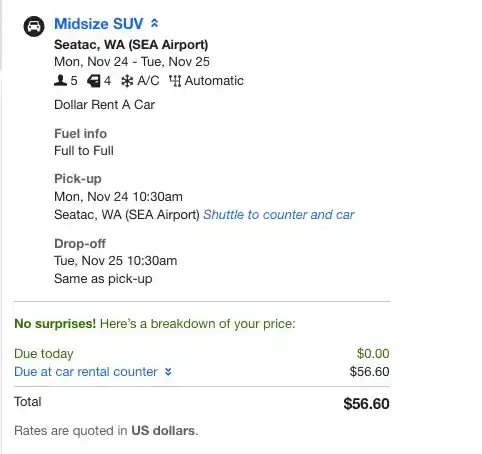
BPC3: Display the rental price
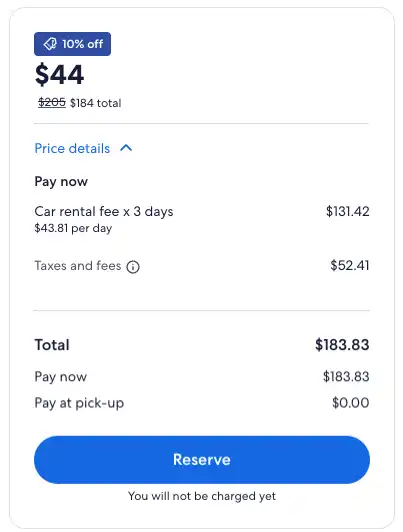
How you need to display the price depends on the rate type being booked and the booking channel being used. Your launch team will indicate which requirements apply to you.
Standalone rates
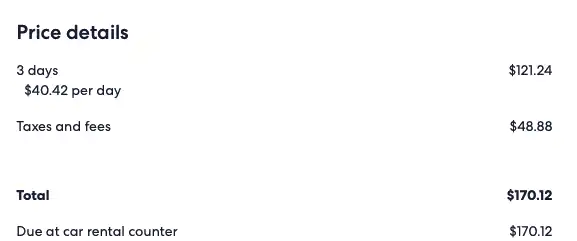
On the booking page, you must display the total price for the selected rental period and a breakdown of any applicable taxes and fees (including one-way fees). Also include whether the rental must be paid in advance (pay now, or Expedia collect) or at the counter (pay later, or vendor collect). Optional add-ons are always paid at the counter.
Package rates
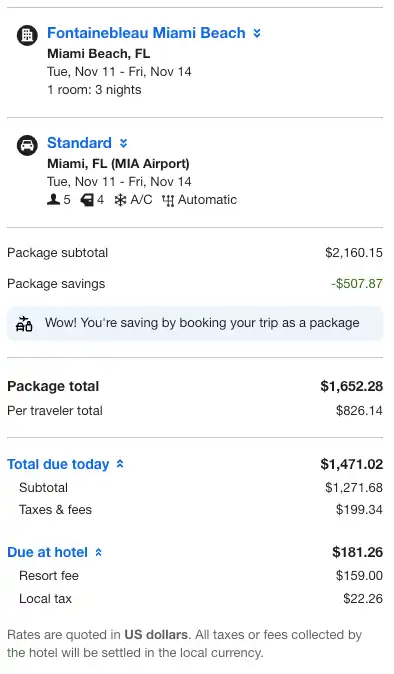
When a package booking is made, display the subtotal, taxes and fees, and the price for the complete package. If a breakdown of taxes and fees is not available, display only the total price for the package. Be sure to include information on when the payment is due (pay now or pay later). Optional add-ons are always paid at the counter.
Exposed package rates
You must display the total price for the selected rental period and a breakdown of any applicable taxes and fees (including one-way fees). Also include whether the rental must be paid in advance (pay now, or Expedia collect) or at the counter (pay later, or vendor collect). Optional add-ons are always paid at the counter.
Member-only deals rates
You must display the total price for the selected rental period and a breakdown of any applicable taxes and fees (including one-way fees), along with whether the rental must be paid in advance (pay now, or Expedia collect) or at the counter (pay later, or vendor collect). Optional add-ons are always paid at the counter.
When displaying a strikethrough price, explain how it is calculated, such as:
Standard rate on our site, provided by the supplier and based on your search, before all discounts and rewards applied.
Mobile rates
You must display the total price for the selected rental period and a breakdown of any applicable taxes and fees (including one-way fees), along with whether the rental must be paid in advance (pay now, or Expedia collect) or at the counter (pay later, or vendor collect). Optional add-ons are always paid at the counter.
When displaying a strikethrough price, explain how it is calculated, such as:
Standard rate on our site, provided by the supplier and based on your search, before all discounts and rewards applied.
Taxes and fees breakdown
Price display must include the sum of all elements of the fees array as one line titled “Taxes and fees”. When referring to any taxes and fee totals within the price breakdown, you must display the exact text below.
Taxes are tax recovery charges we pay to travel providers (e.g., car rentals) and/or are remitted by us. Fees may include additional charges imposed by the travel providers. For more details, please refer to our Terms of Use.This text can be displayed as a pop-up, in plain text, in a modal, or in some other implementation, but it must appear with the price display.
Note: When the fees object is not returned by the API, you should label the Taxes and Fees line item as "Included".
Pay now / Expedia collect example
[
 {
   ...
   "rate": {
     "merchant_of_record": "expedia",
     "sale_scenario": {
       "package": false,
       "member": false,
       "mobile_promotion": false
     },
     "pricing": {
       "daily_rate_strikethrough": {...},
       "daily_rate": {...},
       "totals": {
         "inclusive_strikethrough": {...},
         "inclusive": {...},
         "exclusive": {...},
         "fees": {...}
       }
     }
   },
   ...
 }
]
Pay later / vendor collect example
[
 {
   ...
   "rate": {
     "merchant_of_record": "vendor",
     "sale_scenario": {
       "package": false,
       "member": false,
       "mobile_promotion": false
     },
     "pricing": {
       "daily_rate": {...},
       "totals": {
         "inclusive": {...},
         "exclusive": {...},
         "fees": {...}
       }
     }
   },
   ...
 }
]
BPC4: Display the cancellation policy
If a rental needs to be cancelled, the traveler will need to understand the parameters of the vendor’s cancellation policy.
Free cancellation
Some vendors offer free cancellation of a reservation regardless of timing.
{
        {
            "name": "Free cancellation",
            "descriptions": [],
            "policy_statements": [],
            "policy_type": "CANCELLATION_POLICY"
        },
        {
            "name": "Free cancellation",
            "descriptions": [],
            "policy_statements": [
                {
                    "statement": "Lock in this price today, cancel free of charge anytime. Reserve now and pay at pick-up.",
                    "statement_condition": ""
                }
            ],
            "policy_type": "PRODUCT_USE_POLICY"
        },
}
Free cancel until
Depending on the situation, some vendors may allow free cancellation of a reservation until a certain point, such as 24 hours prior to the date of pick-up.
{
  ...
        {
            "name": "Free cancellation",
            "descriptions": [],
            "policy_statements": [
                {
                    "statement": "Free cancellation",
                    "statement_condition": "Before Wed, Oct 1, 10:30am"
                }
            ],
            "policy_type": "CANCELLATION_POLICY"
        },
        {
            "name": "Free cancellation",
            "descriptions": [
                "Free cancellation up to 24 hours before pick-up",
                "Cancellations made after that or no-shows are subject to a fee of $50 or total reservation amount, whichever is lesser which will be charged on the card details shared by you.",
                "Get 100% refund of Collision Damage Plan cost if canceled before the scheduled pick-up time. This insurance will be canceled automatically with your rental car cancellation.",
                "Cancellations made after that or no-shows are subject to a fee of $50 or total reservation amount, whichever is lesser which will be charged on the card details shared by you.",
                "Get 100% refund of Collision Damage Plan cost if canceled before the scheduled pick-up time. This insurance will be canceled automatically with your rental car cancellation."
            ],
            "policy_statements": [
                {
                    "statement": "Lock in this price today, cancel free of charge up to 24 hours before pick-up. Cancellations within 24 hours of pick-up or no shows will not be eligible for a refund.",
                    "statement_condition": ""
                }
            ],
            "policy_type": "PRODUCT_USE_POLICY"
        },
    }
}ERC1: Include a summary of booking details
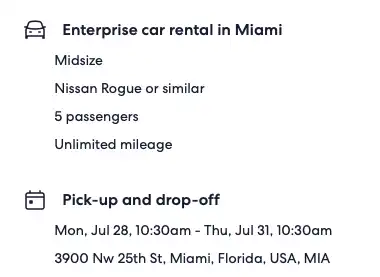
The summary should always include:
- Dates of car rental
- Pick-up location, time, and address
- Drop-off location, time, and address
- Class of car
- Car rental company name
- Fuel source: gas, hybrid, electric, etc. (in California markets)
- Fuel refill policy (full to full)
- Expedia itinerary ID
- Vendor rules and restrictions
ERC2: Display the rental price
How you need to display the price depends on the rate type being booked and the booking channel being used. Your email receipt should use the same rate details that you included on the Booking page.