
SAML v2 overview
Security Assertion Markup Language (SAML) is a standard SSO format. Its XML-based framework enables seamless authentication by the exchange of information through digitally signed XML documents. SAML v2 (or SAML 2.0) has been the standard protocol to enable web-based, cross-domain SSO since 2005.
Authorization Flows
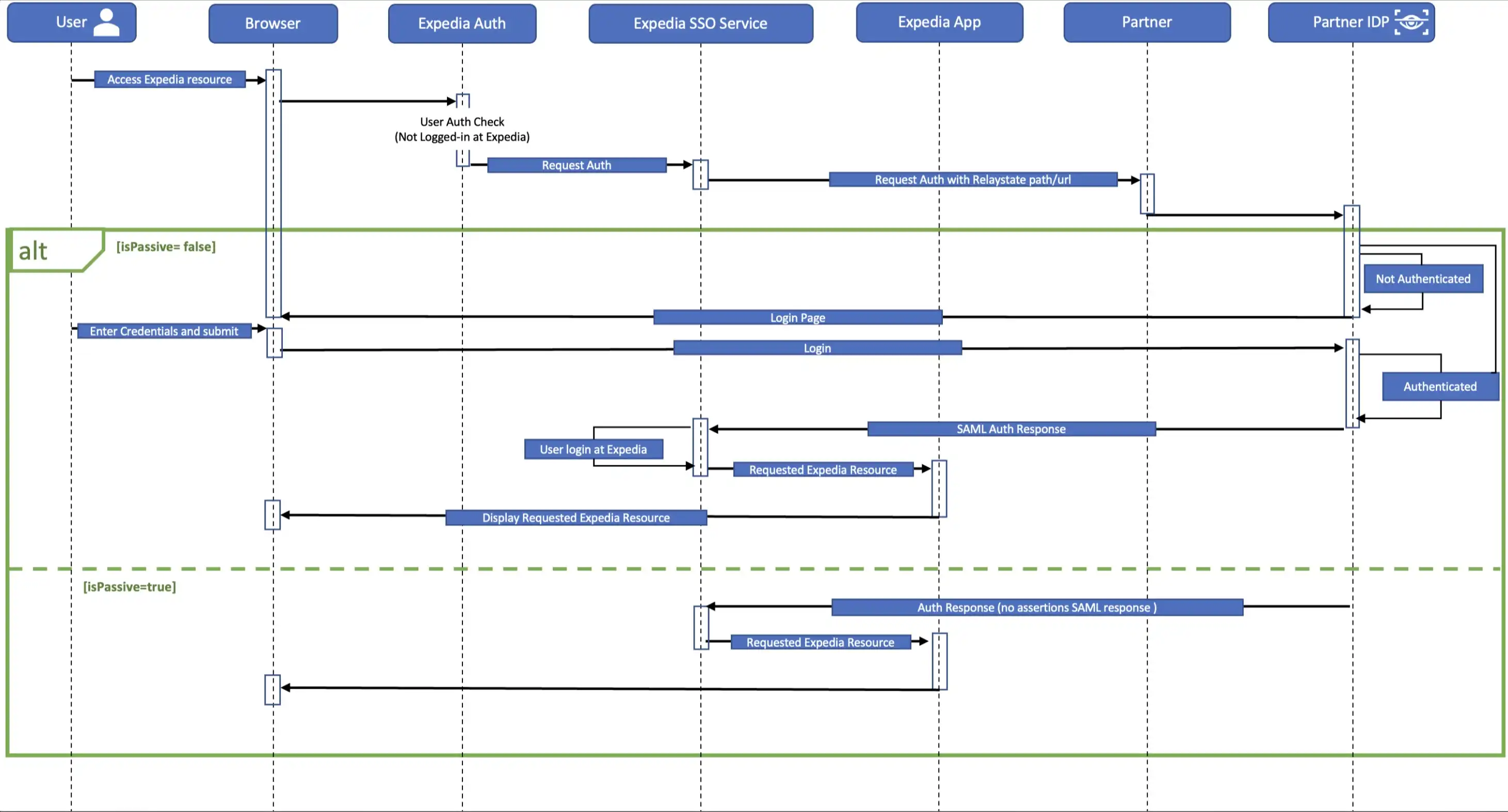
Basic SSO
Regardless of the feature choices you’ve selected, the setup requirements of basic SSO are the same. Adding loyalty or credit card implementations will require additional information.
Setup requirements
To properly set up the SAML SSO access to your template site, we need a few things, including:
- Public key certificates: You'll authorize the SAML file with the private key on your end and Expedia will verify with the public key.
- Audience: The intended service provider for which the SAML assertion is issued, specified within the
AudienceRestrictionparameter to ensure the assertion is accepted only by the designated recipient. - Issuer: The identity provider (IDP) entity that generates and digitally signs the SAML assertion, thereby verifying the authenticated identity of the user.
- Endpoint details: The authentication (Authn) endpoint is the URL from the identity provider to which authentication requests are sent. You will need to configure your template site so that the Expedia SSO endpoint initiates SSO once the user is authenticated.
- IPs to add to allow list: A list of IPs that will be allowed to travel between the template site and Expedia. IPs that are not on the allow lists (on your side or ours) will lead to connectivity issues for both inbound and outbound SSO calls.
- Guest flow (isPassive) support details: Whether the site will have a guest experence or the user will always need to sign in access the site's content.
A standard SAML SSO implementation at Expedia will encrypt using our public key, create a destination endpoint, and will duplicate your IP allow list to guard against interruption attacks.
Technical requirements:
- SAML 2.0 in use on your site
- Your private key must be used to sign the entire SAML response and the SAML payload should be Base64-encoded
- Expedia’s public key will be used to encrypt assertions, which will then be decrypted using Expedia’s private key.
- Populate signature values according to SAML v2 standard
- Include destination and recipient in your SAML response
- Include issuer in SAML response so that we can fetch the proper certificate
Payload details
Once a customer has signed in via your identity provider (IdP), it will send a generated response called a payload to your main site for authentication. If the authentication succeeds, the customer will be granted access. The payload we provide includes the following fields. We don’t require all of these fields, but we use some of them for user experience (for example, to display the customer’s name in a welcome message) and others as part of verification.
| Field | Description | Mandatory? |
|---|---|---|
membershipId | Unique identifier of customer’s account | Yes |
relayState | The URL to which the customer will be redirected once verification is complete | Yes |
languageID | The languages in which the site will be viewable | — |
channelType | Platforms the site is optimized for (values: WEB, MOBILE, TABLET) | — |
firstName | Customer’s first name | Yes |
middleName | Customer’s middle name | — |
lastName | Customer’s last name | — |
email | Customer’s email address | — |
Add loyalty
As part of your template site, you can include the ability for customers to earn loyalty points on their travel purchases. Your template can also allow customers to burn their accumulated loyalty points to purchase travel.
>> Find out nore about loyalty points
The same setup requirements as the standard implementation apply.
Payload details
In addition to the attributes described in the standard implementation, loyalty earn and burn functionality requires the following account (ProgramAccount) attributes.
| Field | Description | Mandatory? |
|---|---|---|
programId | Tier identifier for loyalty program | Yes |
programAccountNumber | The account number for the program the customer is affiliated with (also called loyaltyAccountNumber) | — |
lastFourDigitsOfCreditCard | The last 4 digits of the credit card the customer used for the booking | — |
accountName | The program account name | — |
loyaltyConversionRatio | Ratio of how payment converts to points earned (for example, $1 = 1 point) | — |
loyaltyAccountBalance | Current balance of customer’s earned loyalty points | Yes |
Restrict payment card
We can set your site up so that a customer must use your organization’s credit card to book. This is optional, as all of the template solutions can accept all major credit or debit cards and (in the US) PayPal.
Credit card safety and storage
If you choose to require purchase using your organization’s custom credit card, we want you to feel secure. Here’s how we handle that.
- Card information is stored in a tokenized form that’s linked to the customer's Expedia profile. It is never stored unencrypted.
- No human beings have access to unencrypted card data, and decryption only happens with secure IAM credentials.
- When a card is preloaded to the checkout page, only the card description is visible, not the card number.
- The customer must enter the card’s CVV to complete the booking with the stored card.
Setup requirements
In addition to the setup requirements from the standard implementation, adding your credit card means we need to add an extra layer of security. To do that, we’ll need:
- An endpoint to use for the AuthnRequest parameter
- Your public key for signature verification
We’ll use Expedia’s private key to sign the AuthnRequest payload and share our public key to perform signature validation on your end.
Payload details
Along with the attributes described in the standard implementation, when a customer logs in on your site, we will send an encoded SAML response payload with signed and encrypted assertions to the secure Expedia SSO endpoint.
The payload will also contain the following credit card details:
| Field | Description | Mandatory? |
|---|---|---|
cardNumber | The card number to be charged | Yes |
cardType | Type of card used (for example, Visa, MasterCard, American Express) | Yes |
expirationDate | Expiration date of the card used | Yes |
addressCategoryCode | The type of billing address associated with the card used (for example, Home or Office) | Yes |
firstAddressLine | First line of the billing address | Yes |
secondAddressLine | Second line of the billing address | — |
thirdAddressLine | Third line of the billing address | — |
cityName | City of the billing address | Yes |
provinceName | State or province of the billing address | Yes |
postalCode | Postal code of the billing address | Yes |
countryCode | Country code of the billing address | Yes |
AuthnRequest
Expedia will send both AuthnRequest and RelayState parameters to your endpoint when an unauthenticated user accesses your template site. This will prompt the user to sign in, which will initiate the SSO process. You'll then redirect the customer to Expedia's SSO endpoint to initiate SSO to the template site.
The AuthnRequest elements include:
| Field | Description | Mandatory? |
|---|---|---|
AssertionConsumerServiceURL | URL to the Expedia template site after the user signs in | Yes |
Destination | URL of your endpoint to post AuthnRequest to | Yes |
Issuer | The origin of the data; values: Expedia-Test or Expedia-Prod | Yes |
Signature | SSO signature to be validated by your main site | Yes |
>> For more information, view our payload example
Expedia endpoints
Once the user has authenticated, you will need to redirect them to {WLTP domain}/sso/saml.